
NumPy: Transforming Data
✕1. Filtering and Masking
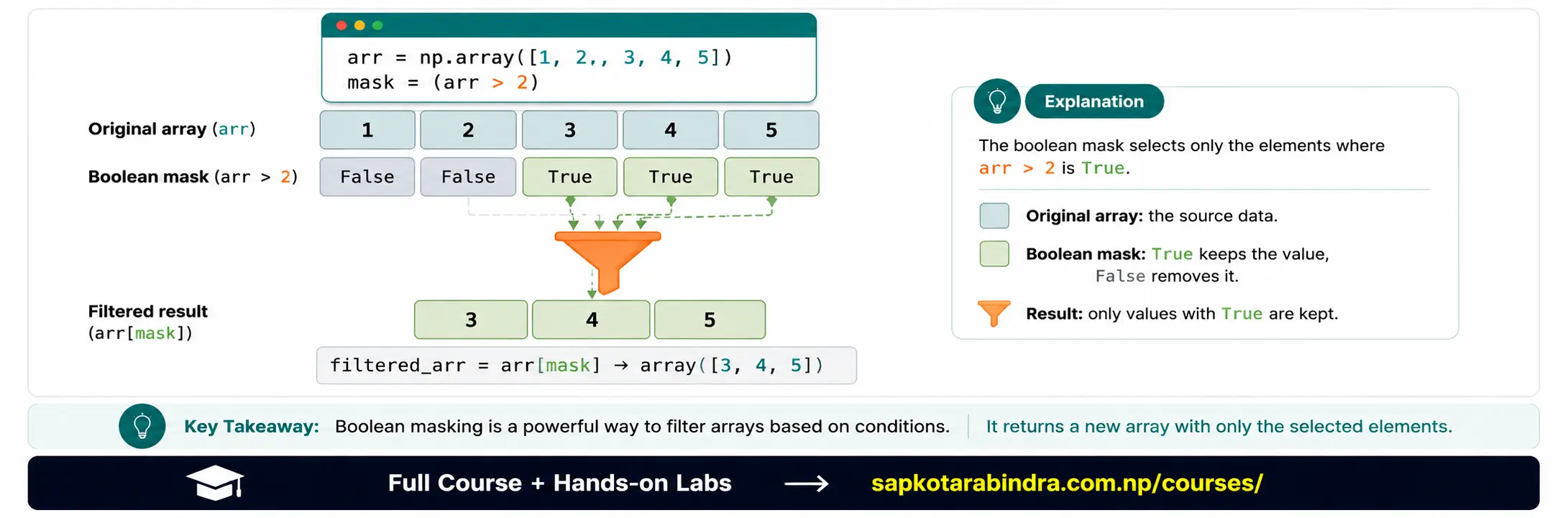
- Filtering means selecting only the values that match a condition.
Example:
From
[1, 2, 3, 4, 5], select only values greater than 2. Result: [3 4 5] - A mask is a list of True and False values. NumPy uses the mask to decide which values to keep.
arr = np.array([1, 3, 4, 5])mask = arr > 2print(mask)Output: [False True True True] Then we can apply the mask:filtered_arr = arr[mask]print(filtered_arr)Output: [3 4 5] 📌 Simple idea: True means keep the value. False means ignore the value. 📌 This is the same idea as Pythonfilter()— but instead of checking one item at a time, NumPy checks the whole array at once.
1.1 🎯 What is Filtering?
1.2 🎭 What is a Mask?
- We can combine conditions using:
&— Both conditions must be true|— At least one condition must be true~— Reverse the condition ⚠️ In NumPy, use&,|, and~instead of Pythonand,or, andnot. import numpy as nparr = np.array([1, 2, 3, 4, 5])Example 1: Values greater than 2mask = arr > 2filtered_arr = arr[mask]print(filtered_arr)Output: [3 4 5] Example 2: Values greater than 2 and less than 5mask = (arr > 2) & (arr < 5)filtered_arr = arr[mask]print(filtered_arr)Output: [3 4] Example 3: Select odd numbersmask = arr % 2 == 0odd_numbers = arr[~mask]print(odd_numbers)Output: [1 3 5] Example 4: Modify values using conditionarr[arr <= 2] = -1print(arr)Output: [-1 -1 3 4 5] 📌 Simple idea: Filtering selects values. Masking can also help modify values.
1.3 🔗 Combining Conditions
1.4 💻 Examples
2. np.where() for Conditional Logic
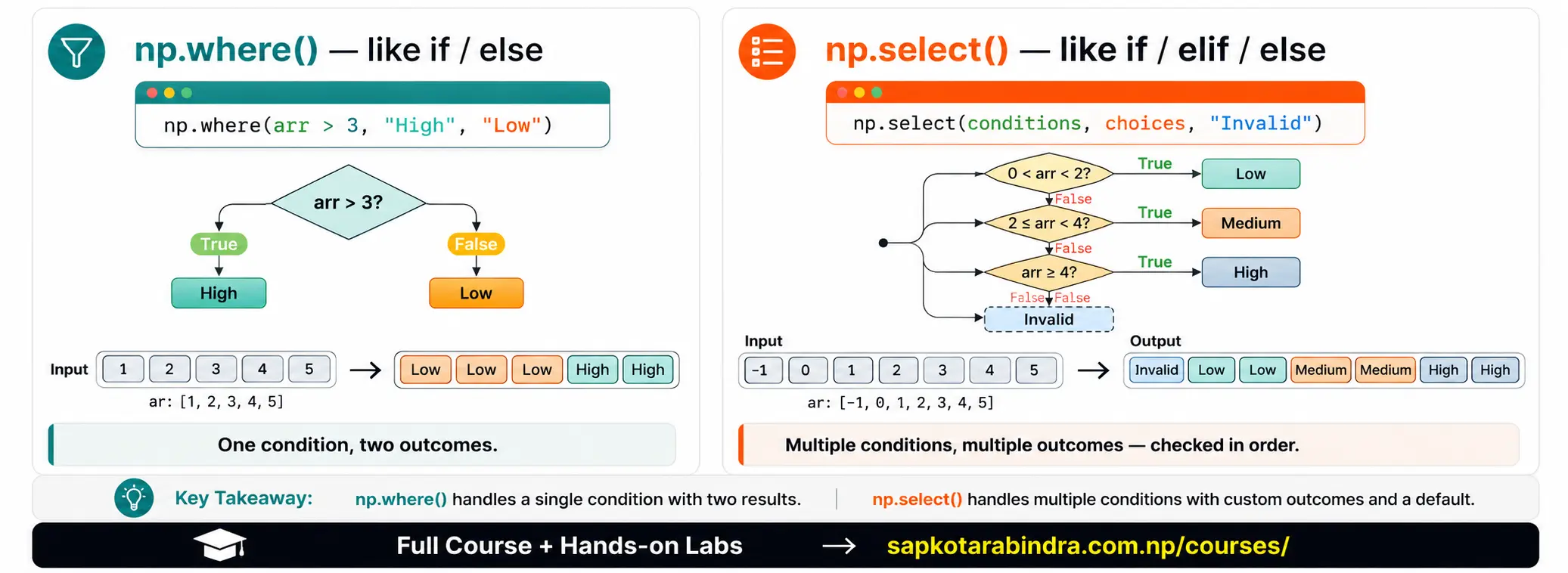
np.where()helps us apply if-else logic on NumPy arrays. It can be used in two ways: 1. Find indices where a condition is true 2. Return different values based on a conditionnp.where(condition, value_if_true, value_if_false)Interpretation: 👉 If condition is True, use first value. 👉 Otherwise, use second value.import numpy as nparr = np.array([1, 2, 3, 4, 5])Example 1: Find index positionsresult = np.where(arr > 3)print(result)Output: (array([3, 4]),) 📌 This means values greater than 3 are found at index 3 and index 4. Example 2: Create categoriescategory = np.where(arr > 3, "High", "Low")print(category)Output: ['Low' 'Low' 'Low' 'High' 'High'] Example 3: Modify values conditionallyheight = np.array([150, 160, 170, 180, 190])new_height = np.where(height <= 160, height + 2, height)print(new_height)Output: [152 162 170 180 190] 📌 Simple idea:np.where()is like applying if-else to every value in an array.
2.1 🤔 What is np.where()?
2.2 Syntax
2.3 💻 Examples
3. np.select() for Multiple Conditions
np.select()is used when we have multiple conditions. It works like an if → elif → elif → else chain.np.select(condition_list, choice_list, default=value)condition_list— List of conditionschoice_list— Output for each conditiondefault— Output when no condition matchesimport numpy as nparr = np.array([-1, 2, 3, 4, 5])conditions = [(arr > 0) & (arr < 2),(arr >= 2) & (arr < 4),arr >= 4]choices = ["Low", "Medium", "High"]result = np.select(conditions, choices, default="Invalid")print(result)Output: ['Invalid' 'Medium' 'Medium' 'High' 'High'] 📌 Simple idea: Usenp.where()for simple if-else. Usenp.select()for multiple conditions.
3.1 🧭 What is np.select()?
3.2 Syntax
3.3 💻 Example
4. Reshape, Resize, Flatten, Ravel, and Transpose
- Sometimes we need to change the shape of data. Example: [1 2 3 4 5 6] can be changed into: [[1 2 3] [4 5 6]] Shape transformation helps us prepare data for analysis, visualization, and Machine Learning.
4.1 🔄 Why Transform Array Shape?
4.2 Quick Comparison
| Function | What It Does |
|---|---|
reshape() | Changes shape if total elements match |
resize() | Returns an array with the given shape and may repeat or remove values |
flatten() | Converts to 1D copy |
ravel() | Converts to 1D view when possible |
transpose() / .T | Swaps rows and columns |
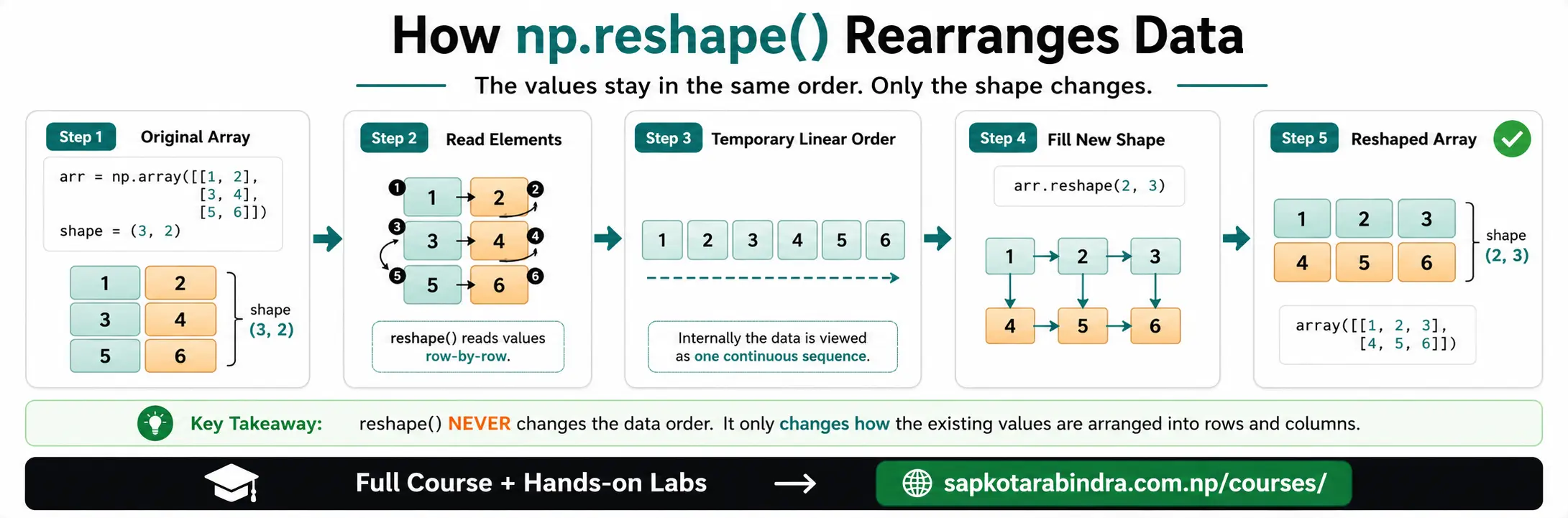
reshape()changes the shape of an array without changing the data. The new shape must have the same total number of elements. Exampleimport numpy as nparr = np.array([[1, 2], [3, 4], [5, 6]])reshaped_arr = np.reshape(arr, (2, 3))print(reshaped_arr)Output: [[1 2 3] [4 5 6]] Original array remains unchanged:print(arr)Output: [[1 2] [3 4] [5 6]] Invalid reshapeprint(np.reshape(arr, (4, 2)))This gives an error because the original array has 6 elements, but shape (4, 2) needs 8 elements. Using -1 NumPy can automatically calculate one missing dimension using -1.print(np.reshape(arr, (-1, 2)))Output: [[1 2] [3 4] [5 6]] Flatten using reshape:print(np.reshape(arr, (-1,)))Output: [1 2 3 4 5 6] 📌 Simple idea:reshape()changes the layout only when the number of elements fits.
4.3 reshape()
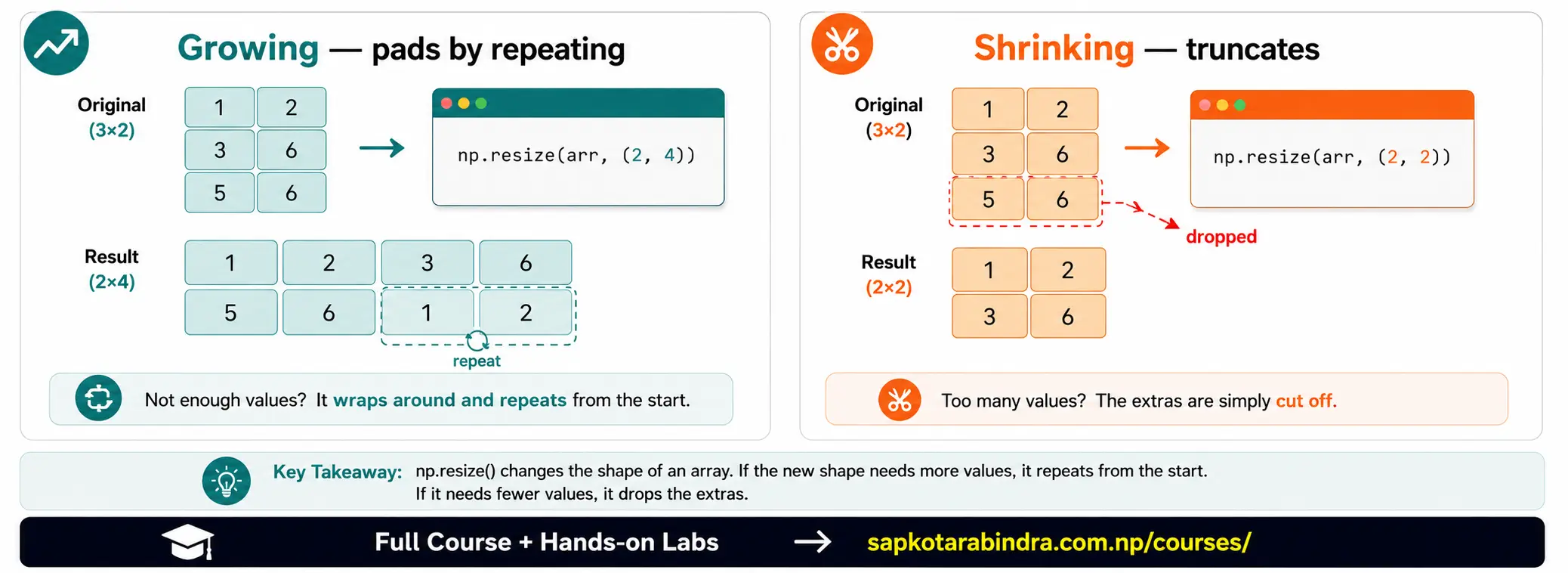
np.resize()returns a new array with the requested shape. If the new size is larger, NumPy repeats values. If the new size is smaller, NumPy removes extra values. Exampleimport numpy as nparr = np.array([[1, 2], [3, 4], [5, 6]])Resize to larger shape:resized_arr = np.resize(arr, (2, 4))print(resized_arr)Output: [[1 2 3 4] [5 6 1 2]] Resize to same number of elements:resized_arr = np.resize(arr, (2, 3))print(resized_arr)Output: [[1 2 3] [4 5 6]] Resize to smaller shape:resized_arr = np.resize(arr, (2, 2))print(resized_arr)Output: [[1 2] [3 4]] 📌 Simple idea:resize()can repeat or remove values to fit the new shape. 📌 Think back to the egg tray —reshape()rearranges the same eggs into a different tray shape.resize()can also add or remove eggs to fit the new tray.
4.4 resize()
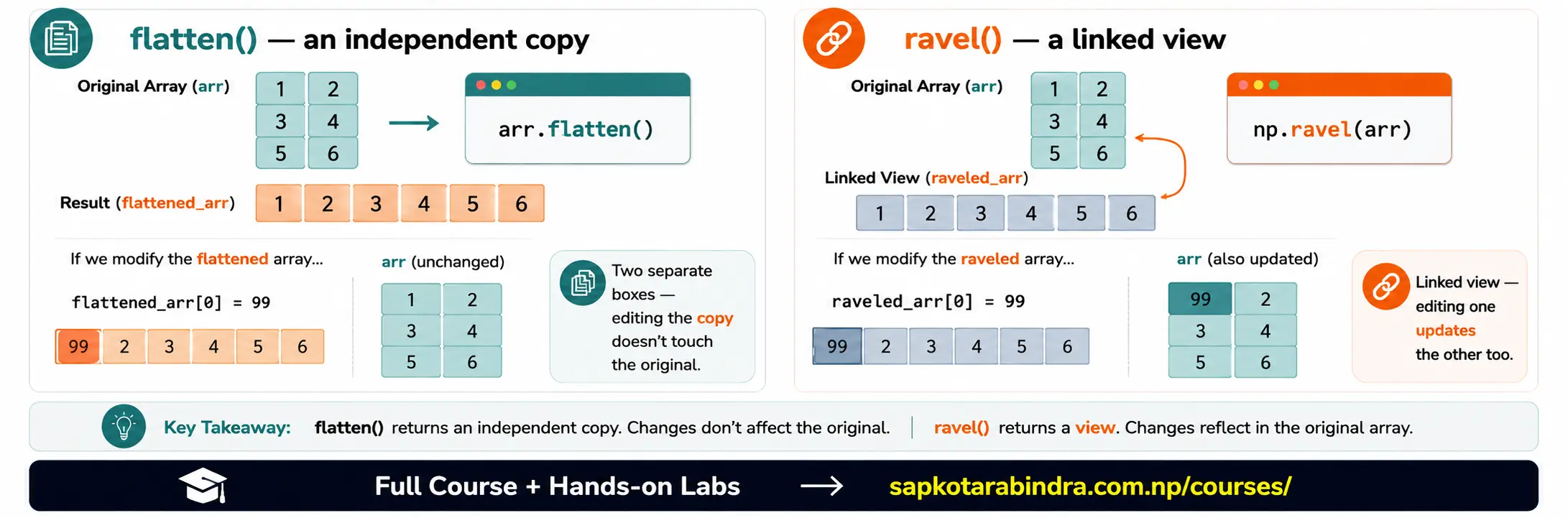
flatten()converts a multi-dimensional array into a 1D array. It returns a copy. Exampleimport numpy as nparr = np.array([[1, 2], [3, 4], [5, 6]])flattened_arr = arr.flatten()print(flattened_arr)Output: [1 2 3 4 5 6] Original array remains unchanged:print(arr)Output: [[1 2] [3 4] [5 6]] 📌 Simple idea:flatten()gives a separate 1D copy.ravel()also converts an array into 1D. It usually returns a view, meaning changes may affect the original array. Exampleimport numpy as nparr = np.array([[1, 2], [3, 4], [5, 6]])raveled_arr = np.ravel(arr)print(raveled_arr)Output: [1 2 3 4 5 6] Modify raveled array:raveled_arr[0] = 99print(arr)Output: [[99 2] [ 3 4] [ 5 6]] 📌ravel()can be connected to the original array.
4.5 flatten()
4.6 ravel()
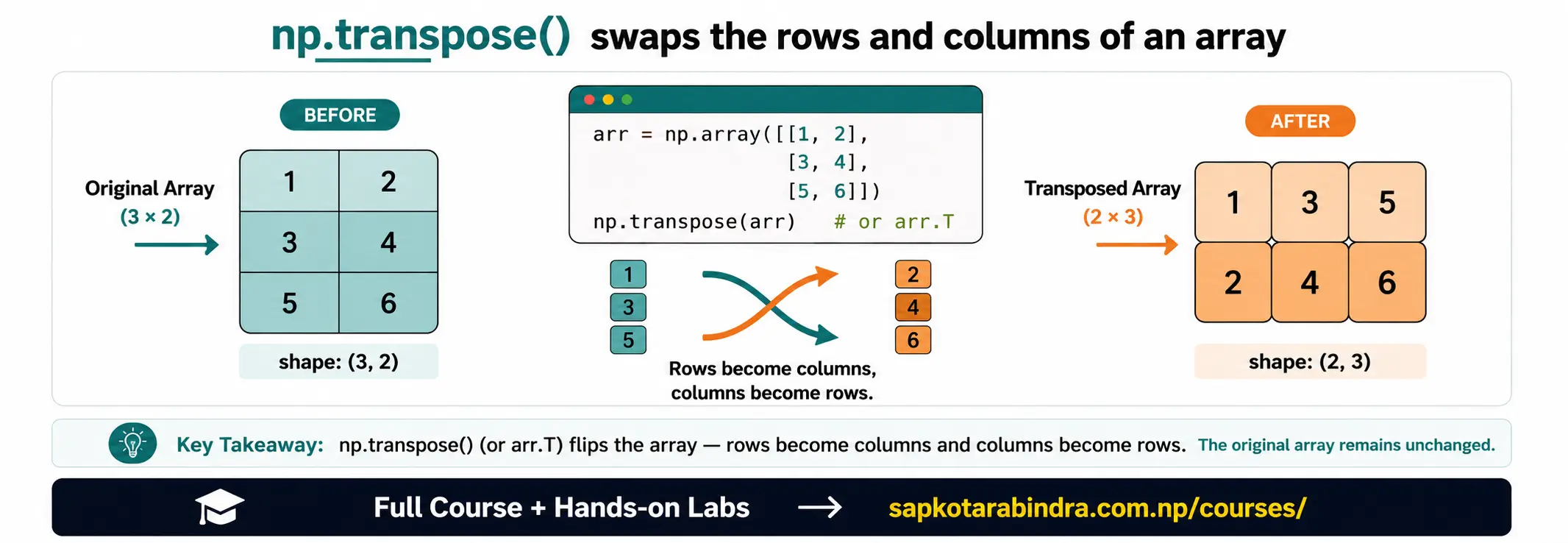
transpose()swaps rows and columns. Exampleimport numpy as nparr = np.array([[1, 2], [3, 4], [5, 6]])transposed_arr = np.transpose(arr)print(transposed_arr)Output: [[1 3 5] [2 4 6]] Shortcut:print(arr.T)📌 Simple idea: Transpose changes rows into columns and columns into rows.
4.7 transpose()
5. Merging Arrays
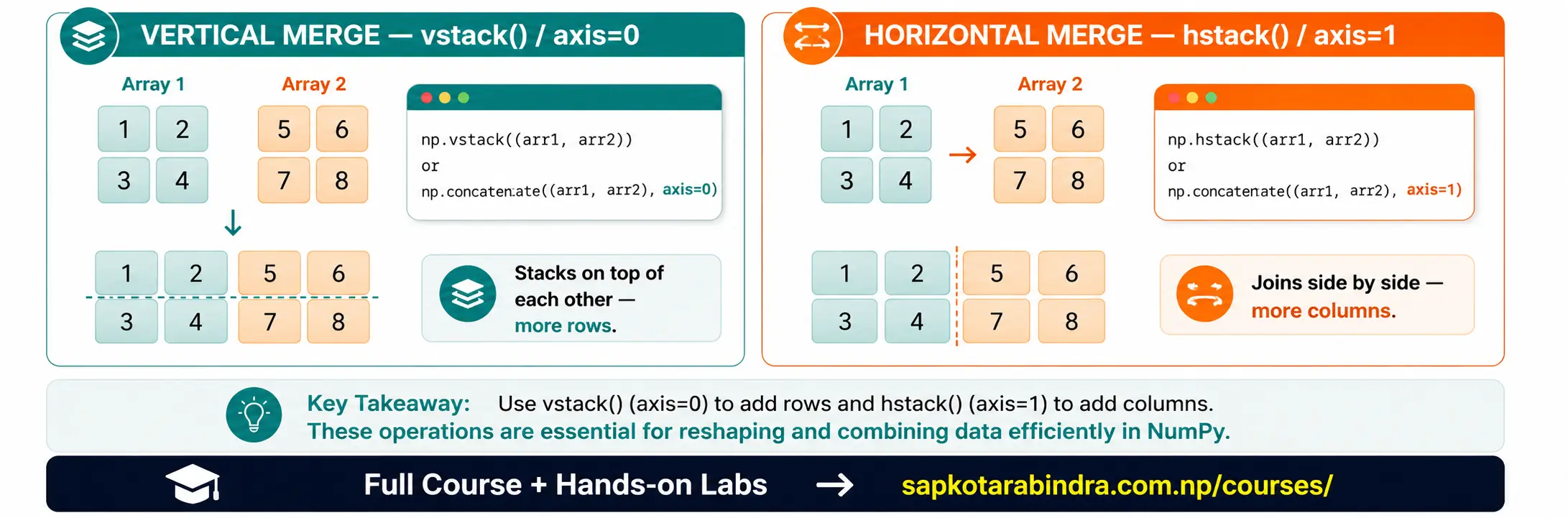
- Merging means combining multiple arrays into one. We can combine arrays: 👉 Vertically, by adding rows 👉 Horizontally, by adding columns
5.1 🧩 Why Merge Arrays?
5.2 Quick Comparison
| Function | Meaning |
|---|---|
np.concatenate() | Combines arrays using selected axis |
np.vstack() | Stacks arrays vertically, row-wise |
np.hstack() | Stacks arrays horizontally, column-wise |
np.concatenate()combines arrays along a selected axis. Exampleimport numpy as nparr1 = np.array([[1, 2], [3, 4]])arr2 = np.array([[5, 6], [7, 8]])Combine row-wiseresult = np.concatenate((arr1, arr2), axis=0)print(result)Output: [[1 2] [3 4] [5 6] [7 8]] Combine column-wiseresult = np.concatenate((arr1, arr2), axis=1)print(result)Output: [[1 2 5 6] [3 4 7 8]] 📌 Simple idea:axis=0adds rows.axis=1adds columns.np.vstack()stacks arrays vertically. It adds one array below another.import numpy as nparr1 = np.array([[1, 2], [3, 4]])arr2 = np.array([[5, 6], [7, 8]])result = np.vstack((arr1, arr2))print(result)Output: [[1 2] [3 4] [5 6] [7 8]] 📌 vstack = stack boxes on top of each other.np.hstack()stacks arrays horizontally. It adds one array beside another.import numpy as nparr1 = np.array([[1, 2], [3, 4]])arr2 = np.array([[5, 6], [7, 8]])result = np.hstack((arr1, arr2))print(result)Output: [[1 2 5 6] [3 4 7 8]] 📌 hstack = place boxes side by side.
5.3 np.concatenate()
5.4 np.vstack()
5.5 np.hstack()
6. Copying Arrays
- Assigning one array to another variable does not create a new copy. It creates another name for the same array.
import numpy as nparr = np.array([1, 2, 3])arr_ref = arrarr_ref[0] = 99print(arr)Output: [99 2 3] 📌 Why did this happen?arr_refandarrpoint to the same array.- To create an actual copy, use
np.copy()orarr.copy(). Exampleimport numpy as nparr = np.array([1, 2, 3])arr_copy = np.copy(arr)arr_copy[0] = 99print(arr)print(arr_copy)Output: [1 2 3] [99 2 3] 📌 Simple idea: Use.copy()when you want to change the new array without changing the original.
6.1 📋 Assignment vs Copy
6.2 Reference Example
6.3 Copy Example
7. Linear Algebra Operations
- NumPy provides functions for matrix operations. These are useful in: 👉 Machine Learning 👉 Data Science 👉 Computer graphics 👉 Statistics 📌 Determinant and inverse come from linear algebra — you do not need to master the math behind them right now to use these functions correctly.
7.1 🧮 What is Linear Algebra in NumPy?
7.2 Common Linear Algebra Operations
| Operation | NumPy Example |
|---|---|
| Matrix multiplication | np.dot(a, b) or a @ b |
| Determinant | np.linalg.det(a) |
| Inverse | np.linalg.inv(a) |
| Solve equations | np.linalg.solve(a, b) |
import numpy as npa = np.array([[1, 2], [3, 4]])b = np.array([[5, 6], [7, 8]])result = a @ bprint(result)Output: [[19 22] [43 50]]import numpy as npa = np.array([[1, 2], [3, 4]])det = np.linalg.det(a)print(det)Output: -2.0import numpy as npa = np.array([[1, 2], [3, 4]])inverse = np.linalg.inv(a)print(inverse)Output: [[-2. 1. ] [ 1.5 -0.5]]- Suppose we have:
x + y = 52x + y = 8We can write it as:a = [[1, 1], [2, 1]]b = [5, 8]Then solve:import numpy as npa = np.array([[1, 1], [2, 1]])b = np.array([5, 8])solution = np.linalg.solve(a, b)print(solution)Output: [3. 2.] This means:x = 3y = 2📌 NumPy can solve equations quickly using matrices.
7.3 Matrix Multiplication
7.4 Determinant
7.5 Inverse
7.6 Solving Linear Equations