Python Sets and Set Methods
1. 🆔 Sets
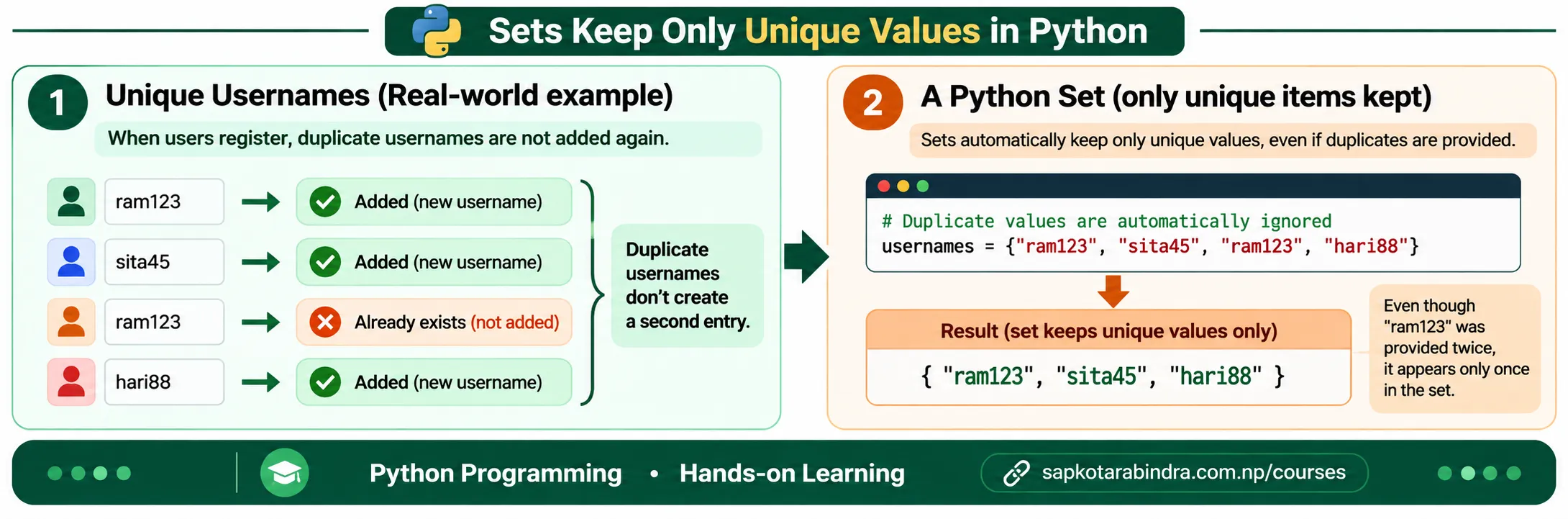
- Imagine a website storing registered usernames. Each username must be unique. If "ram123" is already registered, adding "ram123" again does not create another user with the same username. A Python set works in a similar way.
A set is a data type in Python used to store unique items in a single variable.
A set is:
✅ Unordered
✅ Mutable
✅ Stores unique items only
✅ Written inside curly braces
{ }✅ Useful for removing duplicates and comparing groups 👉 Unordered means items do not have a fixed position. 👉 Mutable means we can add or remove items after the set is created. 👉 Unique means duplicate values are stored only once. Example:usernames = {"ram123", "sita45", "ram123", "hari88"}print(usernames)# ➜ {"ram123", "sita45", "hari88"} 📌 The output order may be different because sets are unordered.
1.1 What is a Set?
- Sets are created by placing items inside curly braces
{ }and separating them with commas. Examples:int_set = {1, 2, 3}str_set = {"apple", "banana", "orange"}mixed_set = {1, "hello", 3.14, True}print(int_set)print(str_set)print(mixed_set) - Sets do not store duplicate values.
Example:
my_set = {1, 2, 2, 3, 3, 3}print(my_set)# ➜ {1, 2, 3} Here, duplicate values are automatically removed. - We cannot create an empty set using
{ }. Example:empty_data = {}print(type(empty_data))# ➜ <class 'dict'> To create an empty set, we useset(). Example:empty_set = set()print(type(empty_set))# ➜ <class 'set'> 📌{ }creates an empty dictionary, not an empty set. - Set items must be immutable. This means we can store values like:
NumbersStringsTuples
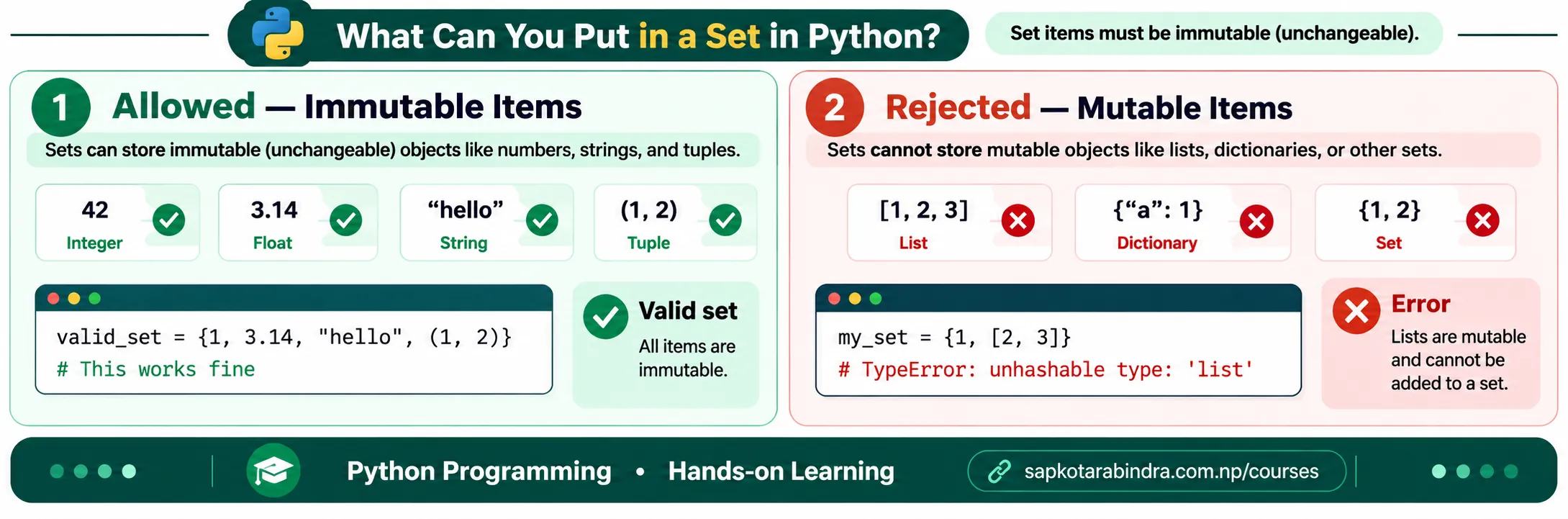
But we cannot store mutable items like lists inside a set.
Example:
valid_set = {1, "hello", (1, 2)}print(valid_set)Invalid Example:my_set = {1, [2, 3]}# ➜ TypeError ⚠️ This line gives an error because list is mutable and cannot be stored inside a set. 📌 TypeError means Python cannot perform the operation because the data type is not suitable.
1.2 Creating Sets
1.3 Duplicate Values are Removed
1.4 Creating an Empty Set
1.5 Sets Can Store Only Immutable Items
2. 🔎 Accessing and Checking Set Items
- Sets are unordered, so items do not have fixed positions. Because of this, indexing is not allowed.
Example:
my_set = {"apple", "banana", "orange"}print(my_set[0])# ➜ TypeError ⚠️ This line gives an error because set items cannot be accessed using index. 📌 Use a list or tuple when position matters. 📌 Use a set when uniqueness matters. - We can check whether an item exists in a set using
in. Example:my_set = {"apple", "banana", "orange"}print("apple" in my_set)# ➜ Trueprint("mango" in my_set)# ➜ False - We can check whether an item does not exist in a set using
not in. Example:my_set = {"apple", "banana", "orange"}print("mango" not in my_set)# ➜ Trueprint("banana" not in my_set)# ➜ False
2.1 Sets Do Not Support Indexing
2.2 Checking Membership using in
2.3 Checking Non-Membership using not in
3. ➕➖ Adding and Removing Set Items
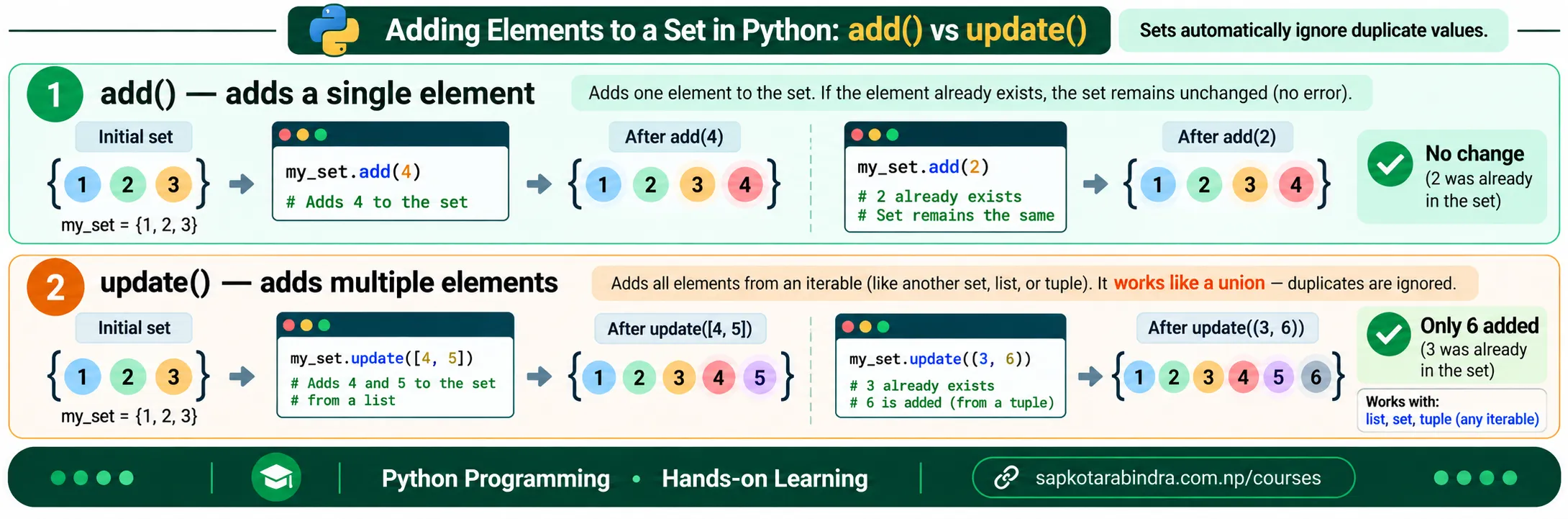
add()is used to add one item to a set. It modifies the original set. Example:my_set = {1, 2, 3}my_set.add(4)print(my_set)# ➜ {1, 2, 3, 4}my_set.add(2)print(my_set)# ➜ {1, 2, 3, 4} 📌 Adding a duplicate value does not change the set.update()is used to add multiple items from another collection such as a list, tuple, or set. It modifies the original set. Example:my_set = {1, 2, 3}my_set.update([4, 5])print(my_set)# ➜ {1, 2, 3, 4, 5}my_set.update((6, 7))print(my_set)# ➜ {1, 2, 3, 4, 5, 6, 7}my_set.update({8, 9})print(my_set)# ➜ {1, 2, 3, 4, 5, 6, 7, 8, 9} 📌add()adds one item. 📌update()adds multiple items.
3.1 add()
3.2 update()
- A string is also an iterable. So if we use
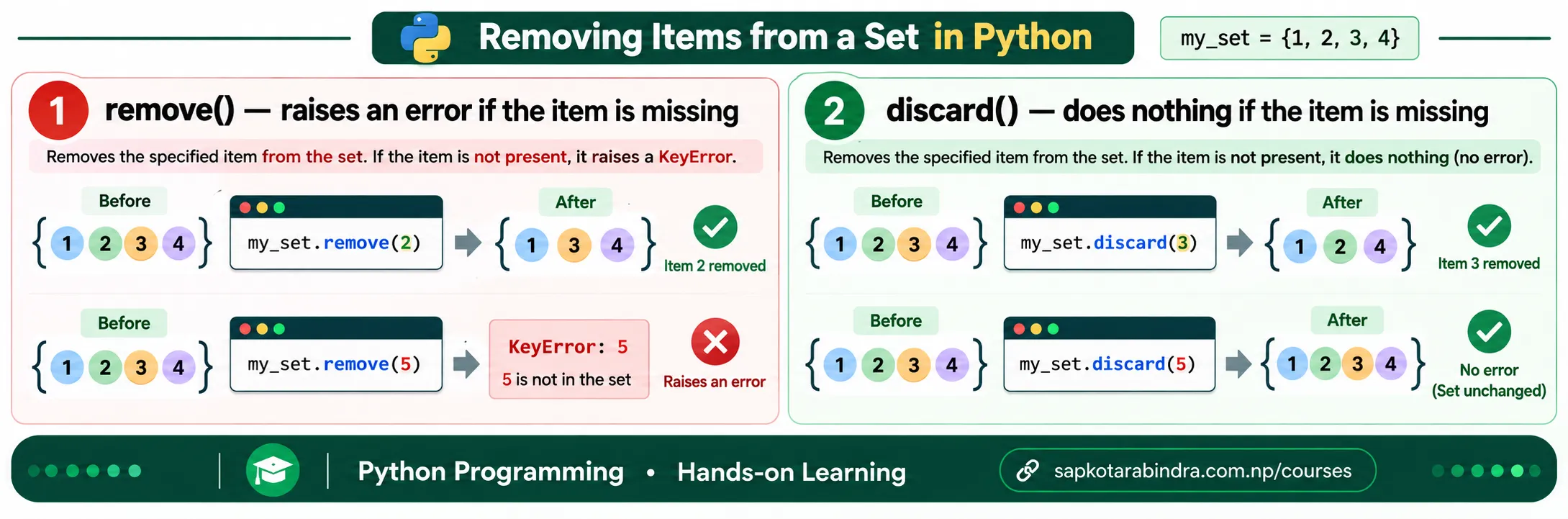
update()with a string, each character is added separately. Example:my_set = {1, 2, 3}my_set.update("hi")print(my_set)# ➜ {1, 2, 3, "h", "i"} 📌 The output order may be different because sets are unordered. remove()removes a specified item from a set. It gives an error if the item is not found. Example:my_set = {1, 2, 3, 4}my_set.remove(2)print(my_set)# ➜ {1, 3, 4}my_set.remove(5)# ➜ KeyError ⚠️ This line gives an error because 5 is not found in the set. 📌 KeyError means Python could not find the requested value in the set.discard()also removes a specified item from a set. But it does not give an error if the item is not found. Example:my_set = {1, 2, 3, 4}my_set.discard(3)print(my_set)# ➜ {1, 2, 4}my_set.discard(5)print(my_set)# ➜ {1, 2, 4} 📌remove()gives an error if the item is not found. 📌discard()does not give an error if the item is not found.
3.3 update() with String
3.4 remove()
3.5 discard()
pop()removes and returns one item from a set. Since sets are unordered, we cannot know which item will be removed. Example:my_set = {1, 2, 3, 4}removed_item = my_set.pop()print(removed_item)# ➜ Could be any item from the setprint(my_set)# ➜ Set with one less item 📌 In lists,pop()usually removes the last item. 📌 In sets,pop()removes an arbitrary item because sets are unordered.
3.6 pop()
4. 🧮 Common Set Functions
- Some functions are useful for numeric sets, while others work with any set.
Common Functions:
sum()➜ Adds all numeric itemsmin()➜ Finds smallest valuemax()➜ Finds largest valuelen()➜ Returns the number of items in the set.sorted()➜ Returns a sorted listcopy()➜ Creates a copy of a set 📌 sum() works only with numeric sets. 📌 min() and max() work when the set items can be compared with each other. num_set = {1, 2, 3, 4, 5}print(sum(num_set))# ➜ 15print(min(num_set))# ➜ 1print(max(num_set))# ➜ 5print(len(num_set))# ➜ 5- Sets do not have a fixed order. If we want sorted output, we can use
sorted().sorted()returns a list, not a set. Example:my_set = {3, 1, 4, 2}sorted_data = sorted(my_set)print(sorted_data)# ➜ [1, 2, 3, 4]print(type(sorted_data))# ➜ <class 'list'> 📌sorted()does not change the original set. 📌sorted()returns a list. - Example:
str_set = {"apple", "ball", "cat"}sorted_str_set = sorted(str_set, reverse=True)print(sorted_str_set)# ➜ ["cat", "ball", "apple"]sorted_by_length = sorted(str_set, key=len)print(sorted_by_length)# ➜ ["cat", "ball", "apple"] 📌 "cat" has 3 letters, "ball" has 4 letters, and "apple" has 5 letters. copy()creates a copy of a set. This is useful when we want to modify the copied set without changing the original set. Example:original_set = {1, 2, 3}copied_set = original_set.copy()copied_set.add(4)print(original_set)# ➜ {1, 2, 3}print(copied_set)# ➜ {1, 2, 3, 4}
4.1 Numeric and Common Functions
4.2 Numeric Function Examples
4.3 sorted()
4.4 Sorting Strings
4.5 Copying Sets
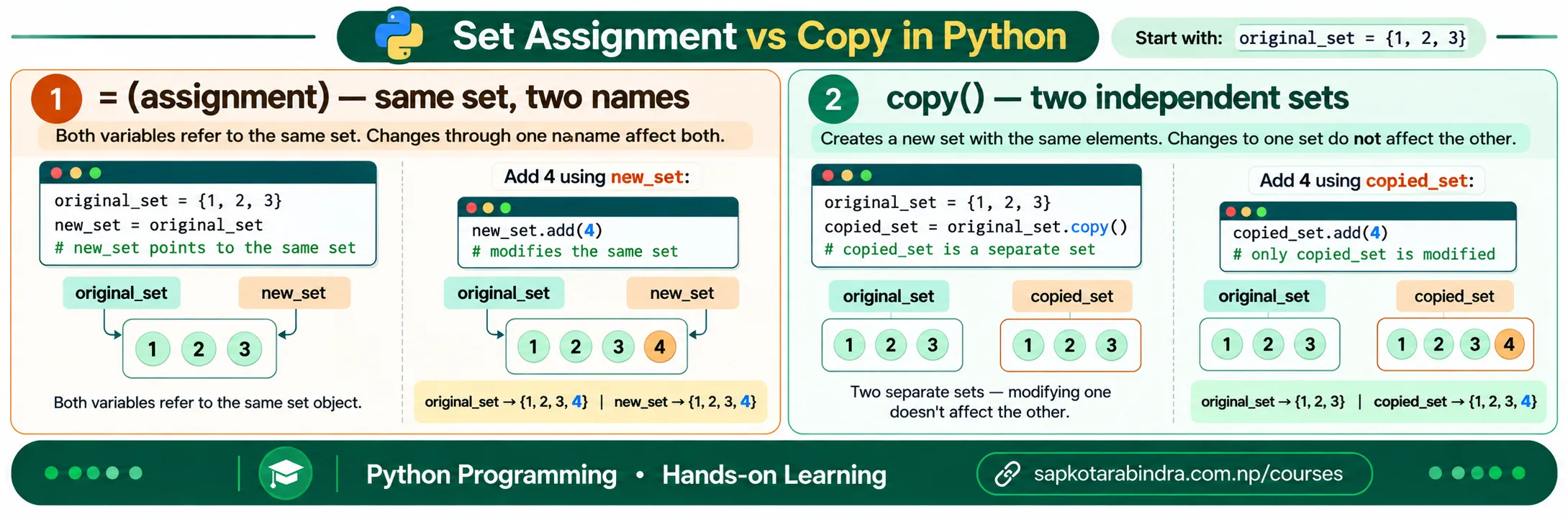
- If we assign one set to another variable using
=, both variables refer to the same set. Example:original_set = {1, 2, 3}same_set = original_setsame_set.add(4)print(original_set)# ➜ {1, 2, 3, 4}print(same_set)# ➜ {1, 2, 3, 4} 📌 Usecopy()when you want a separate set.
4.6 Assignment is Not Copy
5. 🔗 Set Operations
- Set operations are used to compare and combine groups of data.
Common Set Operations:
union()➜ Combines all unique itemsintersection()➜ Finds common itemsdifference()➜ Finds items present in one set but not anothersymmetric_difference()➜ Finds items that are in either set, but not both
5.1 What are Set Operations?
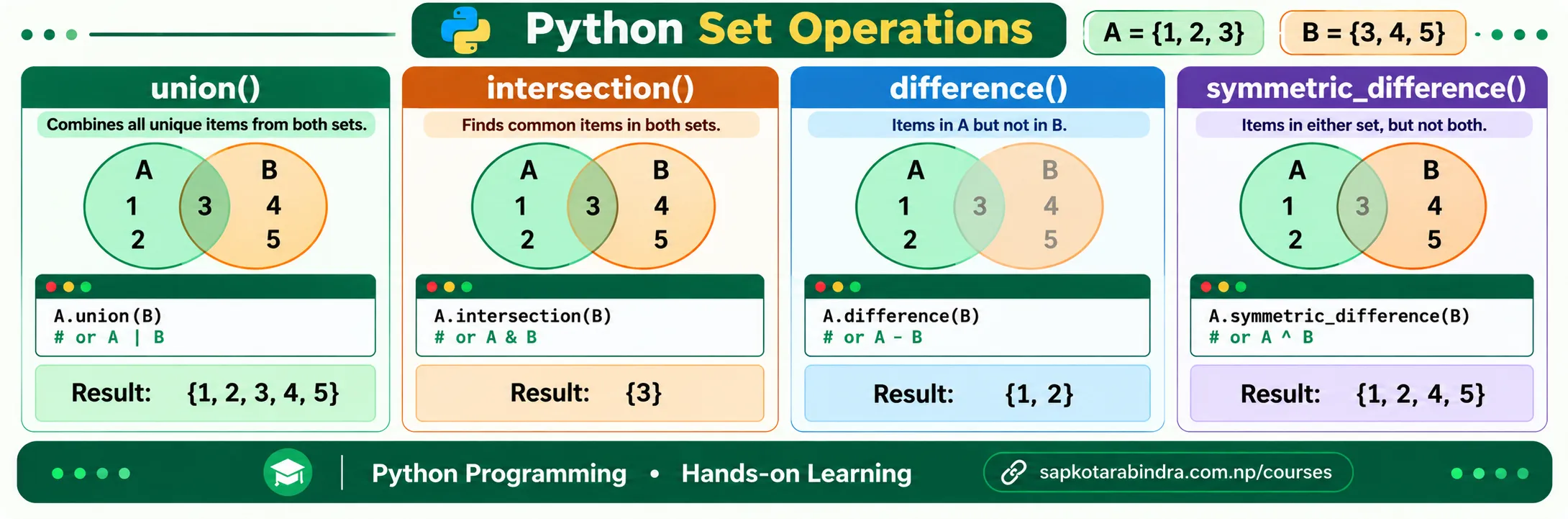
union()combines all unique items from two sets. Symbol:|Example:set_a = {1, 2, 3}set_b = {3, 4, 5}print(set_a.union(set_b))# ➜ {1, 2, 3, 4, 5}print(set_a | set_b)# ➜ {1, 2, 3, 4, 5}intersection()finds common items between two sets. Symbol:&Example:set_a = {1, 2, 3}set_b = {3, 4, 5}print(set_a.intersection(set_b))# ➜ {3}print(set_a & set_b)# ➜ {3}difference()finds items that are in the first set but not in the second set. Symbol:-Example:set_a = {1, 2, 3}set_b = {3, 4, 5}print(set_a.difference(set_b))# ➜ {1, 2}print(set_a - set_b)# ➜ {1, 2} 📌set_a - set_bis different fromset_b - set_a.symmetric_difference()finds items that are in either set, but not in both. Symbol:^Example:set_a = {1, 2, 3}set_b = {3, 4, 5}print(set_a.symmetric_difference(set_b))# ➜ {1, 2, 4, 5}print(set_a ^ set_b)# ➜ {1, 2, 4, 5}
5.2 union()
5.3 intersection()
5.4 difference()
5.5 symmetric_difference()
6. 🧊 Frozenset
frozensetis an immutable version of a set. Once created, items cannot be added or removed. Example:my_frozenset = frozenset([1, 2, 3])print(my_frozenset)# ➜ frozenset({1, 2, 3})- Example:
my_frozenset = frozenset([1, 2, 3])my_frozenset.add(4)# ➜ AttributeError ⚠️ This line gives an error because frozenset does not haveadd(). 📌 AttributeError means Python does not allow that action on this data type because the tool or method is not available.
6.1 What is frozenset?
6.2 frozenset is Immutable