
Basic SQL
✕1. Database and SQL
- A database is an organized place where data is stored. In Data Science and software applications, databases help us store, search, update, and manage data safely.
- A relational database stores data in tables. A table has: Rows ➜ individual records Columns ➜ fields or properties
1.1 🗄️ What is a Database?
1.2 📊 Relational Database
Employee Table
| id | name | salary |
|---|---|---|
| 1 | Alice | 70000 |
| 2 | Charlie | 60000 |
Sample table: employees
- A database is similar to an Excel workbook.
1.3 📘 Excel Analogy
| Database Concept | Excel Analogy |
|---|---|
| Database | Excel workbook |
| Table | Excel sheet |
| Row | Record |
| Column | Field |
Analogy of database and Excel
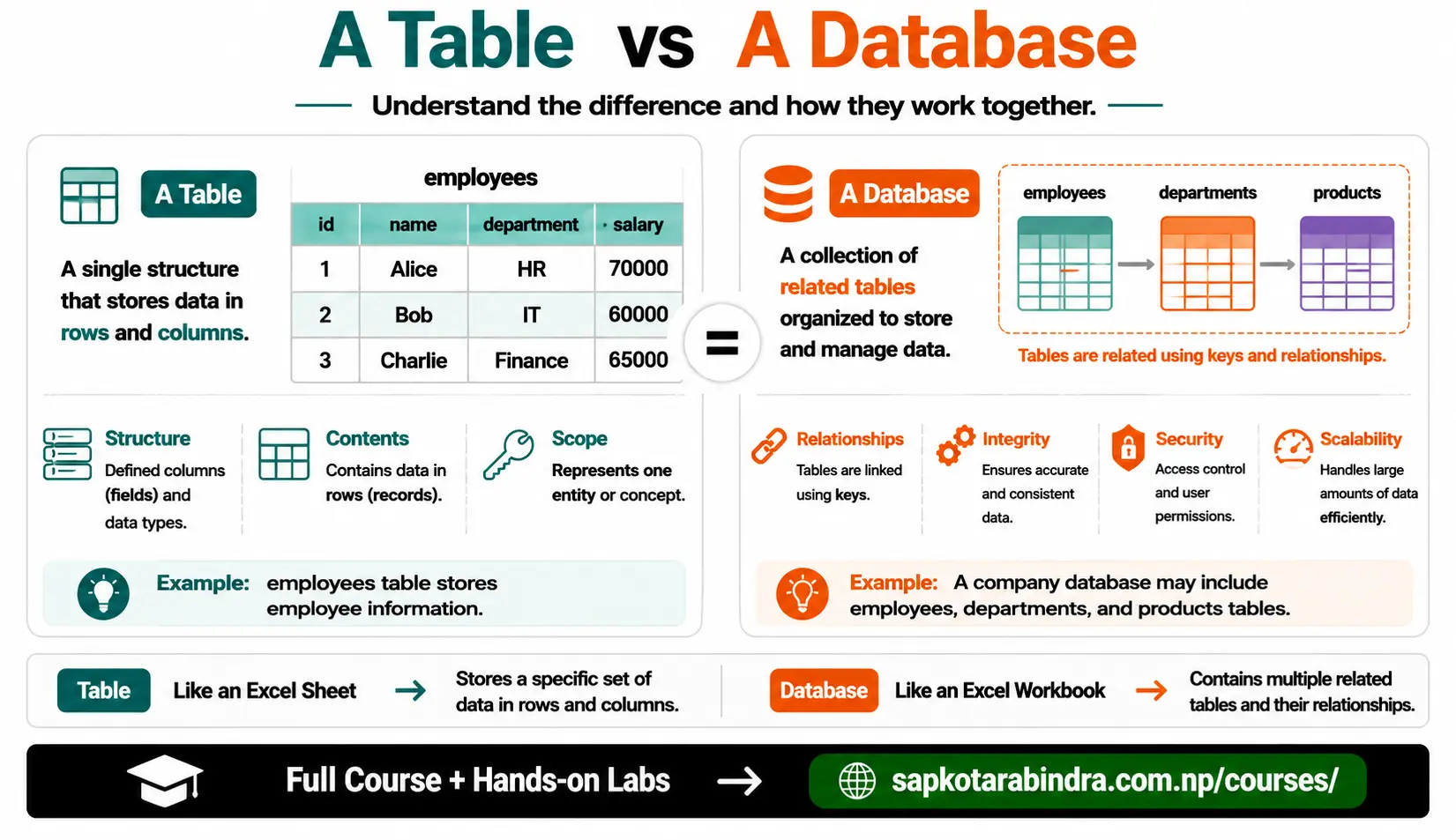
- Databases are better than normal files for many situations because they provide: 👉 Better performance 👉 Better data integrity 👉 Better security 👉 Easier searching and filtering 👉 Better support for multiple users
- RDBMS means Relational Database Management System. It is software used to manage relational databases. Common RDBMS examples: - PostgreSQL - MySQL - SQLite - Oracle - SQL Server
- SQL stands for Structured Query Language. SQL is used to: ✅ Create databases and tables ✅ Insert data ✅ Read data ✅ Update data ✅ Delete data 📌 SQL is the language we use to talk to databases.
- For this lesson, we will use: PostgreSQL: A popular open-source relational database system. PostgreSQL provides official download pages for different operating systems. DBeaver: A database tool used to connect to and query different databases. DBeaver Community is described as a free, open-source database management tool that supports databases including PostgreSQL. Useful links: - Download PostgreSQL - Download DBeaver Community
1.4 ✅ Why Use a Database Instead of Files?
1.5 🛠️ What is RDBMS?
1.6 💬 What is SQL?
1.7 🐘 PostgreSQL and DBeaver
2. Creating and Connecting a Database
- We will use PostgreSQL as our database. PostgreSQL is useful for learning SQL because it is powerful, popular, and open-source.
- Steps:
1. Open DBeaver
2. Click the New Database Connection icon. Shortcut:
Ctrl + Shift + N3. Select PostgreSQL 4. Click Next 5. Fill in connection details: Host, Port, Database, Username, Password 6. Click Test Connection 7. If the connection is successful, click Finish 8. Right-click the database name 9. Go to SQL Editor → New SQL Script 10. Write SQL queries in the SQL editor 📌 Note: DBeaver may download the PostgreSQL driver when you test the connection for the first time. CREATE DATABASE company_db;📌 A database is the container where we create tables and store data.
2.1 🐘 PostgreSQL Database
2.2 🔌 Connecting PostgreSQL in DBeaver
2.3 Creating a Database
3. SQL Command Categories
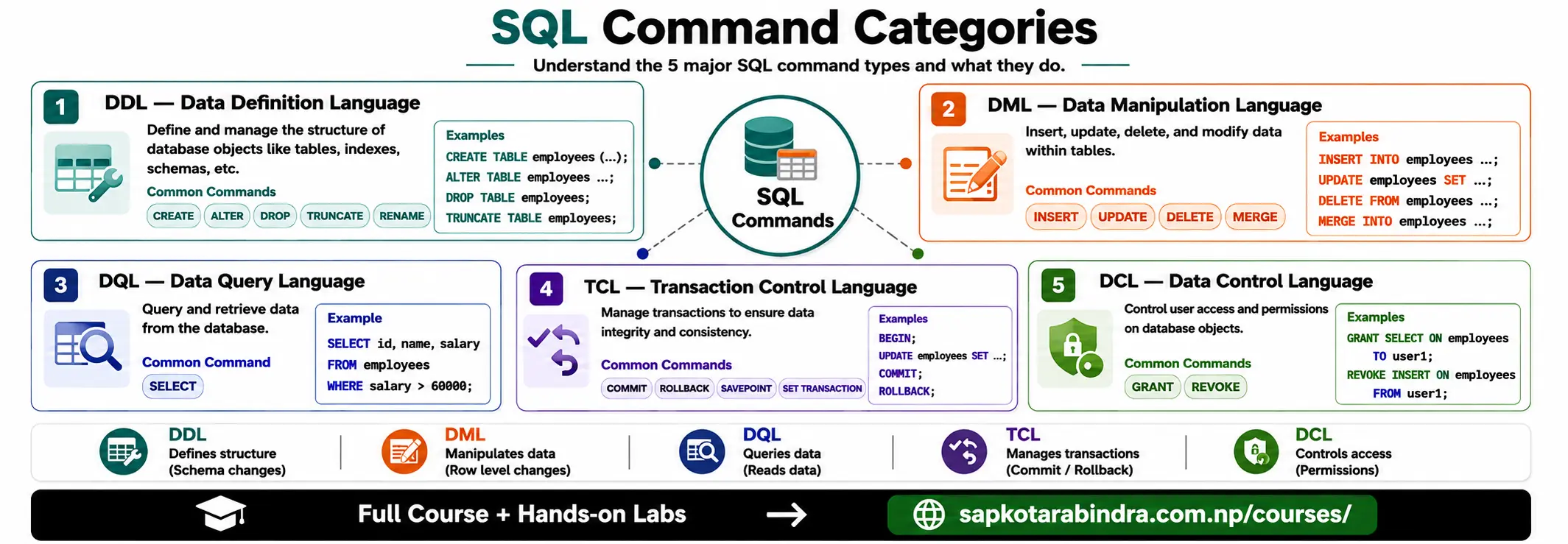
- SQL commands are grouped based on what they do. DDL commands are used to change table structure, such as creating tables, deleting tables, adding/removing fields, or renaming fields. DML commands are used to change data, such as adding new records, removing records, or changing values in records. DQL commands are used to read data from tables based on a search condition. DCL commands are used to control access and permissions.
3.1 📚 Types of SQL Commands
SQL Command Categories
| Category | Full Form | Usage | Examples |
|---|---|---|---|
| DDL | Data Definition Language | Defines database structure | CREATE, ALTER, DROP |
| DML | Data Manipulation Language | Changes data in tables | INSERT, UPDATE, DELETE |
| DQL | Data Query Language | Reads data from tables | SELECT |
| DCL | Data Control Language | Controls access and permissions | GRANT, REVOKE |
| TCL | Transaction Control Language | Manages transactions | COMMIT, ROLLBACK, SAVEPOINT |
SQL Command Categories
4. Creating Tables
- A table is an entity that stores related data in rows and columns.
4.1 🧱 What is a Table?
Sample Table: employees
| id | name | salary | joined_date | is_active |
|---|---|---|---|---|
| 1 | Alice | 70000 | 2027-01-15 | TRUE |
| 2 | Charlie | 60000 | 2027-06-20 | FALSE |
Sample table: employees
CREATE TABLE table_name (column1 datatype,column2 datatype,column3 datatype);
4.2 Syntax
4.3 Common PostgreSQL Data Types
| Data Type | Meaning | Example |
|---|---|---|
| INT | Whole number | 25 |
| SERIAL | Auto-incrementing integer | 1, 2, 3... |
| FLOAT | Decimal number | 75.5 |
| DATE | Date value | 2026-07-16 |
| TIMESTAMP | Date and time | 2026-07-16 10:30:00 |
| VARCHAR(n) | Text with length limit | VARCHAR(255) |
| TEXT | Long text | Description |
| BOOLEAN | True or false | TRUE, FALSE |
Common PostgreSQL Data Types
CREATE TABLE employees (id SERIAL PRIMARY KEY,name VARCHAR(255),salary FLOAT,joined_date DATE,is_active BOOLEAN);📌CREATE TABLEcreates the structure of a table. 📌 PRIMARY KEY is a constraint — explained in next section.
4.4 Example: Create Employees Table
5. SQL Constraints
- Constraints are rules applied to table columns. They help keep data: ✅ Correct ✅ Consistent ✅ Safe ✅ Meaningful If data breaks a constraint, PostgreSQL rejects it.
5.1 🔒 What are Constraints?
5.2 Common SQL Constraints
| Constraint | Meaning |
|---|---|
| PRIMARY KEY | Uniquely identifies each row. Cannot be null or duplicate |
| FOREIGN KEY | Connects one table to another table |
| NOT NULL | Column must have a value |
| UNIQUE | Values must be unique |
| CHECK | Values must satisfy a condition |
| DEFAULT | Provides a default value if no value is given |
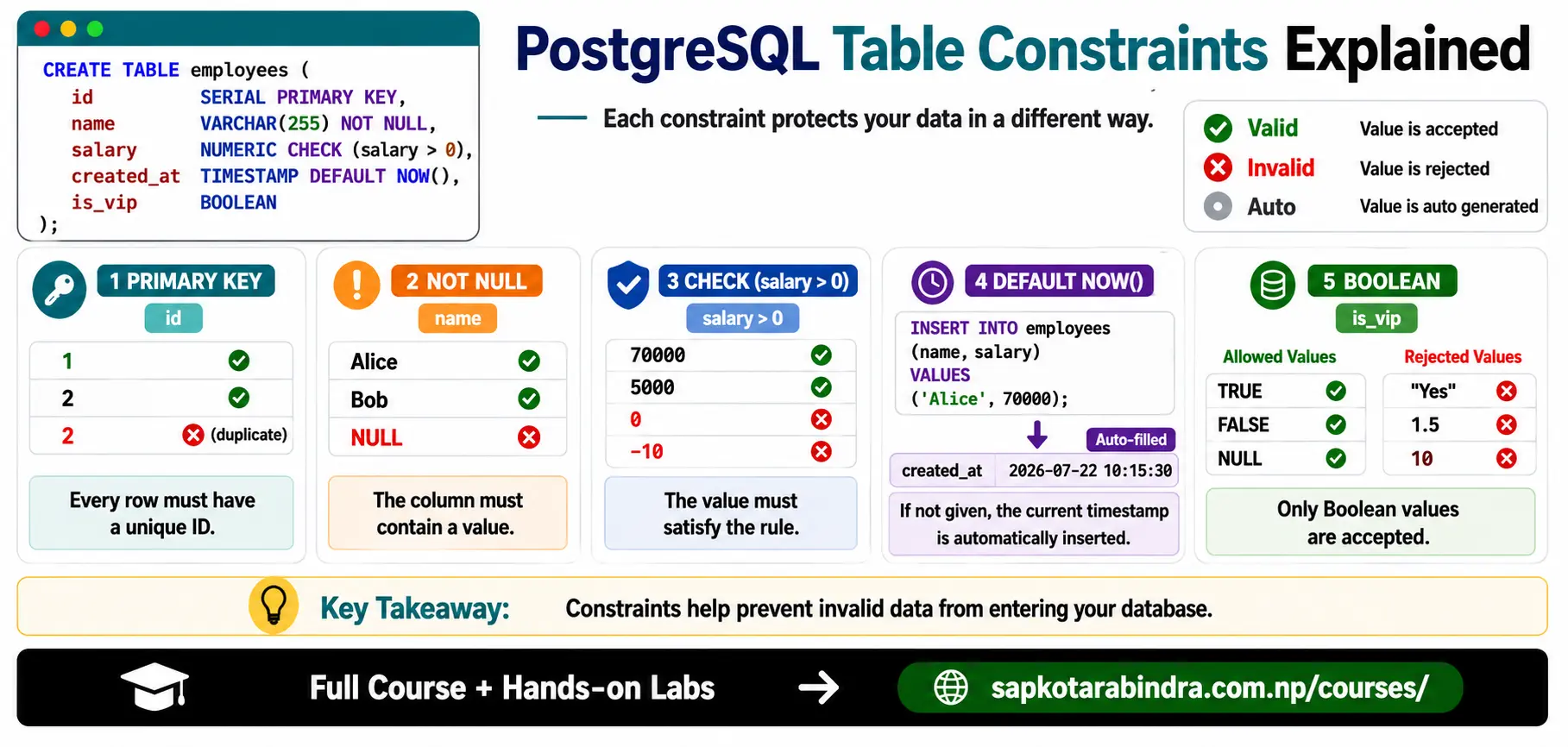
CREATE TABLE employees (id SERIAL PRIMARY KEY,name VARCHAR(255) NOT NULL,salary FLOAT CHECK (salary > 0),created_at TIMESTAMP DEFAULT NOW());📌 NOW() is a built-in function that returns the current date and time.CREATE TABLE employees (id SERIAL PRIMARY KEY,name VARCHAR(255) NOT NULL,salary FLOAT,created_at TIMESTAMP DEFAULT NOW(),CONSTRAINT chk_salary CHECK (salary > 0));ALTER TABLE employeesADD CONSTRAINT chk_salary CHECK (salary > 0);📌 Constraints protect the table from bad data.
5.3 Inline Constraint Example
5.4 Named Constraint Example
5.5 Add Constraint to Existing Table
6. DROP, TRUNCATE, and ALTER
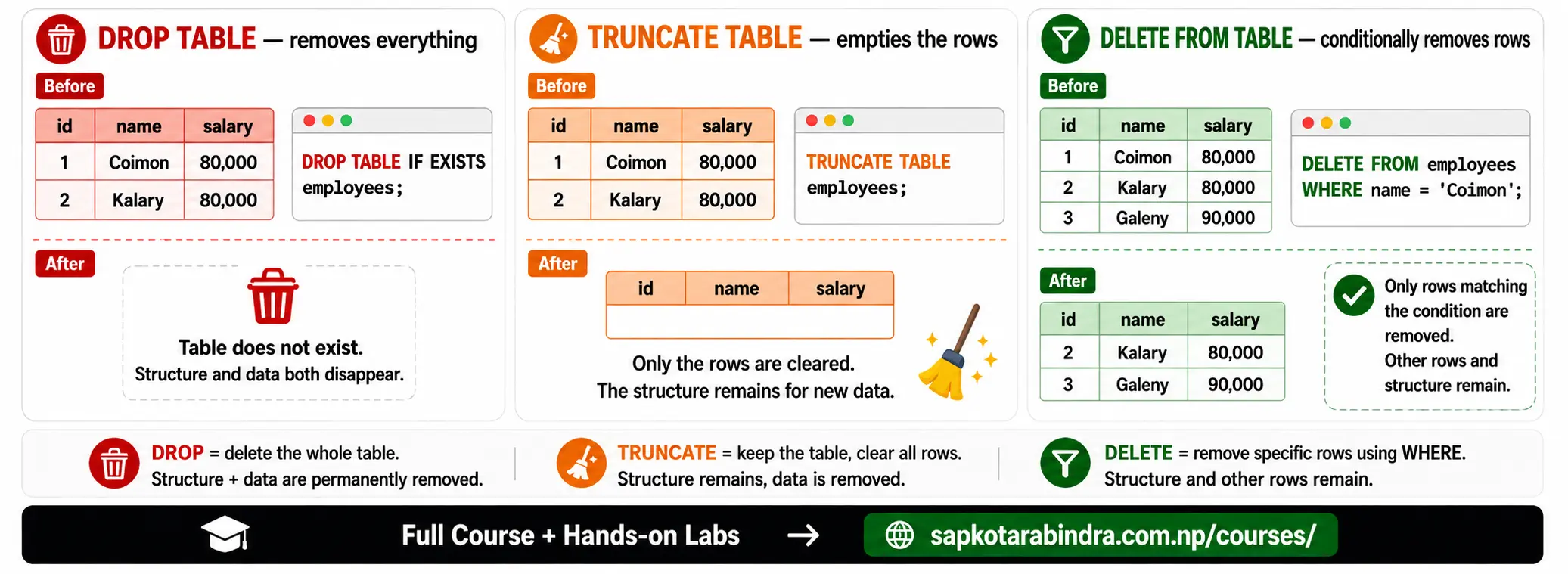
- DROP deletes a database or table completely.
DROP TABLE employees;Safer version:DROP TABLE IF EXISTS employees;Drop a database:DROP DATABASE IF EXISTS company_db;⚠️ Warning: DROP removes the structure and data. - TRUNCATE removes all rows from a table but keeps the table structure.
TRUNCATE TABLE employees;📌 Simple difference:DROP TABLE— Deletes the table itselfTRUNCATE TABLE— Deletes all rows but keeps the table
6.1 🗑️ DROP
6.2 🧹 TRUNCATE
- ALTER TABLE changes the structure of an existing table.
6.3 🛠️ ALTER TABLE
ALTER TABLE Operations
| Operation | Syntax |
|---|---|
| Add column | ALTER TABLE table_name ADD column_name datatype; |
| Drop column | ALTER TABLE table_name DROP COLUMN column_name; |
| Rename column | ALTER TABLE table_name RENAME COLUMN old_name TO new_name; |
| Change data type | ALTER TABLE table_name ALTER COLUMN column_name TYPE new_datatype; |
| Add constraint | ALTER TABLE table_name ADD CONSTRAINT constraint_name constraint_definition; |
| Drop constraint | ALTER TABLE table_name DROP CONSTRAINT constraint_name; |
| Rename table | ALTER TABLE old_table_name RENAME TO new_table_name; |
7. Inserting Data
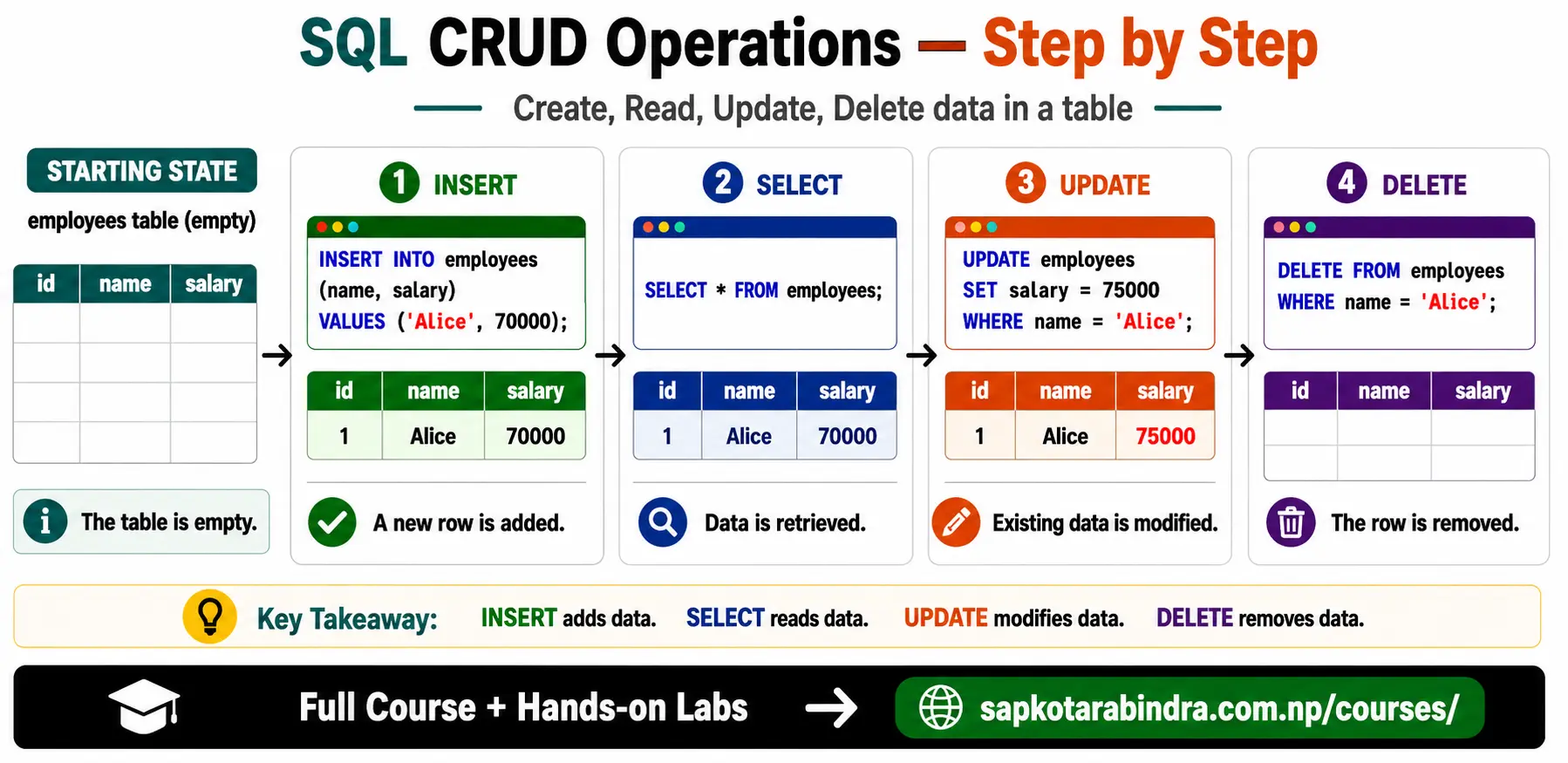
- INSERT INTO adds data into a table. We specify the table name, columns, and values to insert. It is okay not to provide values for all columns if they have default values or allow NULL. The sequence of columns and values must match.
INSERT INTO table_name (column1, column2)VALUES(value1, value2),(value3, value4);📌 value1 and value3 are inserted into column1 📌 value2 and value4 are inserted into column2INSERT INTO employees (name, salary)VALUES('Alice', 70000),('Charlie', 60000);⚠️ PostgreSQL note: Text values should use single quotes, like'Alice', not double quotes.SELECT * FROM employees;📌 Simple idea: Insert first, then verify using SELECT.
7.1 ➕ INSERT INTO
7.2 Syntax
7.3 Example
7.4 Validate Inserted Data
8. Updating and Deleting Data
- UPDATE modifies existing records.
Syntax
UPDATE table_nameSET column_name = new_valueWHERE condition;ExampleUPDATE employeesSET salary = 75000WHERE name = 'Alice';UPDATE employeesSET salary = 80000,is_active = FALSEWHERE id = 1;⚠️ Important: Always use WHERE carefully. Without WHERE, all rows may be updated. - DELETE removes records from a table.
Syntax
DELETE FROM table_nameWHERE condition;ExampleDELETE FROM employeesWHERE name = 'Charlie';⚠️ Important: Without WHERE, all rows may be deleted.
8.1 ✏️ UPDATE
8.2 ❌ DELETE
9. Retrieving Data with SELECT
- SELECT is used to retrieve data from a table. We can choose specific columns, filter rows, sort results, and limit the number of rows returned.
SELECT column1, column2FROM table_nameWHERE conditionORDER BY column ASCLIMIT number;📌 WHERE, ORDER BY, and LIMIT are optional depending on what we need.- Select all columns:
SELECT * FROM employees;Select specific columns:SELECT name, salary FROM employees;Limit number of rows:SELECT * FROM employeesLIMIT 10;Select unique values:SELECT DISTINCT department FROM employees;Rename output column:SELECT name, salary AS slFROM employees;Sort results:SELECT name, salaryFROM employeesORDER BY salary DESCLIMIT 5;📌 Simple idea: SELECT is used when we want to read data.
9.1 🔍 SELECT
9.2 Basic Syntax
9.3 Examples
10. Filtering Data with WHERE
- WHERE filters records based on conditions. It works like filtering in Python or NumPy.
10.1 🎯 WHERE Clause
10.2 Common Operators
| Operator | Meaning |
|---|---|
| = | Equal to |
| != | Not equal to |
| < | Less than |
| > | Greater than |
| <= | Less than or equal to |
| >= | Greater than or equal to |
| LIKE | Pattern matching |
| IN | Match any value in a list |
| BETWEEN | Value inside a range |
| IS NULL | Missing value |
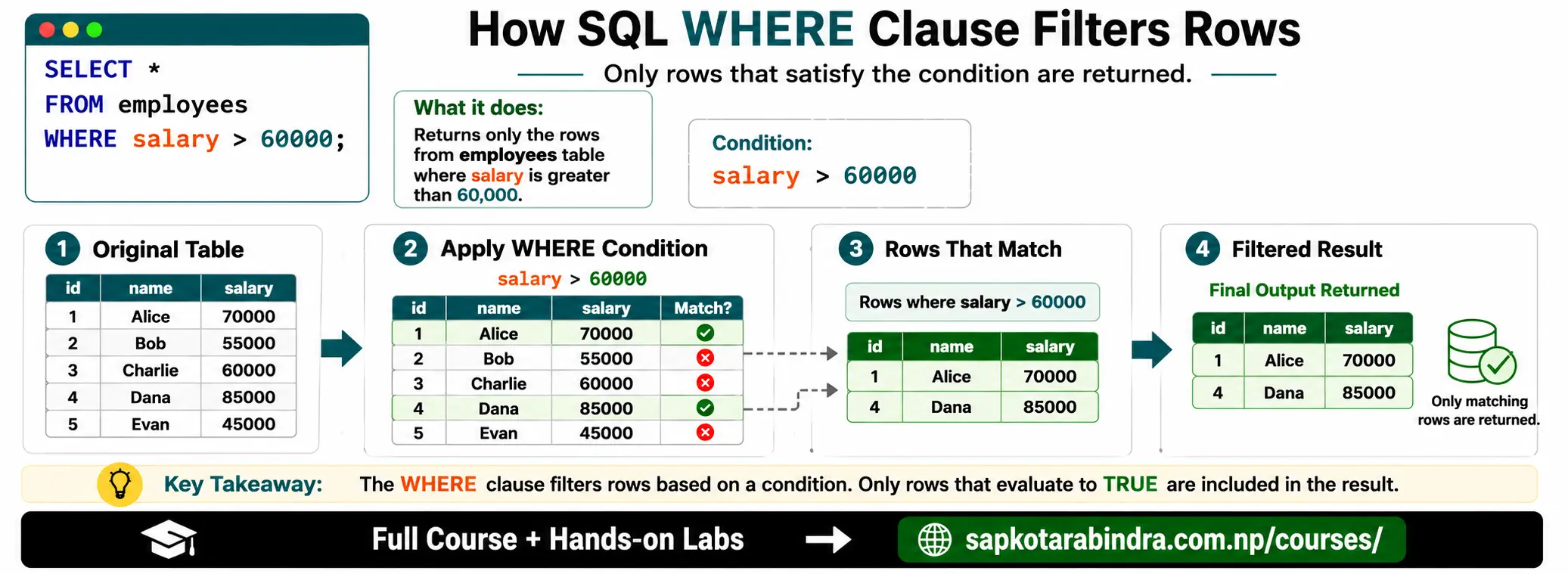
- Salary greater than 60000:
SELECT * FROM employeesWHERE salary > 60000;Department not equal to HR:SELECT * FROM employeesWHERE department != 'HR';Salary between two values:SELECT * FROM employeesWHERE salary >= 50000 AND salary < 80000;Using BETWEEN:SELECT * FROM employeesWHERE salary BETWEEN 50000 AND 80000;📌 Note: BETWEEN includes both boundary values. Name is Alice or Bob:SELECT * FROM employeesWHERE name = 'Alice' OR name = 'Bob';Using IN:SELECT * FROM employeesWHERE name IN ('Alice', 'Bob');Names starting with A:SELECT * FROM employeesWHERE name LIKE 'A%';Names ending with e:SELECT * FROM employeesWHERE name LIKE '%e';Department is missing:SELECT * FROM employeesWHERE department IS NULL;📌 WHERE helps us select only the rows we need.
10.3 Examples
11. Useful SQL Functions
- SQL has useful functions to operate on text and numbers. We can convert case, find length, round numbers, replace text, and more. Some popular functions and their descriptions are listed below:
11.1 Common Functions
| Function | Meaning |
|---|---|
| LOWER() | Convert text to lowercase |
| UPPER() | Convert text to uppercase |
| LENGTH() | Count characters |
| ROUND() | Round numbers |
| REPLACE() | Replace text |
| ABS() | Absolute value |
| TRIM() | Remove extra spaces |
| CONCAT() | Join text |
| COALESCE() | Replace null with another value |
| CASE WHEN ... THEN ... END | If-else logic in SQL |
Common SQL Functions
12. Read SQL Table in Python
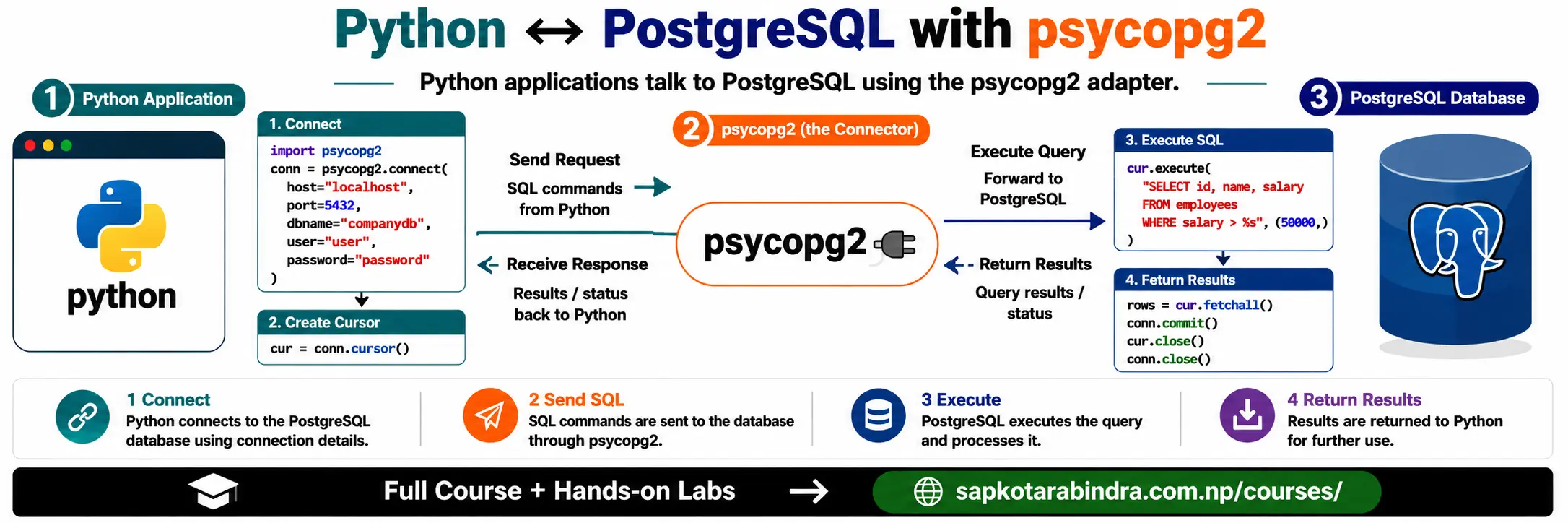
- In Data Science, we often read data from a database into Python for analysis. We can use
psycopg2to connect Python with PostgreSQL. Install it using:pip install psycopg2-binary import psycopg2db_config = {"host": "localhost","dbname": "your_db","user": "your_user","password": "your_password"}conn = psycopg2.connect(**db_config)cursor = conn.cursor()cursor.execute("SELECT * FROM employees;")results = cursor.fetchall()print(results)cursor.close()conn.close()📌 Simple idea: Python sends SQL queries to PostgreSQL and receives the result.
12.1 🐍 Why Connect SQL with Python?
12.2 Example: Read Data
13. Write SQL Table from Python
import psycopg2db_config = {"host": "localhost","dbname": "your_db","user": "your_user","password": "your_password"}conn = psycopg2.connect(**db_config)cursor = conn.cursor()# Create tablecursor.execute("""CREATE TABLE IF NOT EXISTS products (name TEXT,price REAL);""")# Insert datadata_to_add = [("Laptop", 999.99),("Smartphone", 499.99),("Headphones", 199.99)]cursor.executemany("INSERT INTO products (name, price) VALUES (%s, %s);",data_to_add)conn.commit()cursor.close()conn.close()📌conn.commit()saves the transaction, similar to the SQL COMMIT command.
13.1 Example: Create Table and Insert Data