
Intermediate SQL
✕1. Subquery and CTE
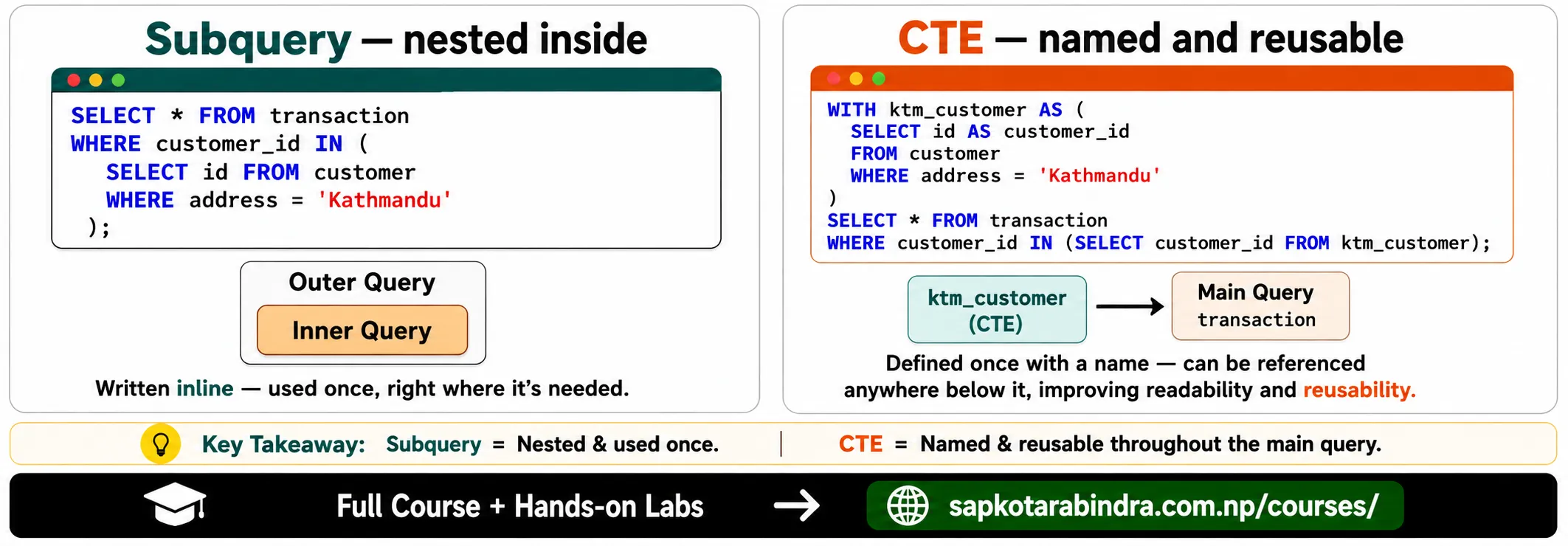
- A subquery is a query written inside another query. It is useful when we want to solve a problem in multiple steps. Example idea: First find customers from Kathmandu. Then find transactions made by those customers.
SELECT *FROM transaction_detailsWHERE customer_id IN (SELECT idFROM customerWHERE address = 'Kathmandu');Here:SELECT id FROM customer WHERE address = 'Kathmandu'runs first. Then the outer query finds transactions for those customer IDs. 📌 Idea: A subquery lets one query use the result of another query.
1.1 🔍 What is a Subquery?
1.2 Subquery Example
2. Common Table Expression
- CTE means Common Table Expression. A CTE is a temporary named result set that we can use later in the same query. It helps make complex SQL queries easier to read.
WITH cte_name AS (SELECT ...)SELECT ...FROM cte_name;WITH ktm_customer AS (SELECT id AS customer_idFROM customerWHERE address = 'Kathmandu')SELECT *FROM transaction_detailsWHERE customer_id IN (SELECT customer_idFROM ktm_customer);📌 Idea: A CTE is like giving a name to a temporary result so we can use it later.
2.1 🧩 What is a CTE?
2.2 CTE Syntax
2.3 CTE Example
2.4 Subquery vs CTE
| Feature | Subquery | CTE |
|---|---|---|
| Where it is written | Inside another query | Before the main query |
| Readability | Good for small logic | Better for complex logic |
| Reuse in same query | Harder | Easier |
| Keyword used | No special keyword | WITH |
3. Aggregation, Grouping, and HAVING
- Aggregation means summarizing many rows into one result. This is similar to NumPy aggregate functions like: 👉 sum 👉 mean 👉 min 👉 max
3.1 📊 What is Aggregation?
Common Aggregate Functions
| Function | Meaning |
|---|---|
| COUNT() | Count rows |
| SUM() | Total value |
| AVG() | Average value |
| MIN() | Minimum value |
| MAX() | Maximum value |
SQL Aggregate Functions
- Count total transactions:
SELECT COUNT(*) AS total_txnFROM transaction_details;Find total salary:SELECT SUM(salary) AS total_salaryFROM employee;Find average product price:SELECT AVG(price) AS avg_priceFROM product;Find minimum and maximum salary:SELECTMIN(salary) AS min_salary,MAX(salary) AS max_salaryFROM employee;📌 Simple idea: Aggregate functions summarize data.
3.2 Aggregate Examples
4. GROUP BY
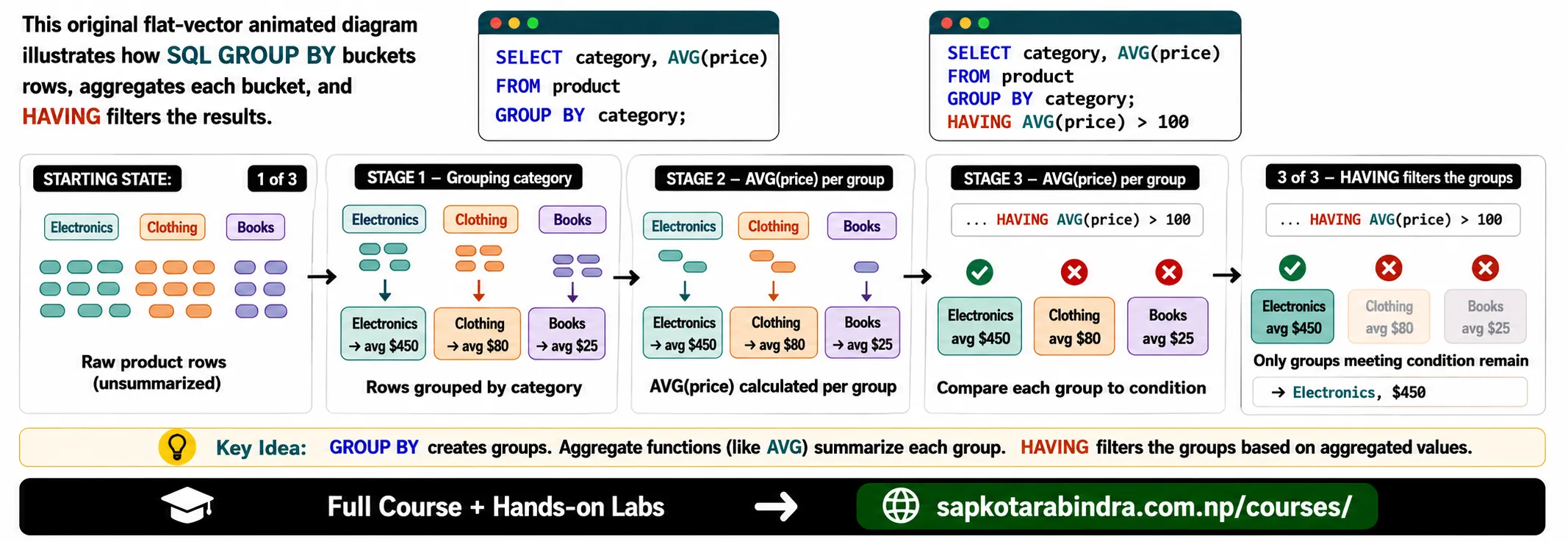
- GROUP BY is used when we want summary results for each group. Example: Find average salary for each department.
SELECTdepartment,AVG(salary) AS avg_salaryFROM employeeGROUP BY department;This groups employees by department and calculates average salary for each department. 📌 Simple idea: GROUP BY creates groups, then aggregate functions summarize each group.- We can also group by more than one column.
SELECTbrand,name,COUNT(*) AS product_countFROM productGROUP BY brand, name;📌 This groups data by both brand and name.
4.1 🧺 What is GROUP BY?
4.2 GROUP BY Example
4.3 GROUP BY Multiple Columns
5. HAVING
- HAVING is used to filter groups after aggregation. Example: Show only departments where average salary is greater than 50000.
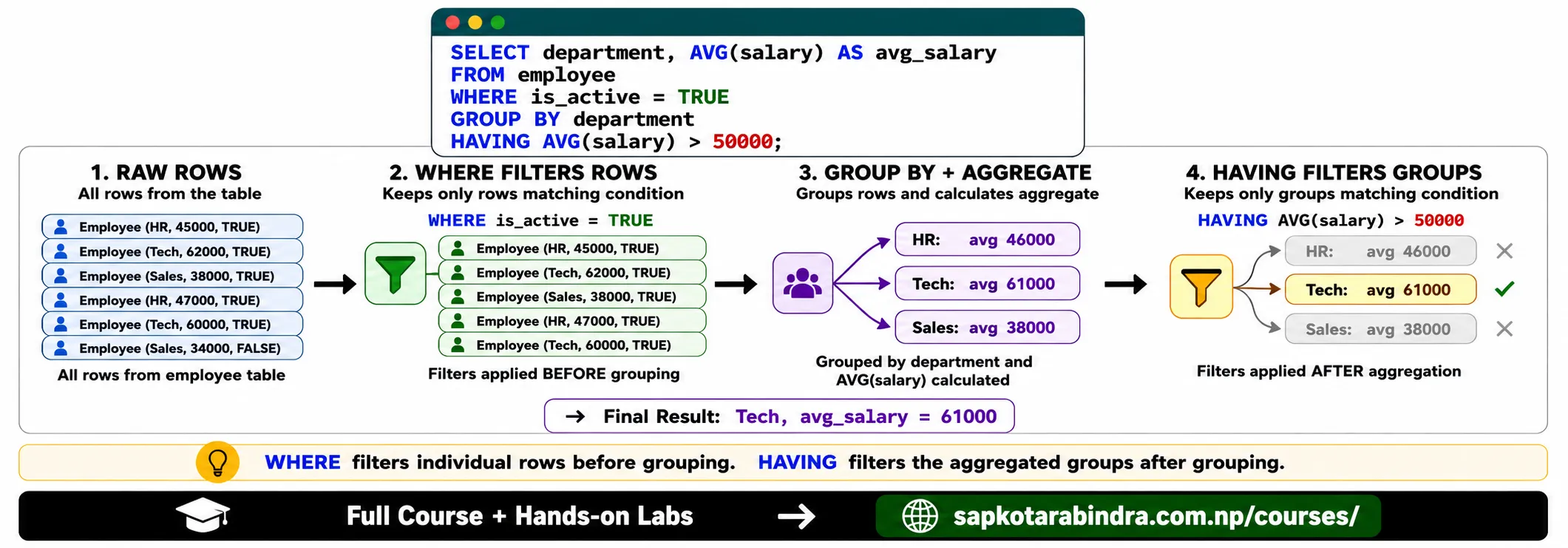
SELECTdepartment,AVG(salary) AS avg_salaryFROM employeeGROUP BY departmentHAVING AVG(salary) > 50000;📌 Simple idea: WHERE filters rows before grouping. HAVING filters groups after grouping.
5.1 🎯 What is HAVING?
5.2 HAVING Example
5.3 WHERE vs HAVING
| Clause | Used For | Works Before or After Aggregation |
|---|---|---|
| WHERE | Filtering rows | Before aggregation |
| HAVING | Filtering grouped results | After aggregation |
SELECTdepartment,AVG(salary) AS avg_salaryFROM employeeWHERE is_active = TRUEGROUP BY departmentHAVING AVG(salary) > 50000;Here:WHERE is_active = TRUEfilters employees firstGROUP BY departmentgroups remaining employeesHAVING AVG(salary) > 50000filters the grouped result
5.4 Example with both
6. Joining Multiple Tables
- A JOIN is used to combine data from multiple tables.
Example:
transaction_detailsstores transaction datacustomerstores customer detailsemployeestores employee or cashier detailsproductstores product details Using joins, we can create one result that combines information from all these tables. 📌 Simple idea: JOIN helps us look up related information from different tables. - We join tables when one table has IDs and another table has details.
Example:
transaction_details columns: customer_id, product_id, cashier_id
customer columns: id, name, address
So we connect:
transaction_details.customer_id = customer.id
6.1 🔗 What is a JOIN?
6.2 Why Do We Join Tables?
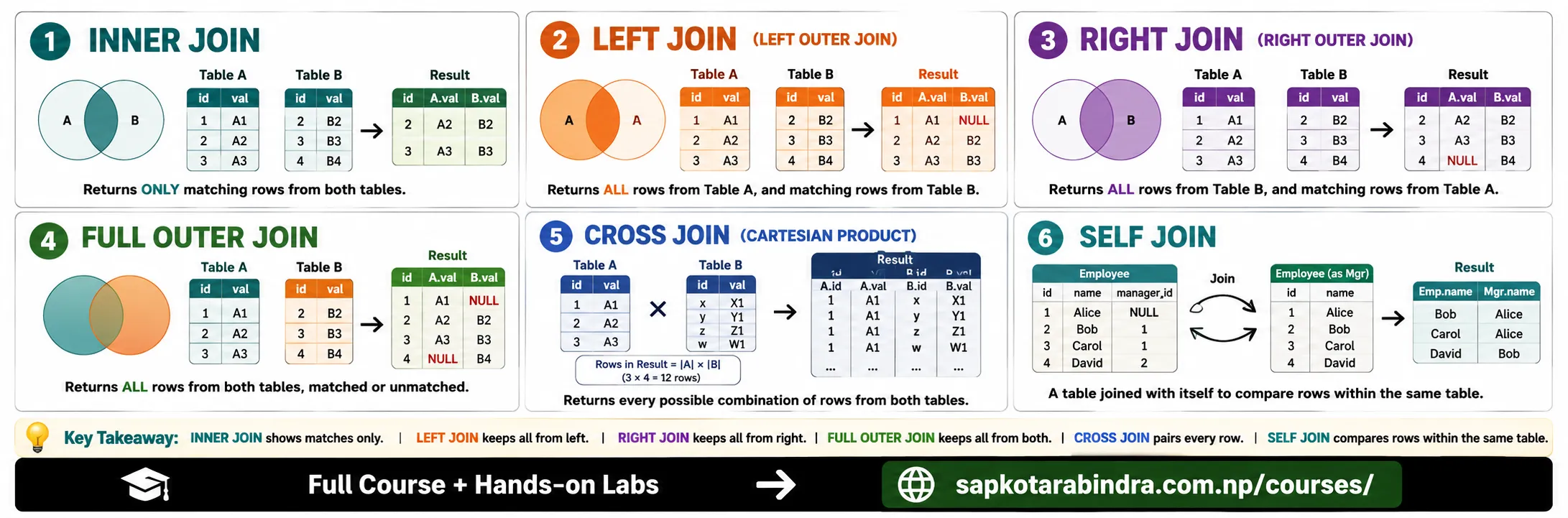
7. Types of SQL Joins
7.1 Join Types
| Join Type | Meaning |
|---|---|
| INNER JOIN | Returns rows that match in both tables |
| LEFT JOIN | Returns all rows from the left table and matching rows from the right table |
| RIGHT JOIN | Returns all rows from the right table and matching rows from the left table |
| FULL OUTER JOIN | Returns all rows from both tables |
| CROSS JOIN | Returns all possible combinations |
| SELF JOIN | Joins a table with itself |
- INNER JOIN returns only matching rows from both tables.
SELECTt.id,c.name AS customer_name,t.txn_dateFROM transaction_details tINNER JOIN customer cON t.customer_id = c.id;📌 If a customer does not match, that transaction will not appear.
7.2 INNER JOIN
- LEFT JOIN returns all rows from the left table. If there is no match in the right table, it shows NULL.
SELECTt.id,c.name AS customer_name,t.txn_dateFROM transaction_details tLEFT JOIN customer cON t.customer_id = c.id;📌 Simple idea: Keep everything from the left table. - RIGHT JOIN returns all rows from the right table.
SELECTt.id,c.name AS customer_name,t.txn_dateFROM transaction_details tRIGHT JOIN customer cON t.customer_id = c.id;📌 Simple idea: Keep everything from the right table. - FULL OUTER JOIN returns all rows from both tables.
SELECTt.id,c.name AS customer_name,t.txn_dateFROM transaction_details tFULL OUTER JOIN customer cON t.customer_id = c.id;📌 If a row does not match, missing values appear as NULL. - CROSS JOIN gives all possible combinations of rows.
SELECTc.name AS customer_name,p.name AS product_nameFROM customer cCROSS JOIN product p;📌 Be careful: CROSS JOIN can create many rows quickly. - A SELF JOIN means joining a table with itself.
Example:
Employees table has manager_id, and we want to find each employee's manager.
SELECTe.name AS employee_name,m.name AS manager_nameFROM employee eLEFT JOIN employee mON e.manager_id = m.id;📌 Simple idea: SELF JOIN compares rows inside the same table.
7.3 LEFT JOIN
7.4 RIGHT JOIN
7.5 FULL OUTER JOIN
7.6 CROSS JOIN
7.7 SELF JOIN
8. Example of Joining Multiple Tables
SELECTc.name AS customer_name,e.name AS employee_name,p.name AS product_name,t.product_qty,t.txn_dateFROM transaction_details tLEFT JOIN customer cON t.customer_id = c.idLEFT JOIN employee eON t.cashier_id = e.idLEFT JOIN product pON t.product_id = p.id;This query combines: - Customer name from customer - Employee name from employee - Product name from product - Quantity and date from transaction_details 📌 Simple idea: One table stores IDs. Other tables explain what those IDs mean.
8.1 Joining Transaction, Customer, Employee, and Product
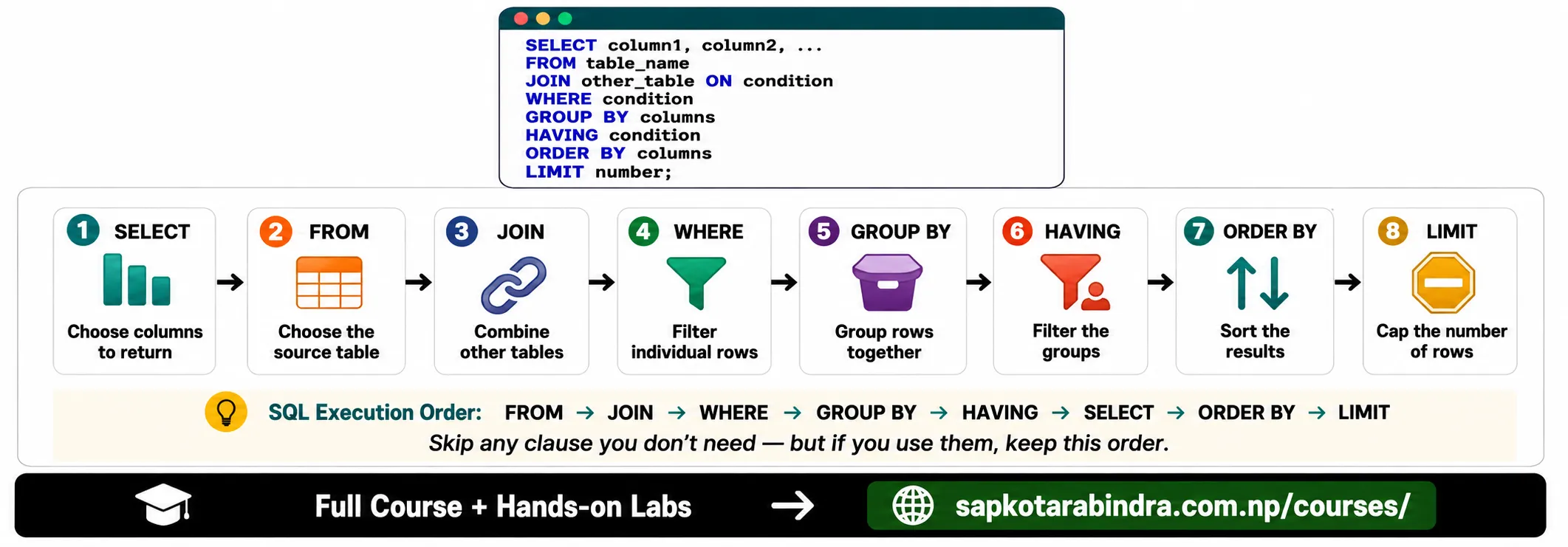
9. Overall SQL Query Order
SELECT ...FROM table_nameJOIN table_nameON conditionWHERE conditionGROUP BY columnsHAVING conditionORDER BY columnsLIMIT number;- We can skip clauses we do not need, but if we use them, they should follow this order: SELECT → FROM → JOIN → WHERE → GROUP BY → HAVING → ORDER BY → LIMIT 📌 SQL clauses must be written in the proper order.
9.1 Full Query Structure
9.2 Important Rule
10. SET Operations
- SET operations combine the results of two or more SELECT statements. They are useful when we want to compare or combine similar results.
10.1 🧮 What are SET Operations?
10.2 Common SET Operations
| Operation | Meaning |
|---|---|
| UNION | Combines results and removes duplicates |
| UNION ALL | Combines results and keeps duplicates |
| INTERSECT | Returns only common rows from both results |
| EXCEPT | Returns rows from the first result that are not in the second result |
- For SET operations, both SELECT queries should return: - Same number of columns - Compatible data types - Same column order 📌 Simple idea: SET operations stack query results on top of each other.
10.3 Important Rule
11. SET Operation Examples
SELECT nameFROM customerWHERE address = 'Kathmandu'UNIONSELECT nameFROM employeeWHERE department = 'HR';📌 UNION removes duplicate names.
11.1 UNION
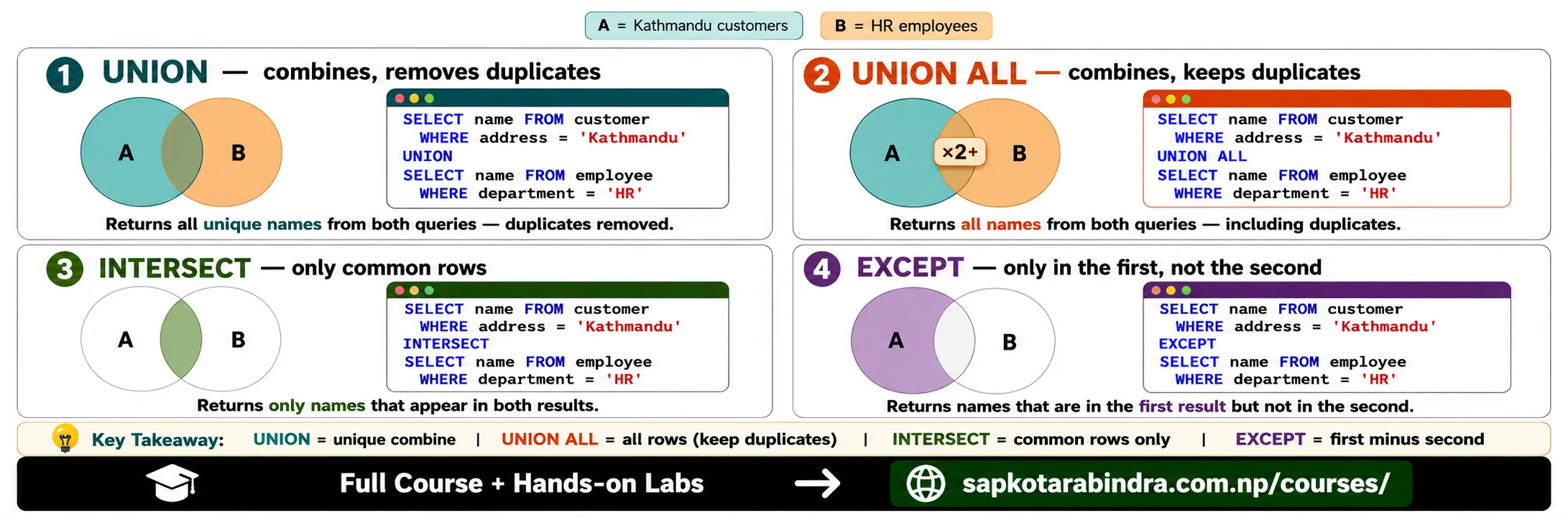
SELECT nameFROM customerWHERE address = 'Kathmandu'UNION ALLSELECT nameFROM employeeWHERE department = 'HR';📌 UNION ALL keeps duplicate names.SELECT nameFROM customerWHERE address = 'Kathmandu'INTERSECTSELECT nameFROM employeeWHERE department = 'HR';📌 INTERSECT returns names found in both results.SELECT nameFROM customerWHERE address = 'Kathmandu'EXCEPTSELECT nameFROM employeeWHERE department = 'HR';📌 EXCEPT returns names from the first result that are not in the second result.
11.2 UNION ALL
11.3 INTERSECT
11.4 EXCEPT
12. What's Next?
- After this lesson, we can learn: - Window functions - Recursive CTE - Performance tuning - More SQL functions
12.1 Upcoming Topics