
Regex Concepts
✕1. Introduction to Regex
- Regex means Regular Expression. Regex is used to search, validate, extract, and replace text based on patterns. It is useful for: 👉 Searching text 👉 Validating email or phone numbers 👉 Extracting information from logs 👉 Cleaning messy text data 👉 Finding patterns in large datasets 📌 Regex is a powerful search tool that searches by pattern, not just exact words. 📌 Imagine describing a phone number as "any 10 digits" instead of one exact number.
1.1 🔎 What is Regex?
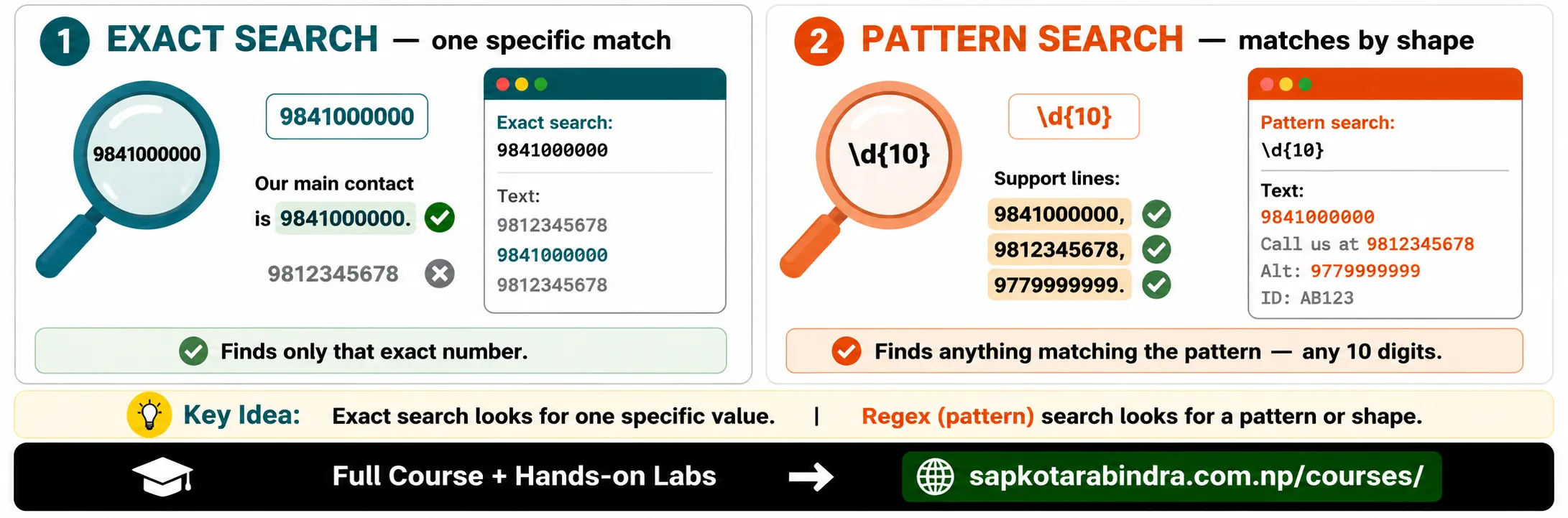
- Regex is very useful in Data Science because real-world data is often messy. Regex is available in many tools: ✅ Text editors ✅ Excel-like tools ✅ SQL ✅ Python ✅ JavaScript ✅ Online regex testers For practice, we will use this Regex Tester tool.
- Regex syntax can look confusing at first.
Example:
\d{10}But this simply means: Match exactly 10 digits. 📌 Regex looks difficult because it uses symbols, but each symbol has a small meaning.
1.2 🧹 Why Learn Regex?
1.3 ⚠️ Why Regex Looks Difficult
2. Literals
- Literals are normal characters that match exactly as written.
Example:
catText: The cat is on the roof. Match: cat - Some characters have special meanings in regex.
Common special characters:
. ^ $ * + ? { } [ ] | ( ) \If we want to match them as normal text, we must escape them using backslash\. Example: This matches the dollar sign:\$Normal letters match normally. Special characters need\.
2.1 🔤 What are Literals?
2.2 Special Characters
Literal Matching Examples
| Text | Desired Match | Regex Pattern |
|---|---|---|
| The cat is on the roof. | cat | cat |
| The price is $100. | $100 | \$100 |
| I have 10+ years of experience. | 10+ | 10\+ |
| Today is 2026.06.15 or 2026/06/15 | 2026.06.15 | 2026\.06\.15 |
3. ⚡ Special Regex Characters
3.1 Common Special Patterns
| Pattern | Meaning |
|---|---|
\n | Newline |
\t | Tab |
\d | Any digit, same as [0-9] |
\D | Any non-digit |
\w | Word character, same as [a-zA-Z0-9_] |
\W | Non-word character |
\s | Whitespace, such as space or tab |
\S | Non-whitespace |
\b | Word boundary |
\B | Non-word boundary |
. | Any single character except newline |
\ | Escapes special characters |
^ | Start of string |
$ | End of string |
- Match digits
Text:
I bought 100 apples.Regex:\d+Match:100Match words Text:Hello_123Regex:\w+Match:Hello_123Match whitespace Text:Hello WorldRegex:\sMatch: space between Hello and World 📌 Special regex shortcuts help us match common character types quickly.
3.2 Examples
4. Character Classes
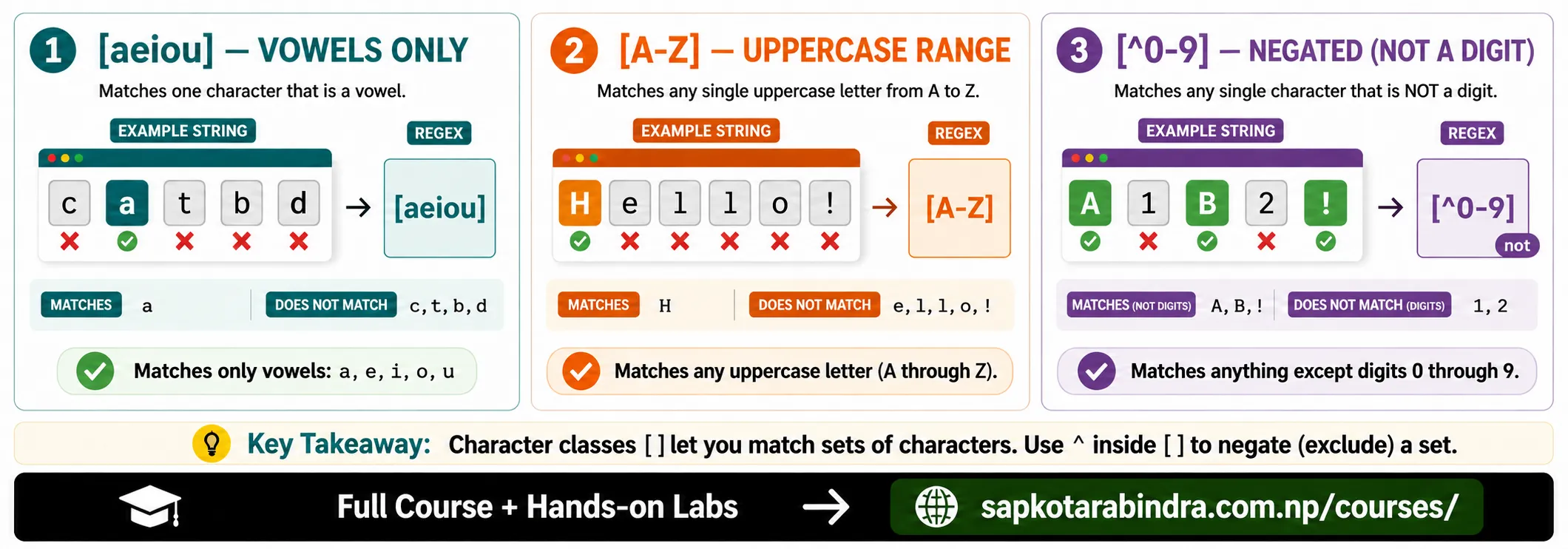
- A character class lets us match one character from a set.
Syntax:
[abc]This matches: a or b or c
4.1 🔡 What is a Character Class?
4.2 Character Class Examples
| Pattern | Meaning | Example Match |
|---|---|---|
| [aeiou] | Any vowel | a in cat, e in bed |
| [A-Z] | Any uppercase letter | H in Hello |
| [0-9] | Any digit | 5 in 5kg |
| \d | Any digit | 5 in 5kg |
| [^0-9] | Any non-digit | A in A1 |
- We can use ranges inside character classes.
-
[a-z]matches any lowercase letter. -[A-Z]matches any uppercase letter. -[0-9]matches any digit. - Inside a character class,
^means not when written at the beginning.[^0-9]This means: Match anything that is not a digit. 📌 Character classes help us say "match one character from this group."
4.3 Ranges
4.4 Negation
5. Groups
- Groups combine multiple characters or patterns together. Groups are useful when we want to: - Reuse part of a pattern - Capture part of matched text - Apply quantifiers to multiple characters - Use alternatives clearly
- Capturing groups use parentheses:
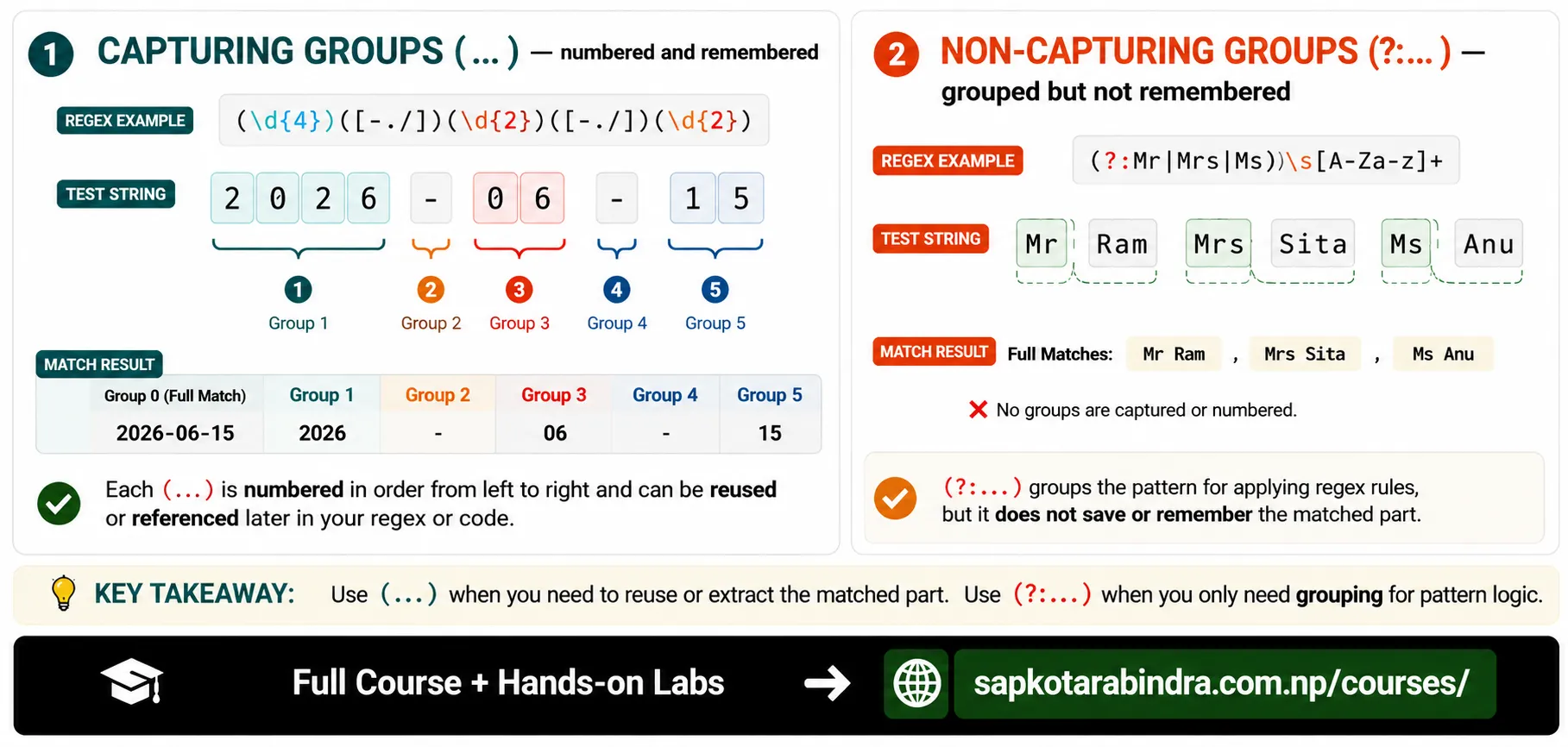
(...)Text matched inside parentheses can be referenced later. Example:(\d{4})([-./])(\d{2})\2(\d{2})This can match dates like: - 2026-06-15 - 2026.06.15 - 2026/06/15 Here:(\d{4})captures year([-./])captures separator\2means reuse the second captured group 📌 Simple idea: Capturing groups remember matched parts. https?://(www\.)?(\w+)(\.\w+)Example text: https://www.google.comPossible captured groups: - \1 captures www. - \2 captures google - \3 captures .com
5.1 🧩 What are Groups?
5.2 Capturing Groups
5.3 Capturing Group Example: Website
- Non-capturing groups use
(?:...). They group a pattern but do not store it for back-referencing. Example:(?:Mr|Mrs|Ms)\.?\s[A-Za-z]+Matches: ✅ Mr Ram ✅ Mrs Smith ✅ Ms Davis But it does not capture the title as a numbered group. 📌 Use(...)when you want to capture. 📌 Use(?:...)when you only want to group.
5.4 Non-Capturing Groups
6. 🔀 Alternation
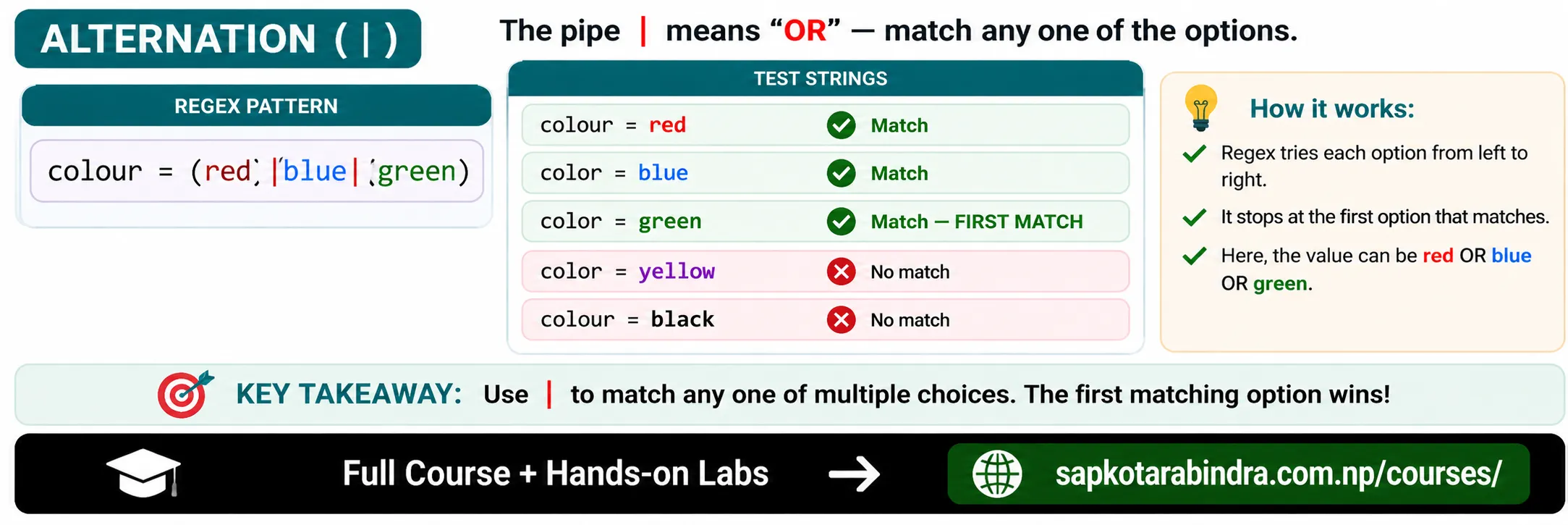
- Alternation means OR. It uses
|to match one pattern or another.
6.1 🔀 What is Alternation?
6.2 Alternation Examples
| Pattern | Meaning | Example Match |
|---|---|---|
| cat|dog | Match cat or dog | cat, dog |
| \b(cat|dog)\b | Match cat or dog as whole words | cat, dog |
| (Mr|Mrs|Ms)\s[A-Za-z]+ | Match title and name | Mr John, Mrs Smith |
- Without grouping:
Mr|Mrs|Ms JohnThis means: Mr OR Mrs OR Ms John Better:(Mr|Mrs|Ms)\sJohnThis means: Mr John OR Mrs John OR Ms John 📌 Simple idea: Use|for OR. Use groups to control what OR applies to.
6.3 Why Use Groups with Alternation?
7. 🔢 Quantifiers
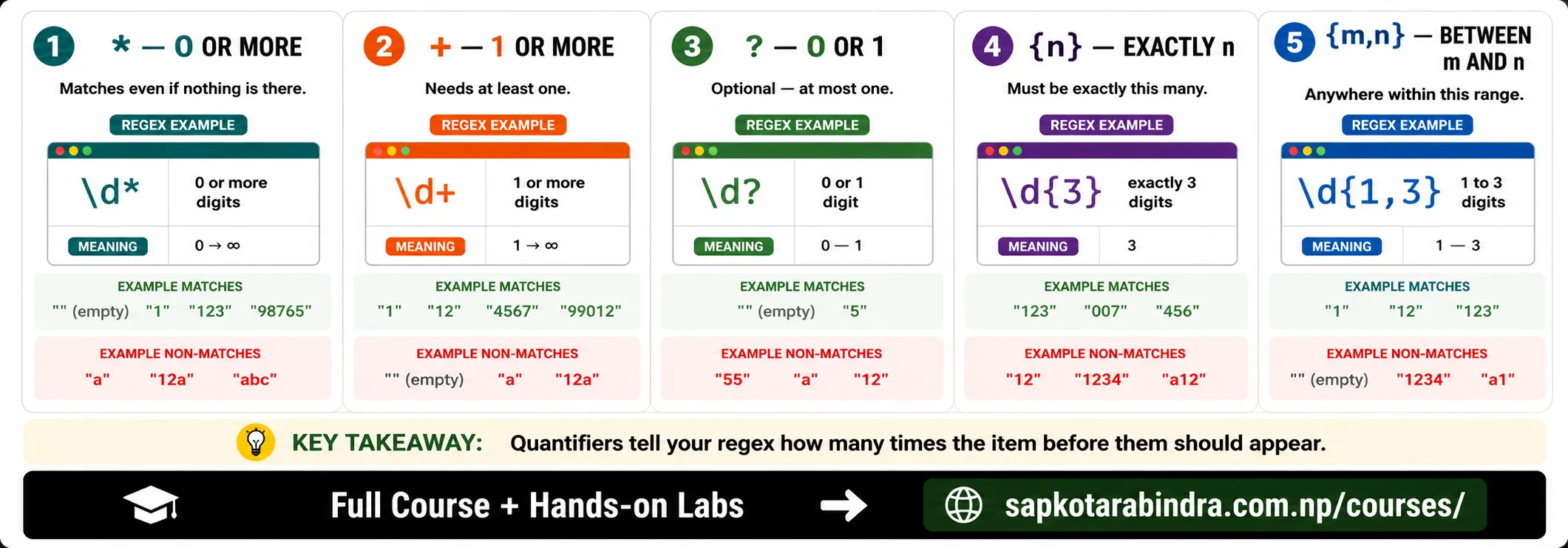
- Quantifiers tell regex how many times the previous pattern should appear. Sample text: I bought 100 apples and 50 oranges.
7.1 🔢 What are Quantifiers?
7.2 Common Quantifiers
| Quantifier | Meaning | Regex | Match |
|---|---|---|---|
| * | 0 or more | \d* | empty match, 100, 50 |
| + | 1 or more | \d+ | 100, 50 |
| ? | 0 or 1 | \d? | empty match, 1, 0, 5 |
| {n} | Exactly n times | \d{3} | 100 |
| {n,} | n or more times | \d{2,} | 100, 50 |
| {m,n} | Between m and n times | \d{1,3} | 100, 50 |
- Match a 10-digit phone number:
\d{10}Matches: 9841000000 Match one or more letters:[a-zA-Z]+Match optional s:apples?Matches: apple, apples 📌 Quantifiers control "how many."
7.3 Useful Quantifier Examples
8. 🍽️ Greedy vs Lazy Quantifiers
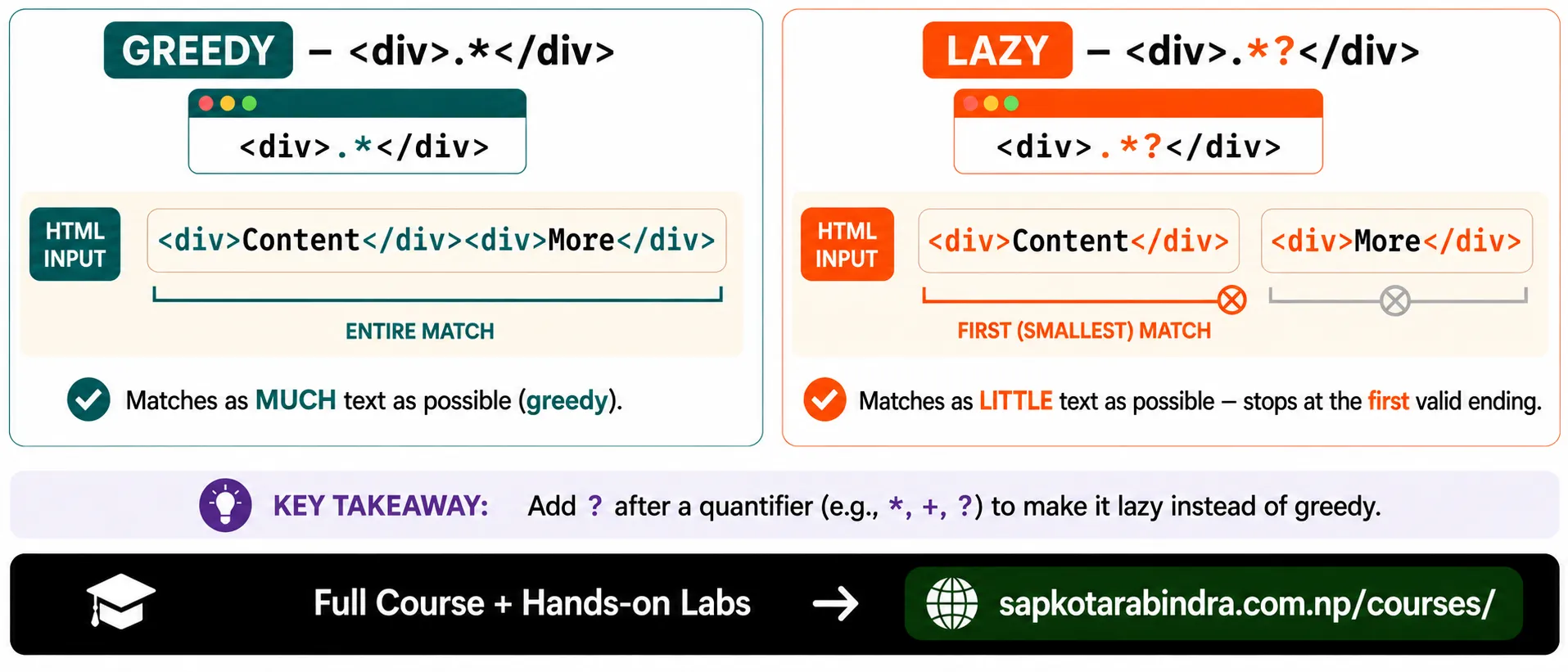
- A greedy quantifier tries to match as much text as possible.
Sample text:
<div>Content</div><div>More</div>Pattern:<div>.*</div>Match:<div>Content</div><div>More</div>It matches too much because.*is greedy. - A lazy quantifier tries to match as little text as possible. We make a quantifier lazy by adding
?. Pattern:<div>.*?</div>Matches:<div>Content</div><div>More</div>
8.1 🍽️ Greedy Quantifiers
8.2 🐜 Lazy Quantifiers
8.3 Greedy vs Lazy Comparison
| Type | Regex | Match |
|---|---|---|
| Greedy | <div>.*</div> | <div>Content</div><div>More</div> |
| Lazy | <div>.*?</div> | <div>Content</div> and <div>More</div> |
9. 👀 Lookaround
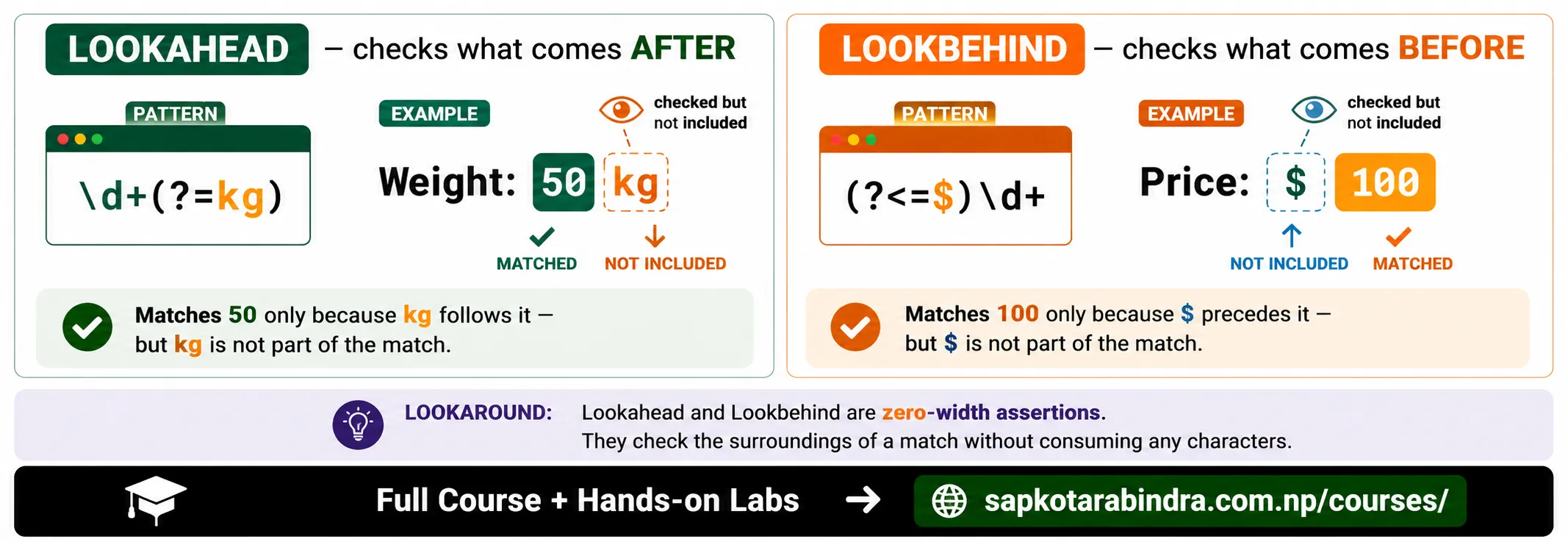
- Lookaround checks what comes before or after a pattern without including it in the match. There are two main types: 👉 Lookahead: checks after 👉 Lookbehind: checks before
9.1 👀 What is Lookaround?
10. 👁️➡️ Lookahead
- Syntax:
(?=...)It checks if a pattern appears after the current position. Example: Text:Weight: 50kg and 20mRegex:\d+(?=kg)Match:50It matches 50 only because it is followed by kg. - Syntax:
(?!...)It checks that a pattern does not appear after the current position. Example: Text:Weight: 50kg, Count: 20 itemsRegex:\d+\b(?!kg)Possible match:20📌 Lookahead checks what comes after, but does not include it in the match.
10.1 Positive Lookahead
10.2 Negative Lookahead
11. 👁️⬅️ Lookbehind
- Syntax:
(?<=...)It checks if a pattern appears before the current position. Example: Text:Price: $100 or Rs 15000Regex:(?<=\$)\d+Match:100It matches 100 only because it is preceded by $. - Syntax:
(?<!...)It checks that a pattern does not appear before the current position. Example: Text:Price: $100, Quantity: 20Regex:(?<!\$)\b\d+\bPossible match:20📌 Lookbehind checks what comes before, but does not include it in the match.
11.1 Positive Lookbehind
11.2 Negative Lookbehind
Lookaround Examples
| Pattern | Meaning | Example Match |
|---|---|---|
| (?<=Mr\. )\w+ | Match name after Mr. | Ram in Mr. Ram |
| \w+(?=:\s) | Match word followed by colon and space | John in John: Doe |
| (?<!hot)dog | Match dog not preceded by hot | dog in The dog ran away. |
| \d+(?=kg) | Match digits followed by kg | 50 in Weight: 50kg |
| (?<=@)\w+(?=\.(com|edu)) | Match domain after @ and before .com or .edu | university in [email protected] |
12. ⚓ Anchors
- Anchors are used to match the start or end of a string.
12.1 ⚓ What are Anchors?
Anchors
| Anchor | Meaning |
|---|---|
| ^ | Start of string |
| $ | End of string |
- Sample text: The cat is on the roof.
12.2 Anchor Examples
| Pattern | Meaning | Example Match |
|---|---|---|
| ^The | Match The at the start | The |
| roof\.$ | Match roof. at the end | roof. |
| ^The.*\.$ | Match full string starting with The and ending with period | The cat is on the roof. |
13. 🎯 Practical Regex Examples
[\w.-]+@[\w.-]+\.\w+Example match: [email protected]9[78]\d{8}Example match: 9841000000\d{4}-\d{2}-\d{2}Example match: 2026-07-16\$\d+Example match: $100
13.1 Match Email-like Text
13.2 Match Nepali Phone Number Style
13.3 Match Date Format YYYY-MM-DD
13.4 Match Price