
Regex in Python
✕1. Introduction to Python re Library
- Python has a built-in library called
refor working with regular expressions. Because it is built into Python, we do not need to install anything extra. We can simply import it:import re - The
relibrary provides functions to: 👉 Search text 👉 Validate patterns 👉 Extract matching text 👉 Split text using patterns 👉 Replace matching text 📌 Regex gives us the pattern. Python'srelibrary helps us apply that pattern to text.
1.1 🐍 What is re?
1.2 What Can We Do with re?
2. re.search()
re.search()searches for a pattern inside a given text. It returns: 👉 The first match object if the pattern is found 👉Noneif the pattern is not found Syntax:re.search(pattern, text)
2.1 🔍 What is re.search()?
2.2 Search Match Object Methods
| Method | Meaning |
|---|---|
.group() | Returns the matched text |
.start() | Returns starting index |
.end() | Returns ending index |
.span() | Returns start and end index as a tuple |
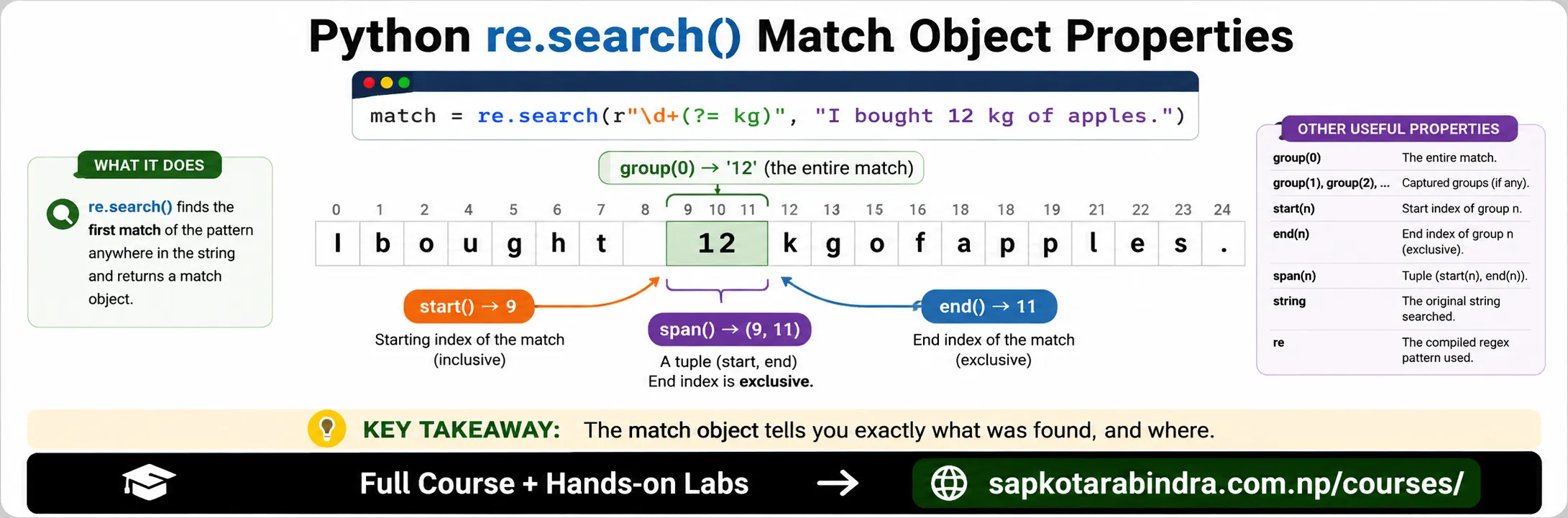
import reusr_txt = "I bought 12 kg of apples."weight_regex = r"\d+(?= kg)"match = re.search(weight_regex, usr_txt)if match:print("Weight:", match.group())print("Start index:", match.start())print("End index:", match.end())print("Span:", match.span())else:print("No weight found.")Output: Weight: 12 Start index: 9 End index: 11 Span: (9, 11) 📌re.search()finds the first matching pattern.
2.3 Example: Search Weight
3. Named Groups
- A named group gives a name to a capturing group.
Syntax:
(?P<name>...)This allows us to access matched text by name instead of group number. import reusr_txt = "Date of today is 2026-07-10. I have 3 classes today."date_regex = r"(?P<year>\d{4})-(?P<month>\d{2})-(?P<day>\d{2})"match = re.search(date_regex, usr_txt)if match:print("Year:", match.group("year"))print("Month:", match.group("month"))print("Day:", match.group("day"))else:print("No date found.")Output: Year: 2026 Month: 07 Day: 10 📌 Named groups make extracted data easier to understand.
3.1 🏷️ What is a Named Group?
3.2 Example: Extract Date Parts
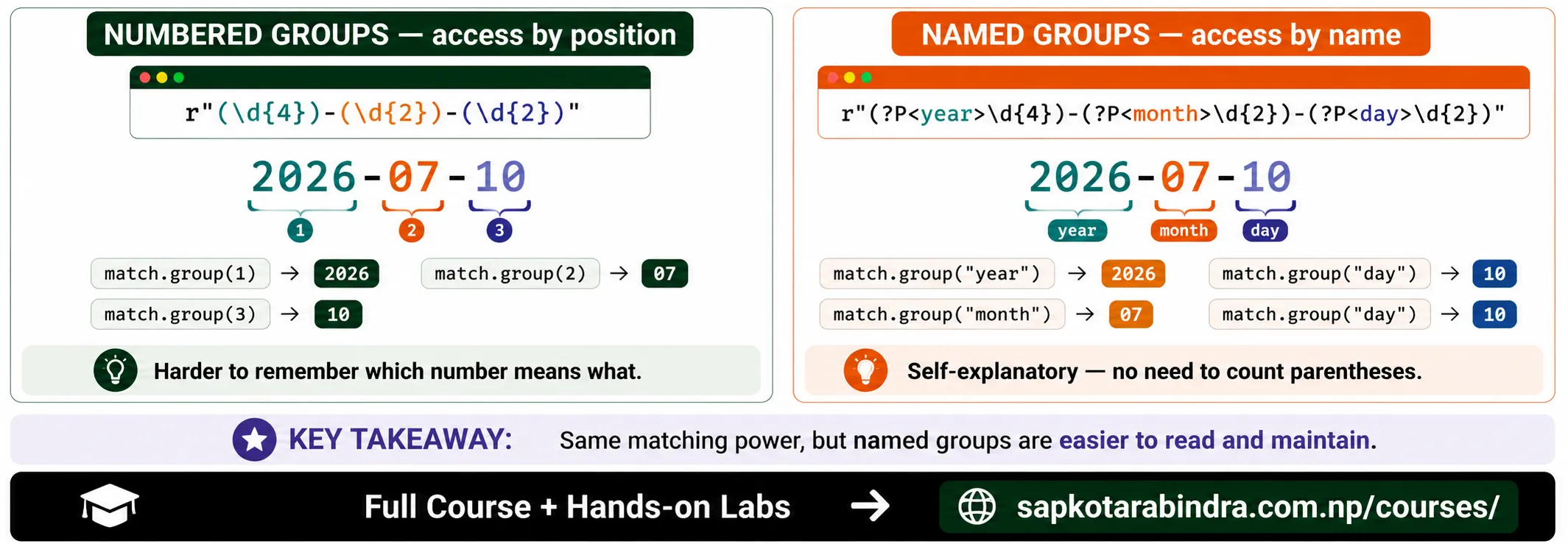
- Using numbered groups:
match.group(1)match.group(2)match.group(3)Using named groups:match.group("year")match.group("month")match.group("day")📌 Named groups are easier to read, especially in larger patterns.
3.3 Named Group vs Numbered Group
4. re.findall()
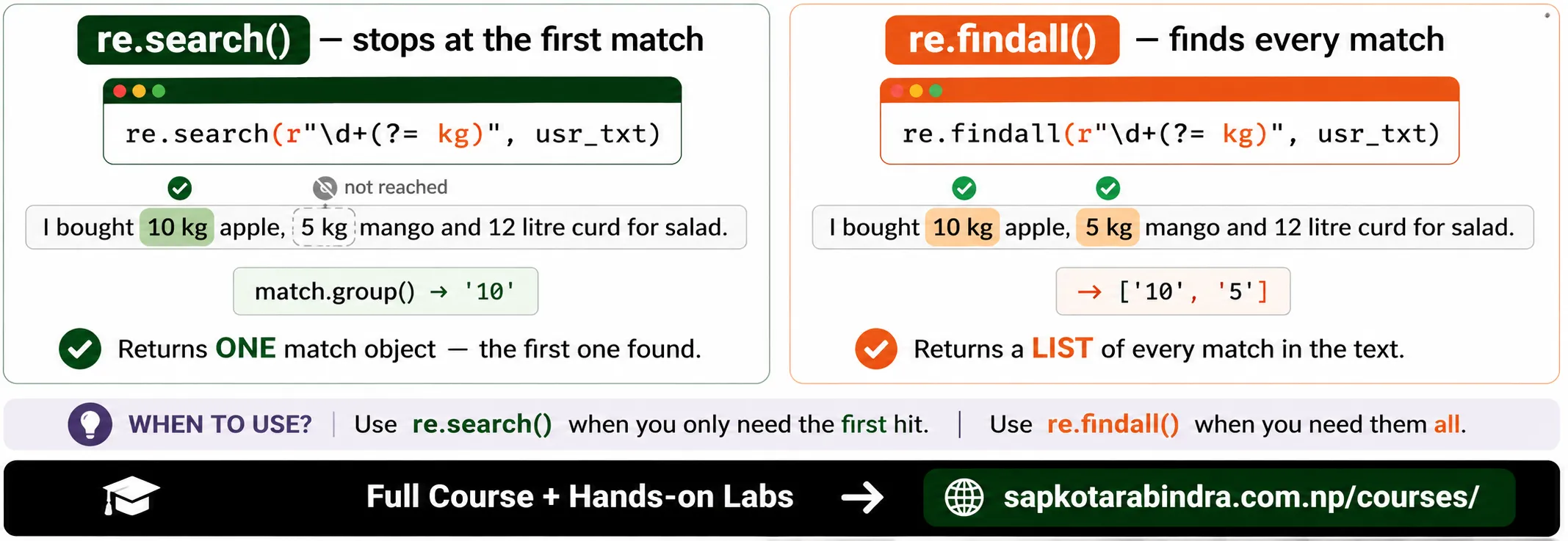
re.findall()finds all non-overlapping matches of a pattern in a string. It returns a list. Syntax:re.findall(pattern, text)import reusr_txt = "I bought 10 kg apple, 5 kg mango and 12 litre curd for salad."weight_regex = r"\d+(?= kg)"weights = re.findall(weight_regex, usr_txt)print("Weights found:", weights)Output: Weights found: ['10', '5'] 📌 12 litre is not matched because the regex only looks for numbers followed by kg. 📌re.findall()gives all matching results as a list.
4.1 📋 What is re.findall()?
4.2 Example: Find All Weights
5. re.split()
re.split()splits a string wherever a pattern is found. It returns a list of substrings. Syntax:re.split(pattern, text)
5.1 ✂️ What is re.split()?
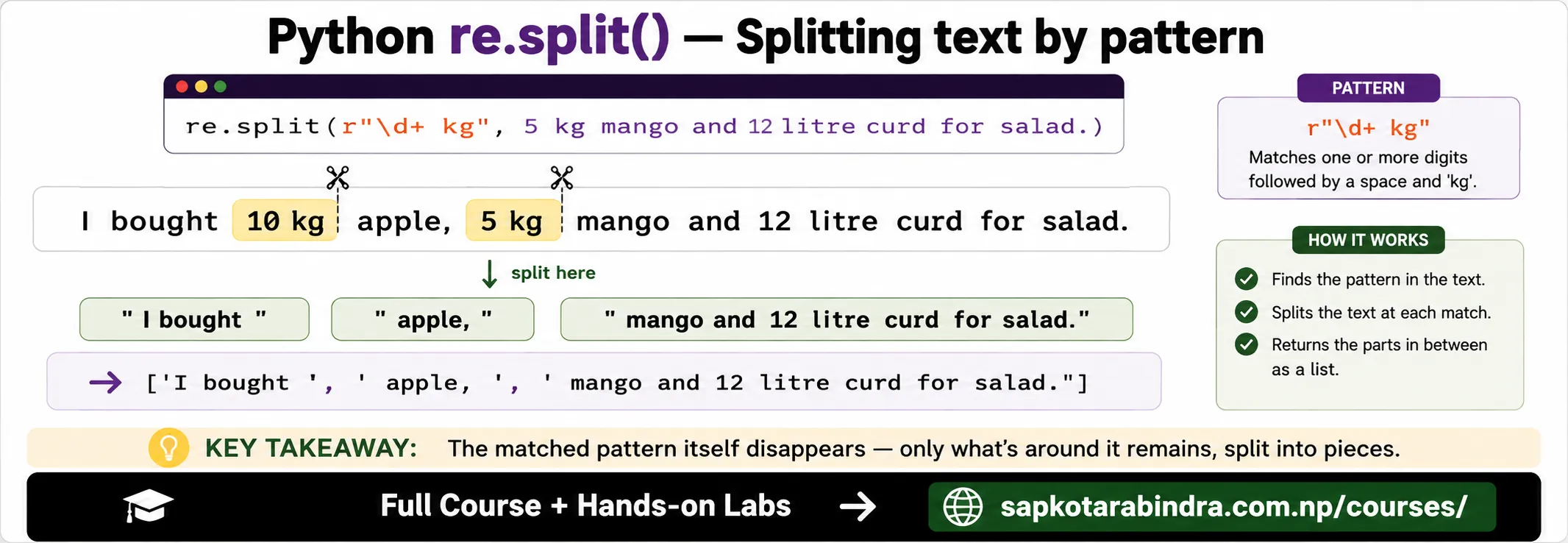
import reusr_txt = "I bought 10 kg apple, 5 kg mango and 12 litre curd for salad."weight_regex = r"\d+ kg"parts = re.split(weight_regex, usr_txt)print("Parts after splitting:", parts)Output: Parts after splitting: ['I bought ', ' apple, ', ' mango and 12 litre curd for salad.'] 📌 Simple idea:re.split()cuts text wherever the pattern appears.
5.2 Example: Split by Weight Values
6. re.sub()
re.sub()replaces matches of a pattern with another value. It returns the modified string. Syntax:re.sub(pattern, replacement, text)
6.1 🔁 What is re.sub()?
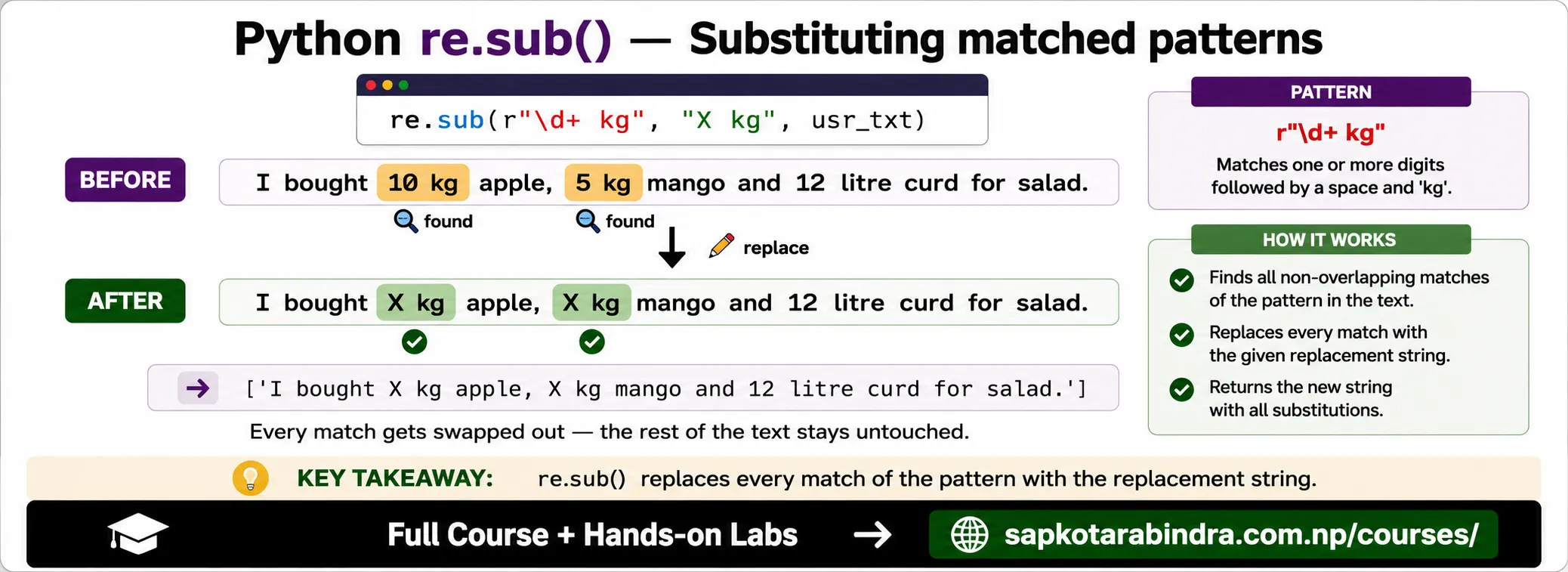
import reusr_txt = "I bought 10 kg apple, 5 kg mango and 12 litre curd for salad."weight_regex = r"\d+ kg"replacement = "X kg"new_txt = re.sub(weight_regex, replacement, usr_txt)print("Modified text:", new_txt)Output: Modified text: I bought X kg apple, X kg mango and 12 litre curd for salad. 📌re.sub()is used when we want to clean or replace matching text.
6.2 Example: Replace Weight Values
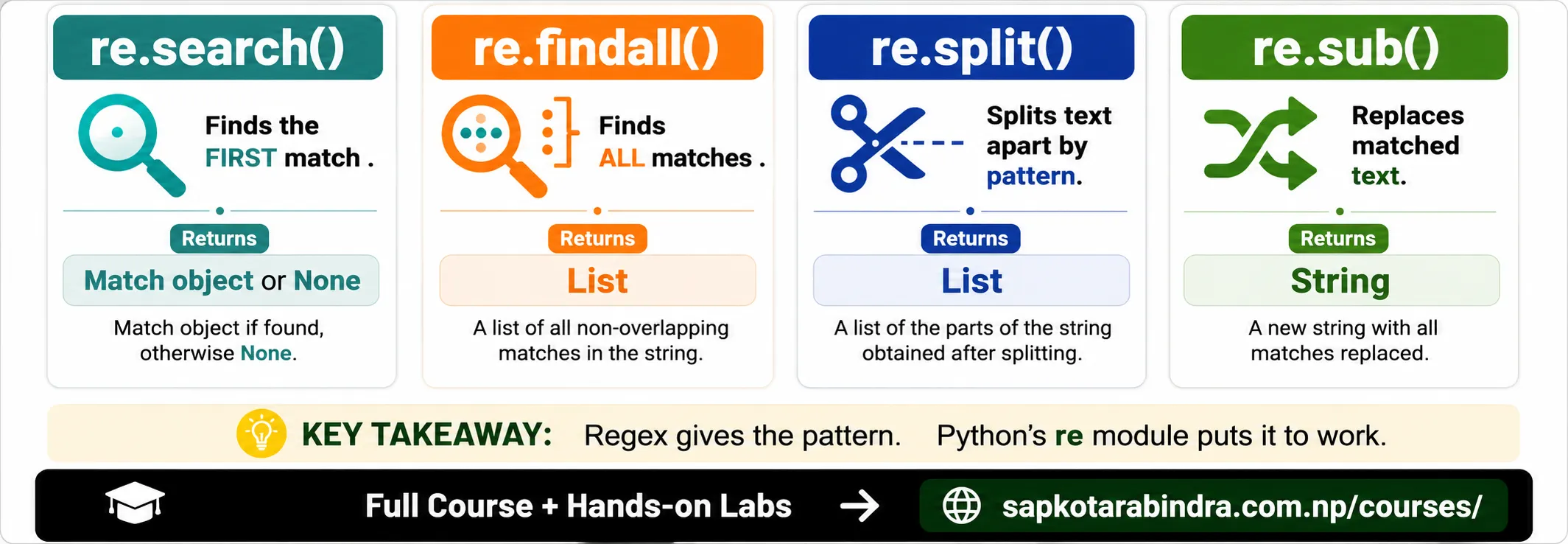
7. Quick Comparison of Common re Functions
| Function | Purpose | Returns |
|---|---|---|
re.search() | Finds the first match | Match object or None |
re.findall() | Finds all matches | List |
re.split() | Splits text by pattern | List |
re.sub() | Replaces matched pattern | String |
8. Practical Example: Extract Phone Numbers
import reusr_txt = "Ram: 9841000000, Sita: 9812345678, Hari: 014445566"phone_regex = r"9[78]\d{8}"phones = re.findall(phone_regex, usr_txt)print("Phone numbers:", phones)Output: Phone numbers: ['9841000000', '9812345678'] 📌 014445566 is not matched because it does not follow the mobile number pattern.
8.1 Phone Number Example
9. Practical Example: Extract Email-like Text
import reusr_txt = "Contact us at [email protected] or [email protected]"email_regex = r"[\w.-]+@[\w.-]+\.\w+"emails = re.findall(email_regex, usr_txt)print("Emails:", emails)Output: Emails: ['[email protected]', '[email protected]'] 📌 Simple idea: Regex is useful for extracting structured information from messy text.
9.1 Email Example
10. Practical Example: Replace Extra Spaces
import reusr_txt = "Python is fun"space_regex = r"\s+"clean_txt = re.sub(space_regex, " ", usr_txt)print(clean_txt)Output: Python is fun 📌 This is useful for text cleaning.
10.1 Cleaning Extra Spaces