
NumPy: Basics
✕1. Introduction
- NumPy stands for Numerical Python. It is a Python library that helps us work with many numbers quickly and easily. Think of NumPy like an egg tray for numbers. 👉 A Python list is like carrying eggs one by one. 👉 A NumPy array is like carrying the whole egg tray at once. This makes NumPy faster and easier when working with large amounts of numerical data. With NumPy, we can add, multiply, compare, and summarize many numbers in one step.
1.1 🥚 What is NumPy?
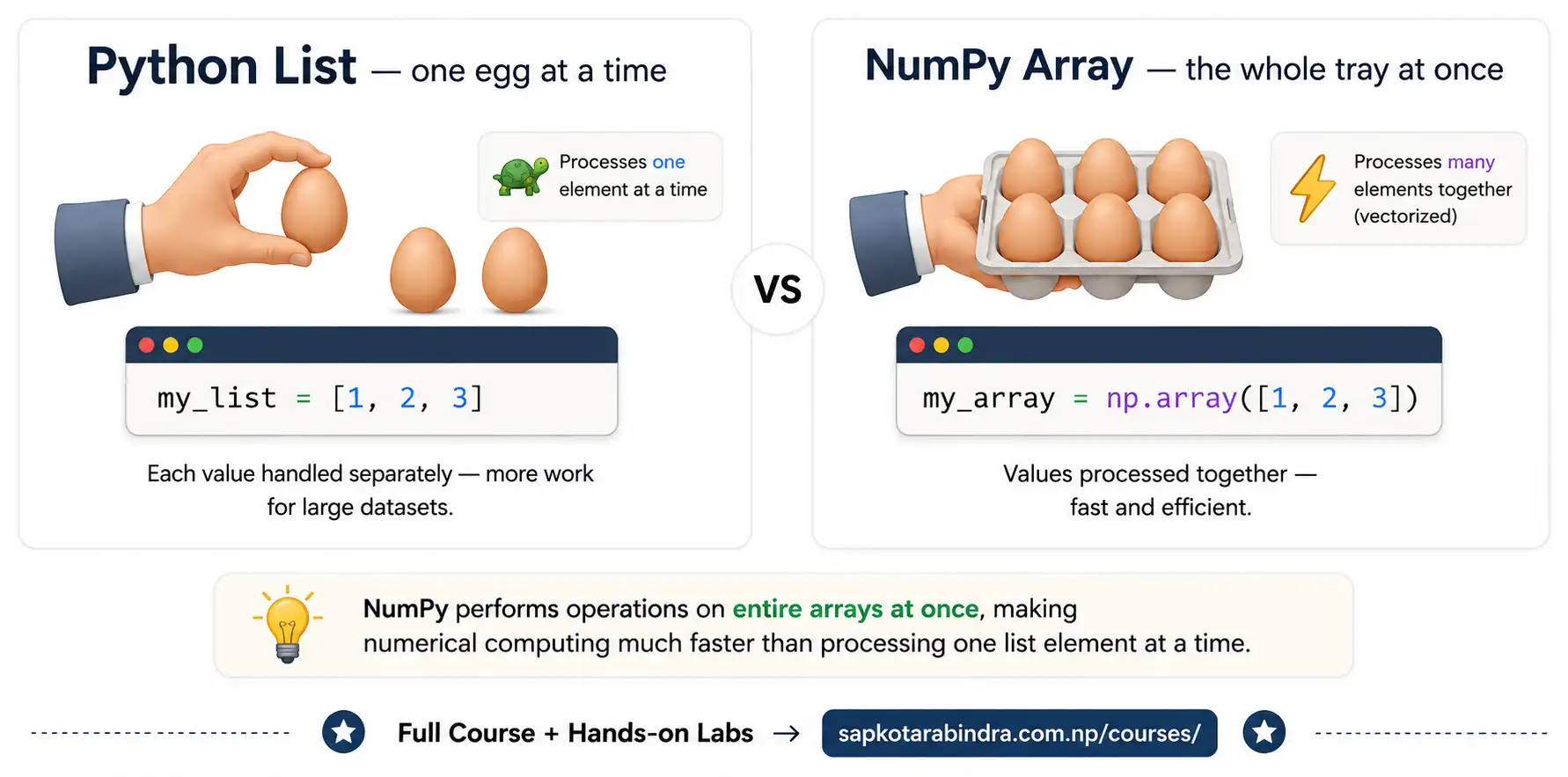
- NumPy is useful because: ✅ It is faster for mathematical operations ✅ It works well with Data Science tools like Pandas and Scikit-Learn ✅ It has many built-in functions for math, statistics, and arrays ✅ It supports vectorized operations, so we can avoid writing many loops 📌 NumPy helps us work with numbers faster and smarter.
1.2 💻 Why Use NumPy?
2. Core Concepts
- The main object in NumPy is called an ndarray. ndarray means N-dimensional array. A NumPy array: 👉 Stores many values together 👉 Stores values of the same data type 👉 Has shape, size, and data type
2.1 🔢 ndarray
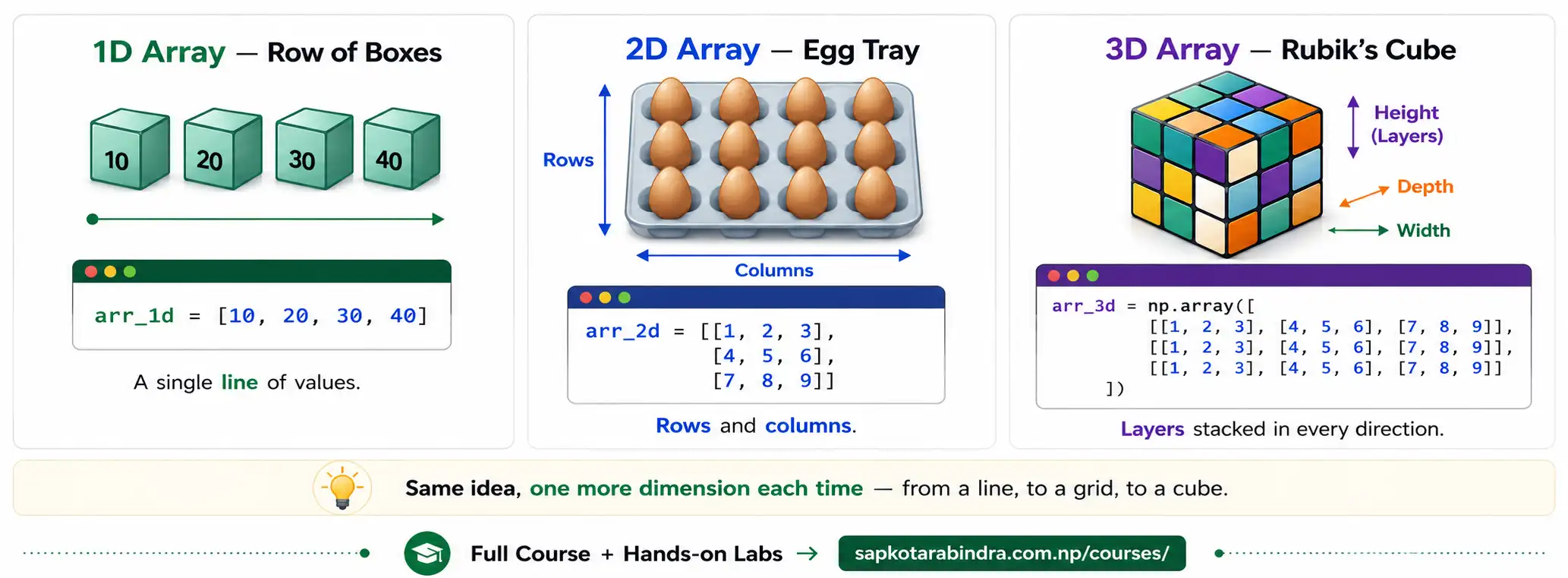
2.2 📐 1D, 2D, and 3D Arrays
| Array Type | Simple Meaning | Real-Life Example |
|---|---|---|
| 1D Array | A single row of values | Row of boxes |
| 2D Array | Rows and columns | Egg tray or table |
| 3D Array | Multiple layers | Rubik's cube |
3. Creating NumPy Arrays
- We can create NumPy arrays from Python lists or tuples. If values have different data types, NumPy may convert them into a common data type. For example, if we mix integers and floats, NumPy converts all values to float.
From List
import numpy as npmy_list = [1, 2, 3]my_array = np.array(my_list)# We can also usenp.asarray(my_list)print(my_array)# [1 2 3]print(type(my_array))# <class numpy.ndarray> From Tupleimport numpy as npmy_tuple = (4, 5, 6)my_array = np.array(my_tuple, dtype=float)print(my_array)# [4. 5. 6.] Creating 2D Arrayimport numpy as npmy_2d_list = [[1, 2], [3, 4]]my_2d_array = np.array(my_2d_list)print(my_2d_array)Output [[1 2] [3 4]] - We can inspect NumPy arrays using
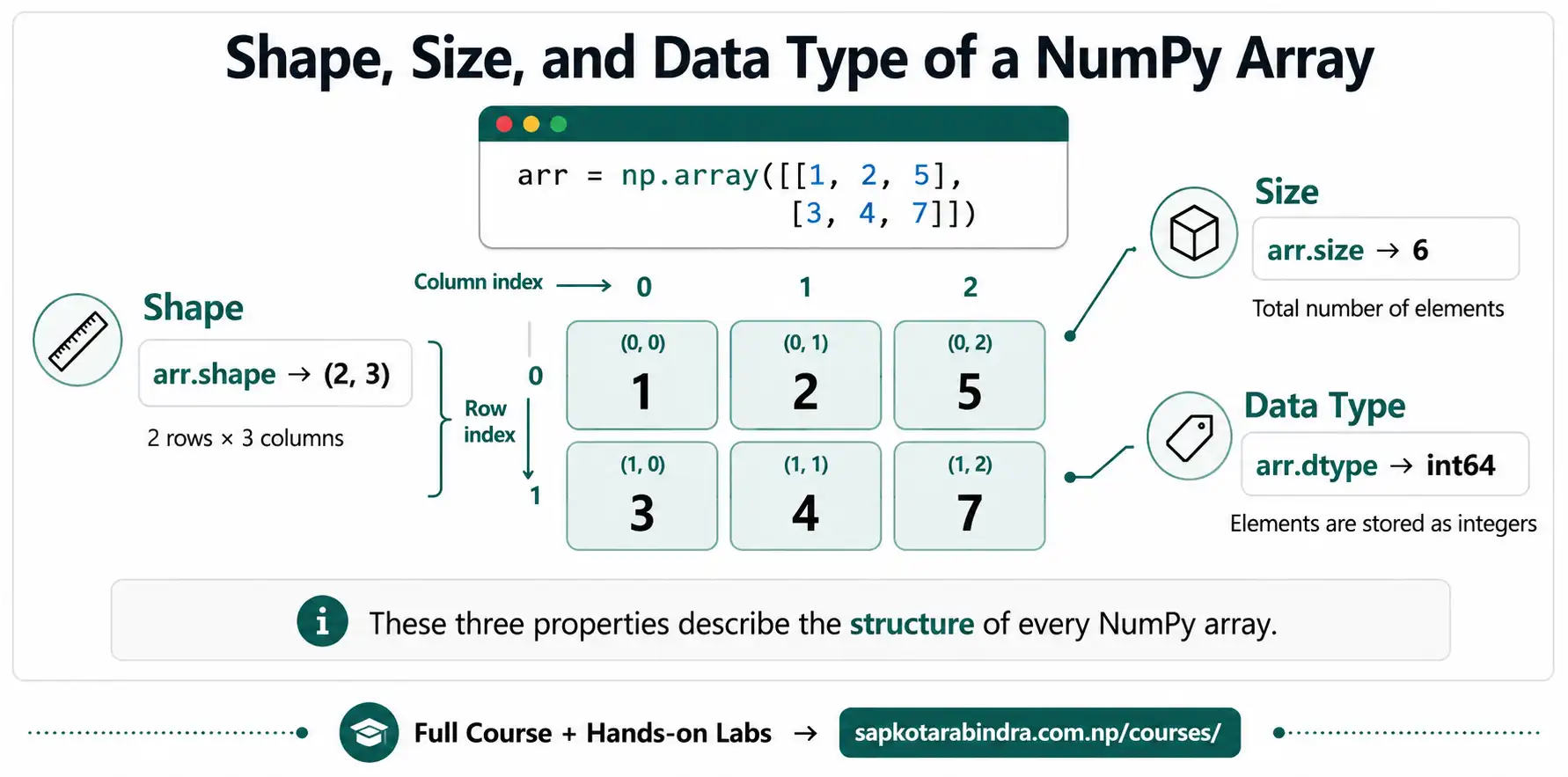
shape,size,dtype. Exampleimport numpy as nparr = np.array([[1, 2, 5], [3, 4, 7]])# [[1 2 5] # [3 4 7]]print(arr.shape)# (2, 3)print(arr.dtype)# int64 or int32print(arr.size)# 6 📌 These properties help us understand the structure of an array.
3.1 Creating Arrays from Lists and Tuples
3.2 Inspecting Array Properties
Array Property Reference
| Property | Meaning |
|---|---|
shape | Number of rows and columns |
size | Total number of elements |
dtype | Data type of elements |
4. Accessing Elements in NumPy Arrays
- Indexing means selecting a specific element from an array. Like Python lists, NumPy indexing starts from 0. We can also use negative indexing.
Index: 1D Array
import numpy as nparr = np.array([10, 20, 30, 40, 50])print(arr[0])# 10print(arr[2])# 30print(arr[-1])# 50print(arr[-2])# 40 We can also update values:arr[-1] = 80print(arr)# [10 20 30 40 80] Index: 2D Arrayimport numpy as nparr_2d = np.array([[1, 2, 3],[4, 5, 6],[7, 8, 9]])print(arr_2d[0])# First row: [1 2 3]print(arr_2d[1, 2])# 2nd row, 3rd column: 6print(arr_2d[-1, -2])# Last row, 2nd last column: 8 Updating a value:arr_2d[0, 0] = 10print(arr_2d)Output: [[10 2 3] [ 4 5 6] [ 7 8 9]]
4.1 Indexing
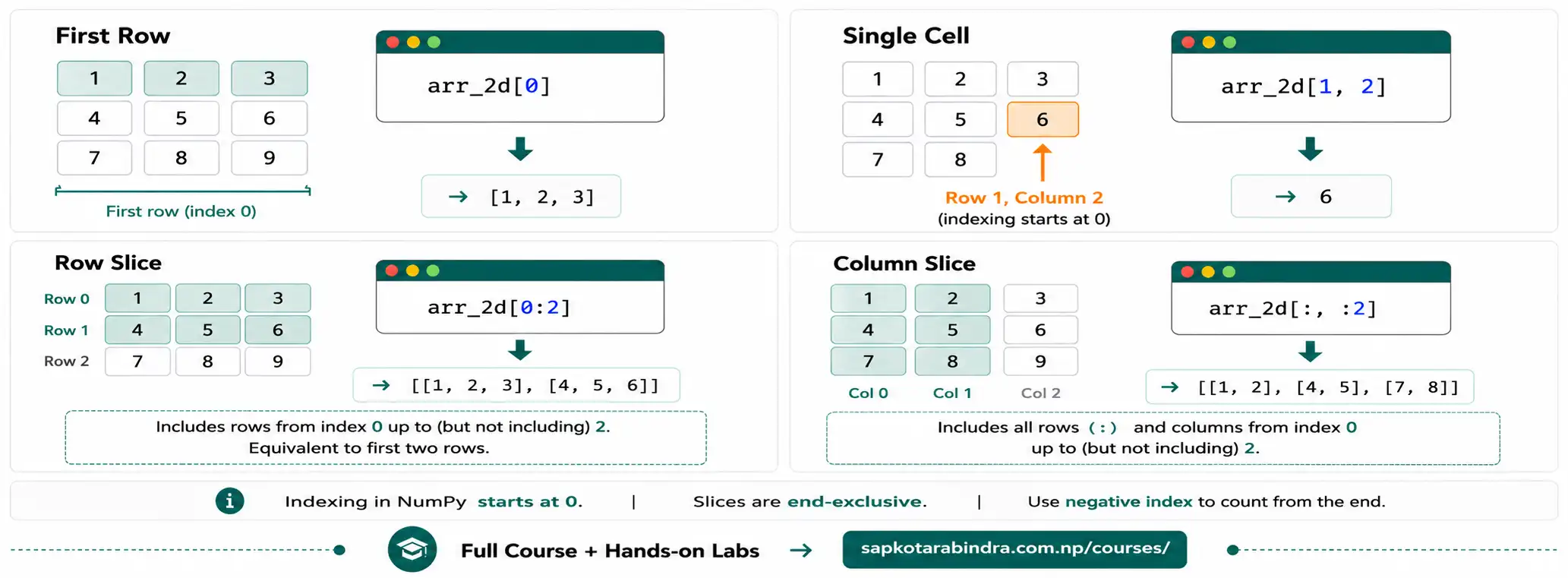
- Slicing means selecting a part of an array.
Syntax:
array[start:stop]start is included stop is not included Slicing: 1D Arrayimport numpy as nparr = np.array([10, 20, 30, 40, 50])print(arr[1:4])# [20 30 40]print(arr[:3])# [10 20 30]print(arr[2:])# [30 40 50]print(arr[-3:-1])# [30 40] For slicing a 2D array, we first slice by row and then by column. The slicing before,is for rows, and the slicing after,is for columns. Exampleimport numpy as nparr_2d = np.array([[1, 2, 3],[4, 5, 6],[7, 8, 9]])print(arr_2d[0:2])# Sub-matrix with row 0 and 1 Output: [[1 2 3] [4 5 6]] Select All rows and first two columns:print(arr_2d[:, :2])Output: [[1 2] [4 5] [7 8]] Select rows from index 1 to end and last column:print(arr_2d[1:, -1])Output: [6 9]
4.2 Slicing
5. Adding Elements to NumPy Arrays
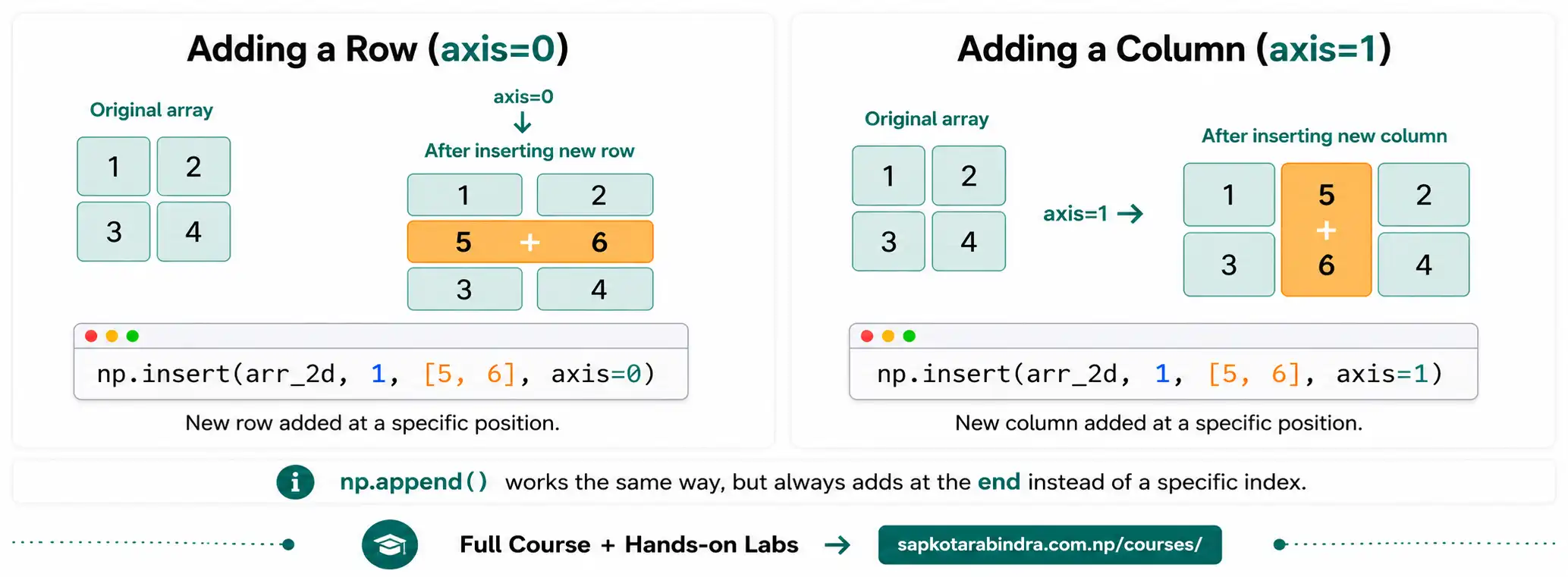
np.insert()adds values at a specific index. Insert on 1D Arrayimport numpy as nparr = np.array([3, 5, 8, 2, 7])new_arr = np.insert(arr, 2, 10)print(new_arr)Output: [ 3 5 10 8 2 7] For 2D array, we can either add new row or column.axisis used to determine whether to add on row or on column.axis=0indicates new row has to be added andaxis=1indicates new column has to be added. Example: Add Row in 2D Arrayimport numpy as nparr_2d = np.array([[1, 2], [3, 4]])new_arr = np.insert(arr_2d, 1, [5, 6], axis=0)print(new_arr)Output: [[1 2] [5 6] [3 4]] Example: Add Column in 2D Arrayimport numpy as nparr_2d = np.array([[1, 2], [3, 4]])new_arr = np.insert(arr_2d, 1, [5, 6], axis=1)print(new_arr)Output: [[1 5 2] [3 6 4]]np.append()adds values at the end of an array. For 2D array similar tonp.insert, we use axis parameter to control whether to add at last row or add at last column. For 2D arrays, the new row or column should also be given in 2D format. Append: 1D Arrayimport numpy as nparr = np.array([1, 2, 3])new_arr = np.append(arr, [4, 5])print(new_arr)Output: [1 2 3 4 5] Append: Add Row in 2D Arrayimport numpy as nparr_2d = np.array([[1, 2], [3, 4]])new_arr = np.append(arr_2d, [[5, 6]], axis=0)print(new_arr)Output: [[1 2] [3 4] [5 6]] Example: Add Column in 2D Arrayimport numpy as nparr_2d = np.array([[1, 2], [3, 4]])new_arr = np.append(arr_2d, [[5], [6]], axis=1)print(new_arr)Output: [[1 2 5] [3 4 6]]
5.1 np.insert
5.2 np.append
6. Removing Elements
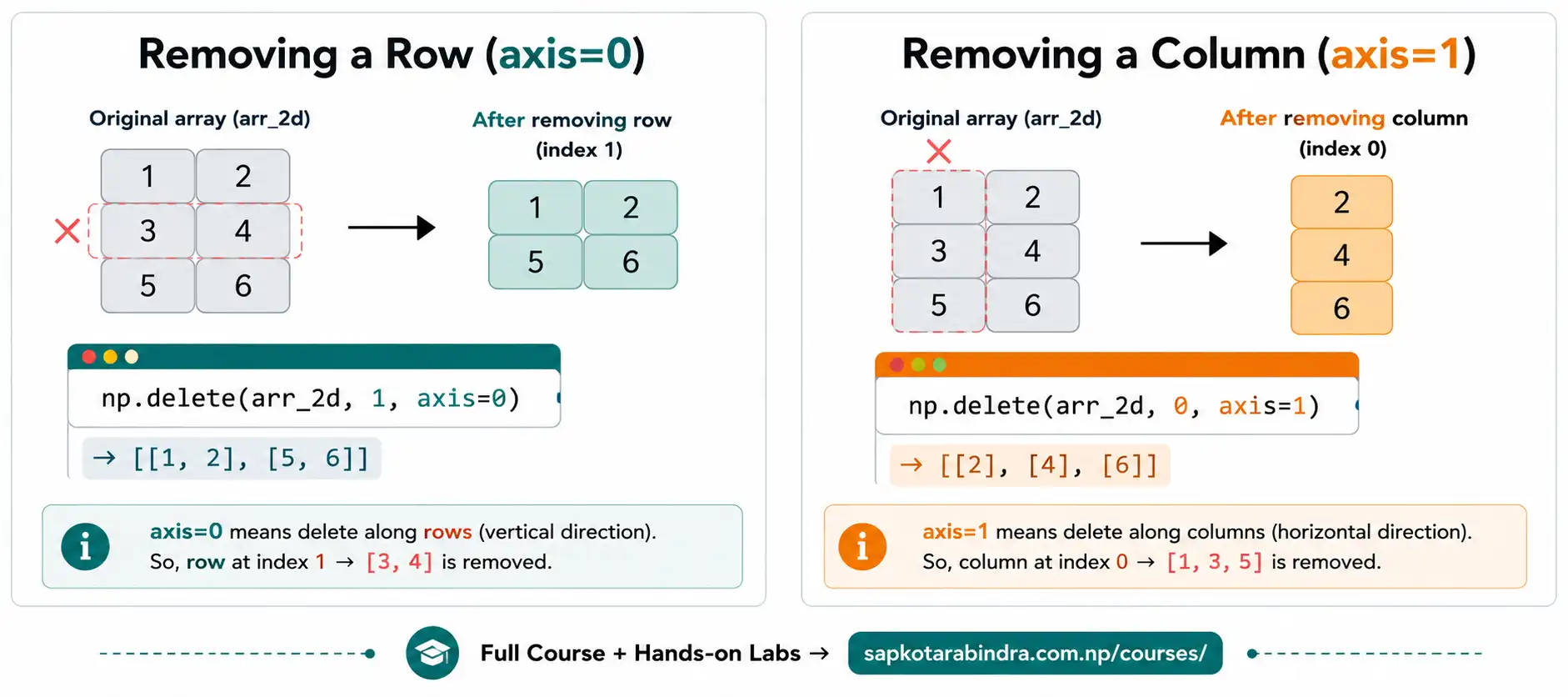
np.delete()removes values from an array. We can specify the index which needs to be dropped. For 2-D,axis=0drops row andaxis=1drops column. Example: 1D Arrayimport numpy as nparr = np.array([10, 20, 30, 40, 50])new_arr = np.delete(arr, 2)print(new_arr)Output: [10 20 40 50] Example: Remove Row from 2D Arrayimport numpy as nparr_2d = np.array([[1, 2], [3, 4], [5, 6]])new_arr = np.delete(arr_2d, 1, axis=0)print(new_arr)Output: [[1 2] [5 6]] Example: Remove Column from 2D Arrayimport numpy as nparr_2d = np.array([[1, 2], [3, 4], [5, 6]])new_arr = np.delete(arr_2d, 0, axis=1)print(new_arr)Output: [[2] [4] [6]]
6.1 np.delete
7. Vectorized Operations
- Vectorized operations apply an operation to every element of an array. This means we do not need to write loops. Common operations include:
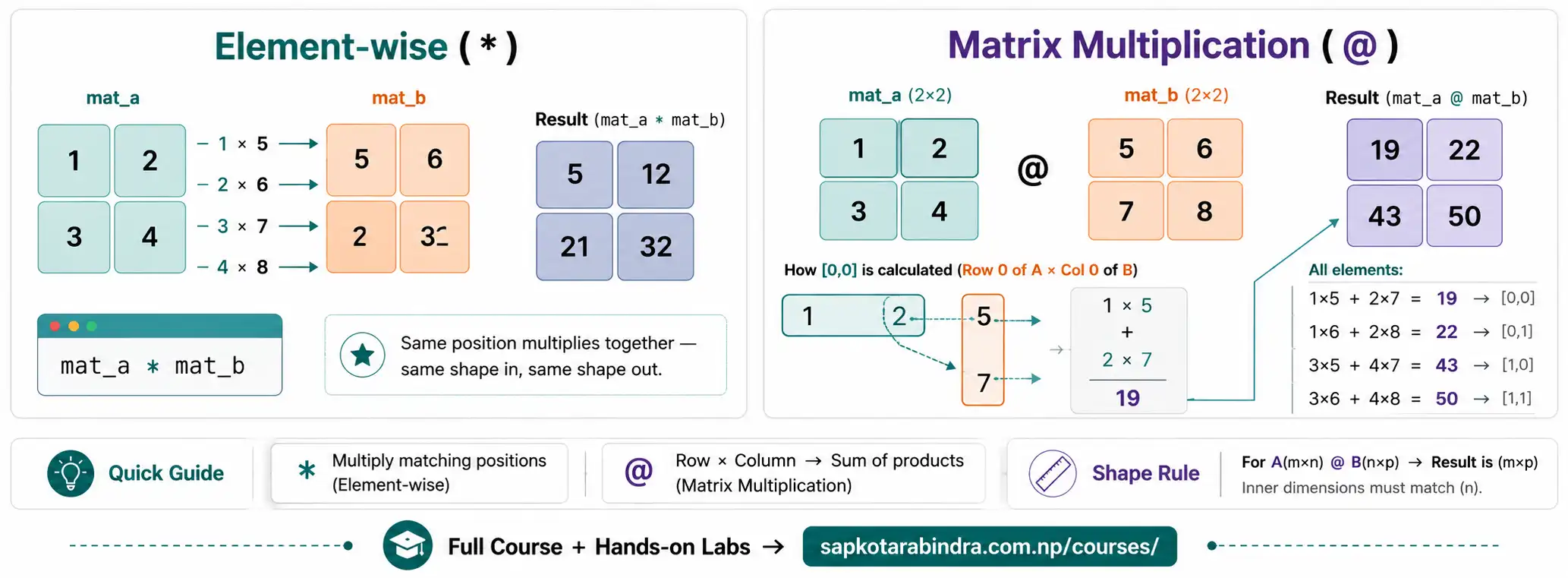
+,-,*,/,**,//,%,<,<=,>,>=,==,!=Exampleimport numpy as nparr = np.array([1, 2, 3, 4])print(arr + 10)# [11 12 13 14]print(arr * 2)# [2 4 6 8]print(arr > 2)# [False False True True]print((arr % 2 == 0) & (arr > 2))# [False False False True] 📌 NumPy applies the operation to all elements at once. - When two arrays have the same shape, NumPy applies operations element-wise.
Example
import numpy as nparr1 = np.array([1, 2, 3])arr2 = np.array([4, 5, 6])print(arr1 + arr2)# [5 7 9]print(arr1 * arr2)# [ 4 10 18]print(arr1 > arr2)# [False False False] - For matrix multiplication, use
@.import numpy as npmat_a = np.array([[1, 2], [3, 4]])mat_b = np.array([[5, 6], [7, 8]])print(mat_a @ mat_b)Output: [[19 22] [43 50]] 📌 Important:*performs element-wise multiplication, but@performs matrix multiplication.
7.1 Array with Constants
7.2 Array with Array
7.3 Matrix Multiplication
8. Mathematical Functions
- NumPy provides many mathematical functions. These functions usually work element-wise.
Example
import numpy as npa1 = np.array([2, 5.2, 8.7])print(np.sqrt(a1))# Square rootprint(np.power(a1, 2))# Squareprint(np.sin(a1))# Sine valueprint(np.round(a1, 2))# Round to 2 decimalsprint(np.abs(a1))# Absolute valueprint(np.radians(a1))# Degrees to radiansprint(np.degrees(a1))# Radians to degrees 📌 NumPy math functions can work on the whole array at once.
8.1 Applying Math Functions
Common Math Functions
| Function | Meaning |
|---|---|
np.sqrt() | Square root of each element |
np.power() | Raise each element to a power |
np.sin() | Sine of each element |
np.round() | Round values |
np.abs() | Absolute value |
np.radians() | Convert degrees to radians |
np.degrees() | Convert radians to degrees |
9. String Functions: np.char
- NumPy also supports string operations using
np.char. These functions work element-wise on string arrays. Exampleimport numpy as nps1 = np.array(["hi ", " all"])print(np.char.upper(s1))# ["HI " " ALL"]print(np.char.title(s1))# ["Hi " " All"]print(np.char.strip(s1))# ["hi" "all"]print(np.char.replace(s1, " ", "_"))# ["hi_" "_all"]print(np.char.split(s1))# [["hi"] ["all"]]print(np.char.find(s1, "h"))# [0 -1]print(np.char.count(s1, "l"))# [0 2]print(np.char.str_len(s1))# [3 4]
9.1 Applying String Functions
Common String Functions
| Function | Meaning |
|---|---|
np.char.upper() | Convert strings to uppercase |
np.char.lower() | Convert strings to lowercase |
np.char.title() | Convert strings to title case |
np.char.strip() | Remove extra spaces |
np.char.replace() | Replace one text with another |
np.char.split() | Split strings |
np.char.find() | Find index of text |
np.char.count() | Count text occurrences |
np.char.str_len() | Find string length |
np.char.startswith() | Check if string starts with text |
np.char.endswith() | Check if string ends with text |
10. Aggregate Functions
- Aggregate functions summarize data. They help answer questions like:
❓What is the total?
❓What is the average?
❓What is the minimum?
❓What is the maximum?
We can aggregate the whole array, or aggregate by rows and columns using the axis parameter.
Example: Whole Array
import numpy as npa2 = np.array([[1, 2], [3, 4]])print(np.sum(a2))print(np.mean(a2))print(np.median(a2))print(np.std(a2))print(np.var(a2))print(np.min(a2))print(np.max(a2))print(np.argmin(a2))print(np.argmax(a2))print(np.clip(a2, 2, 3))print(np.cumsum(a2))print(np.ptp(a2))print(np.quantile(a2, 0.5))Example: Along Axisimport numpy as npa2 = np.array([[1, 2], [3, 4]])print(np.sum(a2, axis=0))# Column-wise sum [4 6]print(np.mean(a2, axis=1))# Row-wise mean [1.5 3.5] 📌 Aggregate functions help summarize data quickly. - For a 2D array:
axis=0means column-wise operation ↓.axis=1means row-wise operation →. 📌 Axis controls the direction of calculation.
10.1 What are Aggregate Functions?
10.2 Axis Meaning
Common Aggregate Functions
| Function | Meaning |
|---|---|
np.sum() | Total of values |
np.mean() | Average |
np.median() | Middle value |
np.std() | Standard deviation |
np.var() | Variance |
np.min() | Minimum value |
np.max() | Maximum value |
np.argmin() | Index of minimum value |
np.argmax() | Index of maximum value |
np.clip() | Limit values within a range |
np.cumsum() | Cumulative sum |
np.cumprod() | Cumulative product |
np.ptp() | Range: max - min |
np.quantile() | Quantile value |
np.cov() | Covariance |
11. Applying Custom Functions to NumPy Arrays
np.vectorize()is a convenient way to apply our own function to every element of a NumPy array. Exampleimport numpy as npdef can_have_license(age):return age >= 16vectorized_license_check = np.vectorize(can_have_license)ages = np.array([10, 16, 18, 12])result = vectorized_license_check(ages)print(result)# [False True True False] 📌np.vectorize()helps apply a custom function to each value in an array.
11.1 np.vectorize
12. NumPy Constants
- NumPy provides some useful mathematical constants.
12.1 Common NumPy Constants
Common NumPy Constants
| Constant | Meaning | Value |
|---|---|---|
np.pi | Value of pi π | 3.141592653589793 |
np.inf | Positive infinity | inf |
-np.inf | Negative infinity | -inf |
np.nan | Not a Number | nan |
import numpy as npprint(np.pi)print(np.inf)print(-np.inf)print(np.nan)📌 These constants are useful in math, statistics, and data cleaning.
12.2 Example