
String Data and Methods
✕1. Strings
- A string is a data type in Python used to store text data such as words, sentences, numbers written as text, symbols, and spaces.
A string is written as a sequence of characters enclosed inside quotes.
Examples of Text Data:
"Python",'Hello, World!','12345',"😊","report_2026.pdf" - Strings can be created using:
' ' ➜ Single quotes
" " ➜ Double quotes
""" """ ➜ Triple quotes for multi-line strings
Examples:
name = "Rabindra"course = 'Python'print(name)# ➜ Rabindraprint(course)# ➜ Python - Sometimes, the text we want to store already contains quotes. In such cases, choosing the correct quote type helps us avoid errors.
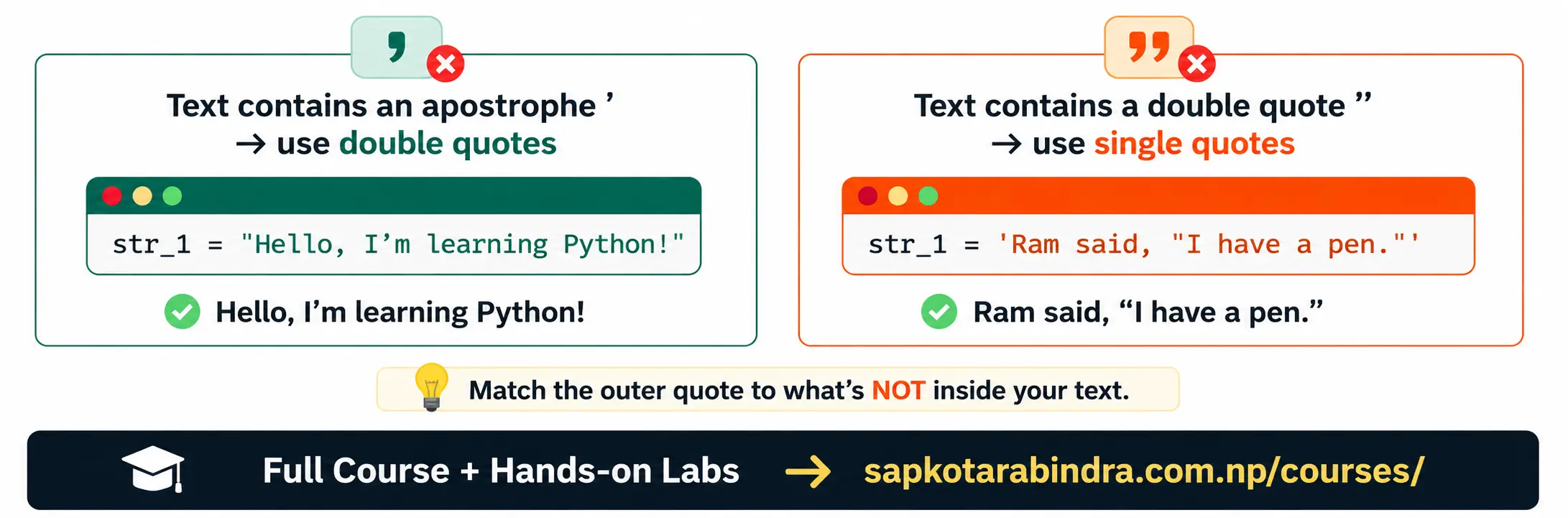
str_1 = 'Hello, I'm learning Python!'❌ Problem: Single quote inside single-quoted string. Python sees the quote in I'm and thinks the string has ended. So it gives an error. ✅ Solution: Use double quotes outsidestr_1 = "Hello, I'm learning Python!"print(str_1)# ➜ Hello, I'm learning Python!
1.1 What is a String?
1.2 Creating Strings
1.3 When to use single and double quotes in Strings?
- Triple quotes are used to create multi-line strings.
Example:
message = """Dear Manager, I am on leave! Thanks"""print(message)Output: Dear Manager, I am on leave! Thanks
1.4 Multi-line Strings
2. Escape Character and Special Characters
text = "Name:\tRabindra"print(text)Output: Name: Rabindra 😕 Why did Python show extra space instead of printing \t? This happened because \t has a special meaning in Python strings. \t is an escape sequence that creates a tab space. The backslash \ is called an escape character. It is used to give special meaning to the character that comes after it. Few Special Characters:\ncreates a new line.\tcreates a tab space.\\prints a backslash.
2.1 Escape Character
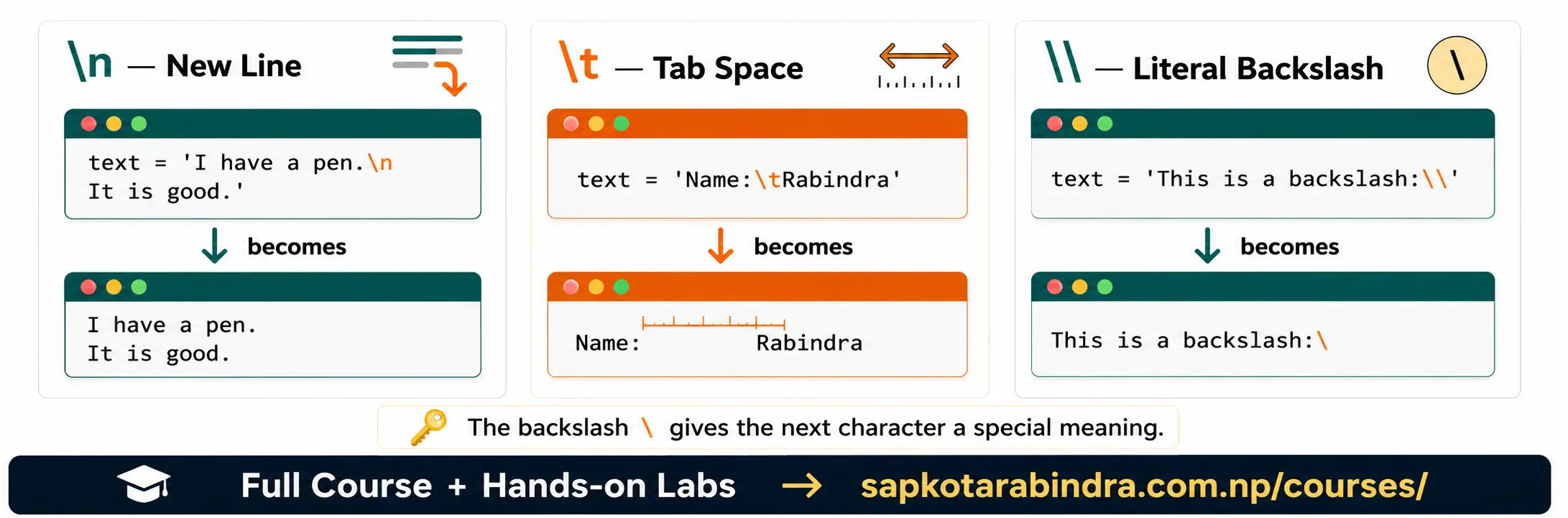
str_1 = 'Hello, I\'m learning Python!'print(str_1)# ➜ Hello, I'm learning Python!str_2 = "Name:\tRabindra"print(str_2)# ➜ Name: Rabindrastr_3 = "This is a backslash: \\"print(str_3)# ➜ This is a backslash: \str_4 = "I have a pen.\nIt is good."print(str_4)Output: I have a pen. It is good.- If we want to print
\n,\tas normal text instead of creating a new line, we need to escape the backslash. Example:text = "This is newline symbol: \\n"print(text)# ➜ This is newline symbol: \ntext = "\\n and \\t are escape sequences."print(text)# ➜ \n and \t are escape sequences.
2.2 Examples
2.3 Printing Literal Escape Sequences
3. Indexing and Slicing
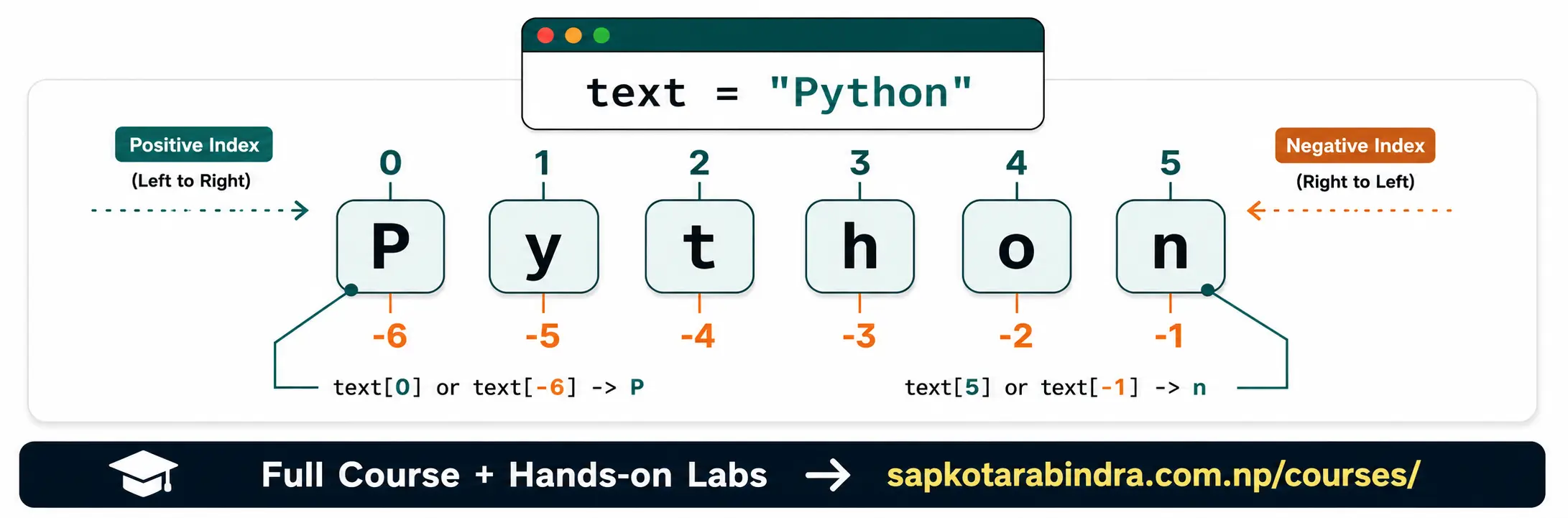
- Indexing is used to access a single character from a string. Each character in a string can be accessed using positive or negative index.
Example:
text = "Python"Index positions: P y t h o n 0 1 2 3 4 5 -6 -5 -4 -3 -2 -1print(text[0])# ➜ Pprint(text[-6])# ➜ Pprint(text[5])# ➜ nprint(text[-1])# ➜ n
3.1 Indexing [ ]
str_1 = "Python is fun"print(str_1[0])# ➜ Pprint(str_1[4])# ➜ oprint(str_1[-1])# ➜ nprint(str_1[7])# ➜ i- Slicing is used to extract a part of a string.
Syntax:
variable[start:stop:step]start ➜ Starting index stop ➜ Stopping index, but not included step ➜ Number of characters to skip 📌 Start is included. 📌 Stop is not included. 📌 Step is optional. 📌 If start is not given, slicing begins from the start. 📌 If stop is not given, slicing continues till the end.
3.2 Indexing Examples
3.3 Slicing [start:stop:step]
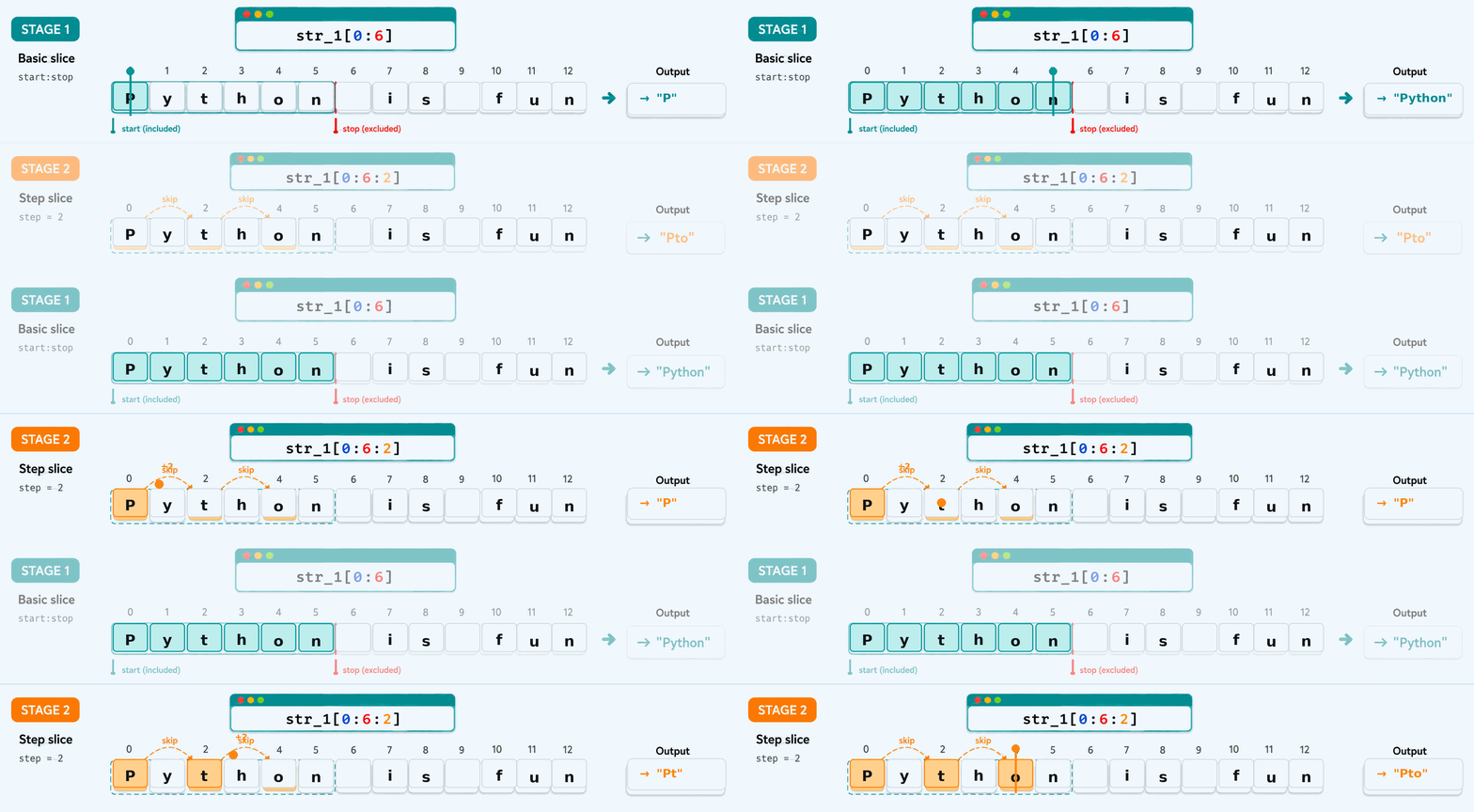
str_1 = "Python is fun"print(str_1[0:6])# ➜ Pythonprint(str_1[0:6:2])# ➜ Ptoprint(str_1[:3])# ➜ Pytprint(str_1[10:])# ➜ funprint(str_1[::-1])# ➜ nuf si nohtyP- Strings are immutable. This means once a string is created, it cannot be changed directly in-place. If we apply a string method, Python creates a new string instead of changing the original string.
Example:
text = "hello"text[2] = "P"⚠️ This line gives an error because individual characters in a string cannot be changed directly.
3.4 Slicing Examples
3.5 Strings are Immutable
4. Basic String Operations
- Concatenation means combining two or more strings. The
+operator is used for string concatenation. Example:str_1 = "Hello,"str_2 = "World!"greeting = str_1 + " " + str_2print(greeting)# ➜ Hello, World!print("Python " + "is " + "fun!")# ➜ Python is fun!
4.1 Concatenation (+)
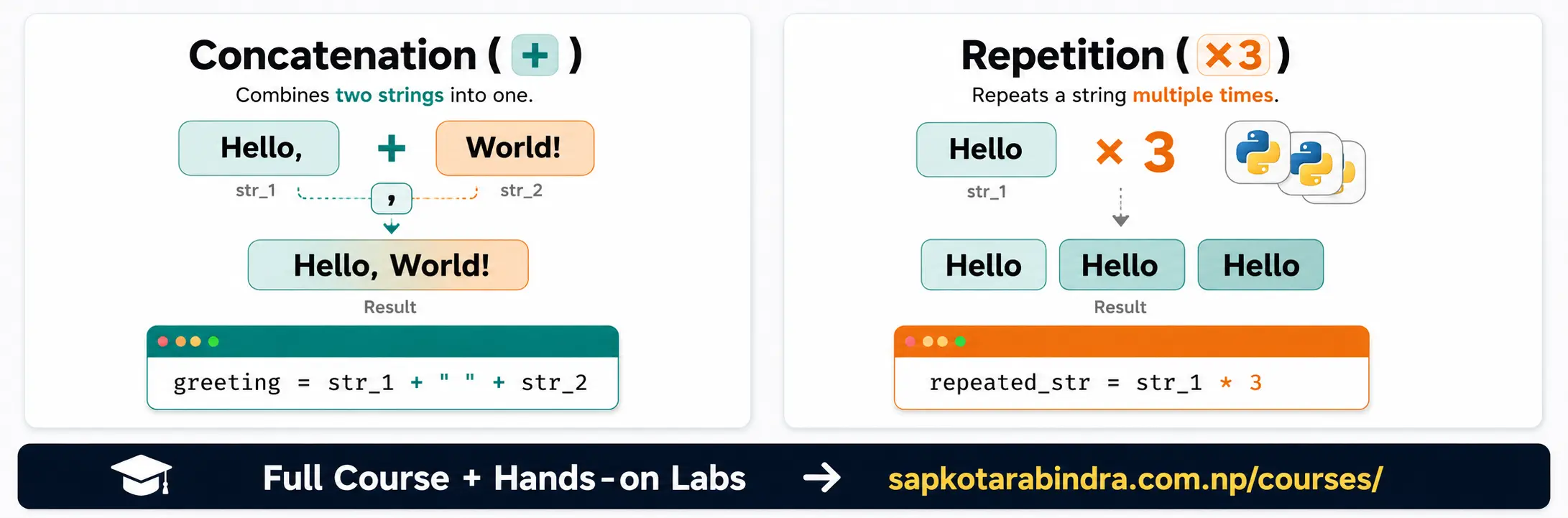
- Repetition means repeating a string multiple times. The
*operator is used for string repetition. Example:str_1 = "Hello "repeated_str = str_1 * 3print(repeated_str)# ➜ Hello Hello Helloprint("abc" * 5)# ➜ abcabcabcabcabc len()is used to count the number of characters in a string. Example:str_1 = "Hello, World!"print(len(str_1))# ➜ 13print(len("Python"))# ➜ 6print(len("abc"))# ➜ 3 📌 Spaces, commas, and symbols are also counted as characters.
4.2 Repetition (*)
4.3 Length len()
5. String Methods
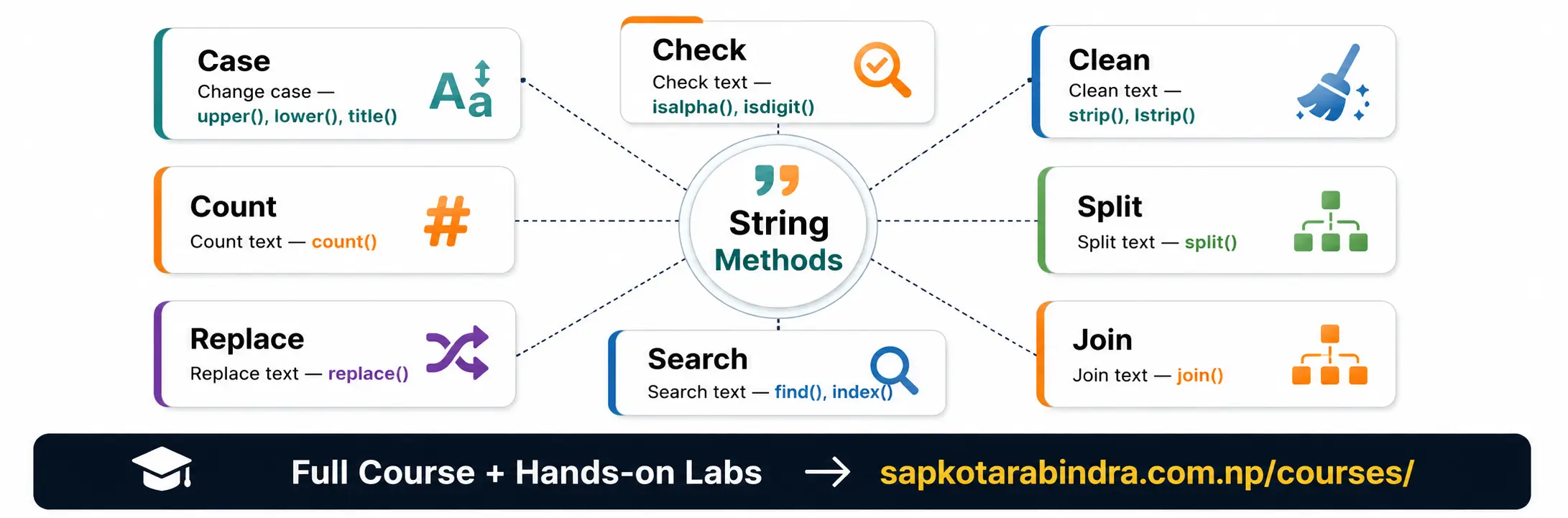
- String methods are built-in operations used to work with text. They help us: 🔠 Change case ✅ Check text 🧹 Clean text ✂️ Split text 🔗 Join text 🔍 Search text 🔁 Replace text 🔢 Count text 📌 Since strings are immutable, string methods usually return a new string instead of changing the original string.
5.1 What are String Methods?
- Case methods are used to check or change uppercase/lowercase letters.
Common Methods:
isupper()➜ Checks if string is uppercaseislower()➜ Checks if string is lowercaseistitle()➜ Checks if each word starts with uppercase and remaining letters are lowercaseupper()➜ Converts to uppercaselower()➜ Converts to lowercasetitle()➜ Converts to title caseswapcase()➜ Swaps uppercase and lowercase Examples:str_1 = "Hello, World!"print(str_1.isupper())# ➜ False (returns True only when all characters are in uppercase)print(str_1.islower())# ➜ False (returns True only when all characters are in lowercase)print("PYTHON".isupper())# ➜ Trueprint("python".islower())# ➜ Trueprint("Hello".istitle())# ➜ Trueprint(str_1.upper())# ➜ HELLO, WORLD!print(str_1.lower())# ➜ hello, world!print(str_1.title())# ➜ Hello, World!print(str_1.swapcase())# ➜ hELLO, wORLD! - Data checking methods check what kind of characters a string contains.
Common Methods:
isalpha()➜ Checks if all characters are alphabetsisdigit()➜ Checks if all characters are digitsisalnum()➜ Checks if all characters are alphabets or numbersisspace()➜ Checks if all characters are whitespacestartswith()➜ Checks if string starts with given textendswith()➜ Checks if string ends with given text Examples:str_1 = "Hello"print(str_1.isalpha())# ➜ Trueprint(str_1.isdigit())# ➜ Falseprint("123".isdigit())# ➜ Trueprint("abc123".isalnum())# ➜ Trueprint(" ".isspace())# ➜ Trueprint("Hello123".isalpha())# ➜ Falsefile_name = "2026-03-01.csv"print(file_name.startswith("2026"))# ➜ Trueprint(file_name.endswith(".csv"))# ➜ Trueprint(file_name.endswith(".pdf"))# ➜ Falseprint(file_name.startswith("03"))# ➜ False - Cleanup methods remove unnecessary characters from a string.
Common Methods:
strip()➜ Removes characters from both left and right sidelstrip()➜ Removes characters from left side onlyrstrip()➜ Removes characters from right side only Examples:str_1 = " Hello, World! "clean_str = str_1.strip()print(clean_str)# ➜ "Hello, World!"print("###Data # Fun###".strip("#"))# ➜ "Data # Fun"print("###Data###".lstrip("#"))# ➜ "Data###"print("###Data###".rstrip("#"))# ➜ "###Data" split()➜ Breaks a string into a list based on split character provided.join()➜ Joins a list of strings into one string. split() Examples:str_1 = "Hello, World!"print(str_1.split())# ➜ ["Hello,", "World!"]date_separated = "2026-03-01.csv".split("-")print(date_separated)# ➜ ["2026", "03", "01.csv"]print("apple,banana,orange".split(","))# ➜ ["apple", "banana", "orange"] join() Examples:str_list = ["Hello", "World"]print(" ".join(str_list))# ➜ "Hello World"print("-".join(["2026", "03", "01"]))# ➜ "2026-03-01"print(",".join(["apple", "banana", "orange"]))# ➜ "apple,banana,orange"print(".".join("apple"))# ➜ "a.p.p.l.e"- These methods are used to find, replace, or count text inside a string.
Common Methods:
find()➜ Finds index of text, returns -1 if not foundindex()➜ Finds index of text, gives error if not foundreplace()➜ Replaces textcount()➜ Counts text occurrence find() and index() Examples:str_1 = "Hello, World!"print(str_1.find("o"))# ➜ 4 (As o occurs first at index 4)print(str_1.index("o"))# ➜ 4print(str_1.find("z"))# ➜ -1print(str_1.index("z"))# ➜ ValueError ⚠️ This line gives an error because "z" is not found. 📌find()returns -1 if text is not found. 📌index()raises ValueError if text is not found. replace() Examples:str_1 = "Hello, World!"new_str = str_1.replace("World", "Python")print(new_str)# ➜ "Hello, Python!"print("2026-03-01.csv".replace("-", "/"))# ➜ "2026/03/01.csv"print("apple,banana,orange".replace(",", ";"))# ➜ "apple;banana;orange" count() Examples:str_1 = "Hello, World!"count_of_o = str_1.count("o")print(count_of_o)# ➜ 2print("banana,apple".count("banana"))# ➜ 1print("2026-03-01.csv".count("-"))# ➜ 2print("test_exercise.py".count(".pdf"))# ➜ 0
5.2 Case Methods 🔠
5.3 Data Checking Methods ✅
5.4 Cleanup Methods 🧹
5.5 Split and Join Methods ✂️ 🔗
5.6 Search, Replace, and Count Methods 🔍 🔁 🔢